
A percentage calculator is a tool that helps you with math involving percentages. It can find a percentage of a number, increase/decrease a number by a percentage, and more. It helps you with any calculation that involves %.
Percentage Calculator
What is a percentage?
A percentage is a way of expressing a part of something out of a whole, but that whole is always considered to be divided into 100 parts. So, 50% means 50 out of 100, or half. We use the % symbol to represent the percentage.
Change the way you work with agentic AI
One-click dashboards,KPI tracking, and AI-powered insights—for work that actually gets done.
Percentage Formula
There are two main formulas for percentages:
- Finding a percentage of a number:
- Percent (%) / 100 × Number (what you want to find the percentage of) = Your answer (%)
- Converting a part of something to a percentage of the whole:
- (Part / Whole) × 100 = Your answer (%)
| Formula | Description |
|---|---|
| (%) / 100 × Number | Find a percentage of a number |
| (Part / Whole) × 100 | Convert a part to a percentage of the whole |
What is percentage change?
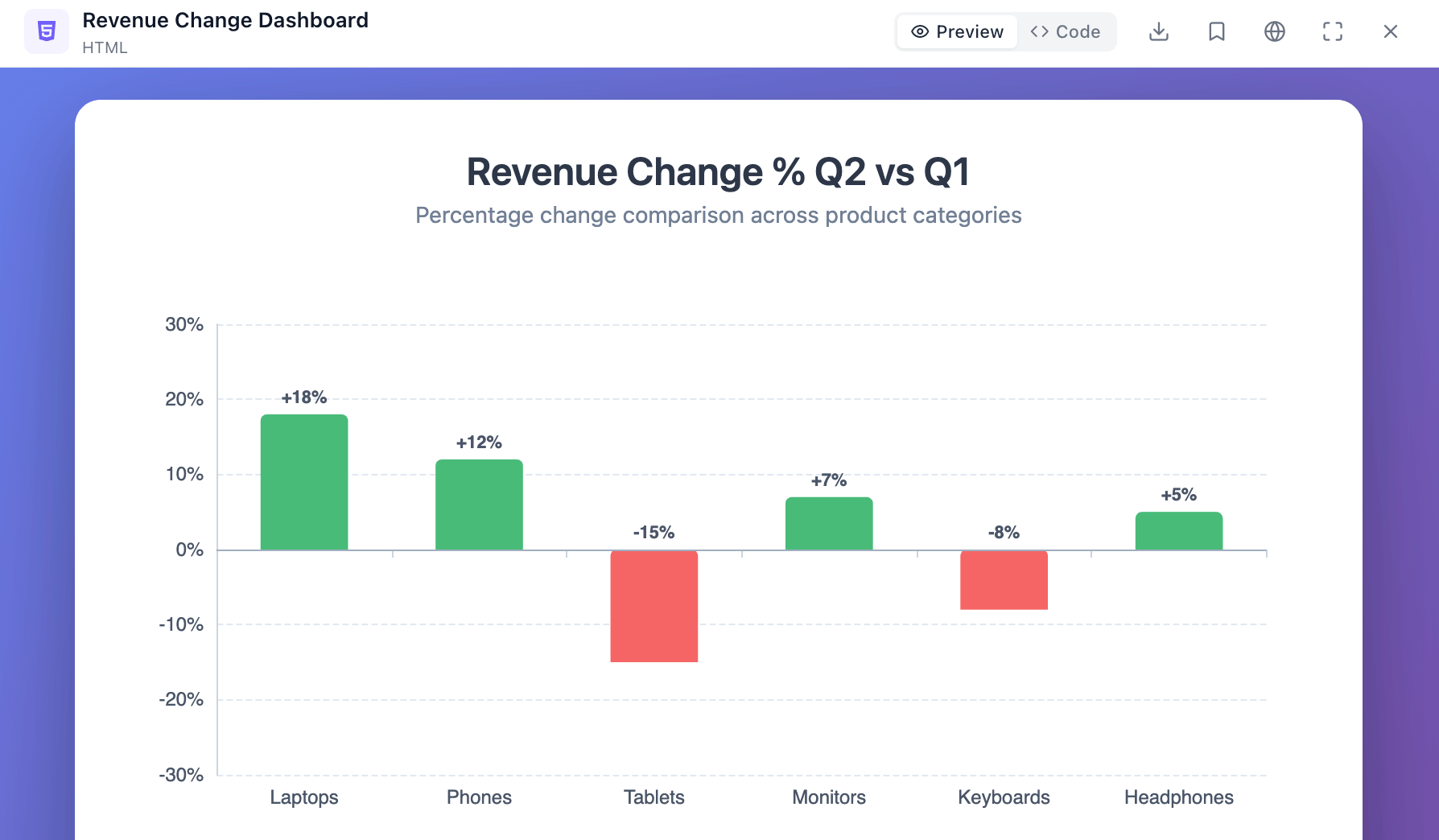
Percentage change refers to the relative difference between two values, expressed as a percentage. It tells you how much a value has increased or decreased compared to its original value.
Percentage Change Formula
[(New Value – Old Value) / |Old Value|] × 100
Where,
- New Value: This is the final value you’re comparing to the original value. For example, “Sold items in April”
- Old Value: This is the initial value you’re using as the baseline for comparison. For example, “Sold items in March”
- |Old Value|: This represents the absolute value of the original value. The absolute value ensures the result is a positive percentage regardless of whether the change is an increase or decrease.
- × 100: This part converts the decimal result into a percentage by multiplying by 100. If you calculate in Excel, then you can skip this step and choose “%” formatting.
Key points:
- If the result is positive, it indicates a percentage increase.
- If the result is negative, it indicates a percentage decrease.
Related Article: How To Calculate Revenue Growth Rate: Formula & Examples
How to calculate percentage change?
Let’s say you want to calculate the percentage change between sold item value in March and April. Sold table value in March is 400$ and 350$ in April. Let’s calculate the percentage change:
- New Value (April) = $400
- Old Value (March) = $350
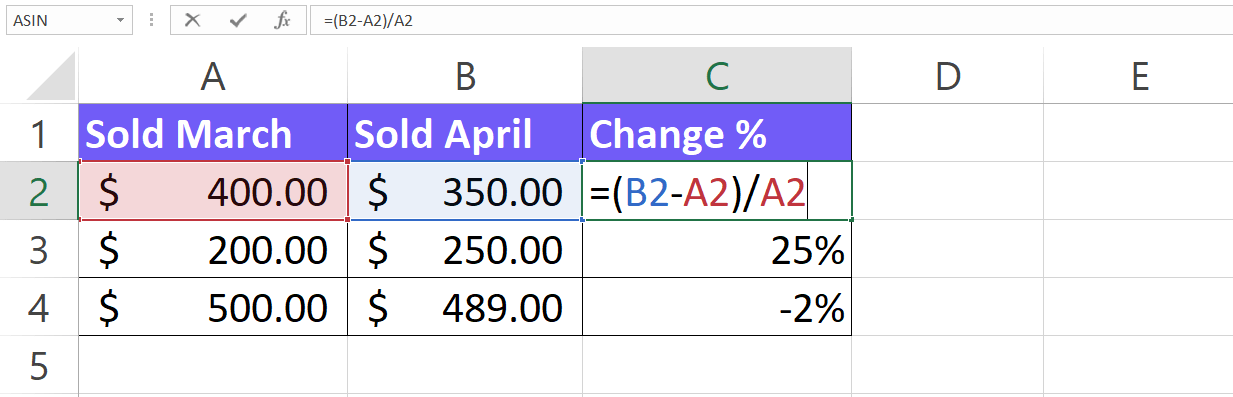
Percentage Change = [($350 – $400) / |$400|] × 100 = ($50 / $350) × 100 = 0.125 × 100 = -12.5%
Therefore, the sold amount value decreased by 12.5%.
What is the Percentage Difference?
The percentage difference tells you the relative magnitude of the difference between two quantities, expressed as a percentage. It considers the average of the two values, unlike percentage change which focuses on the original value.
In simpler terms, it shows how big the difference is compared to the average size of the two numbers you’re comparing, all expressed as a percentage.
Percentage Difference Formula
| Expression | Description |
|---|---|
| Formula | (a – b) / [(a + b) / 2] |
| a | First number |
| b | Second number |
How to calculate the percentage difference?
Imagine you have two test scores: 70 and 90. What’s the percentage difference between them?
- Calculate the difference: 90 – 70 = 20.
- Find the average: (70 + 90) / 2 = 80.
- Apply the formula: |(90 – 70)| / [(90 + 70) / 2] × 100 = 20 / 80 × 100 = 0.25 × 100 = 25%
Therefore, the percentage difference between the scores is 25%. This means the difference (20 points) is 25% of the average score (80 points).
Related Article: 7 Best AI For Data Analysis: Tools You Can’t Miss
how to get a percentage of a number?
Finding what percent a number is of another number (a part out of a whole):
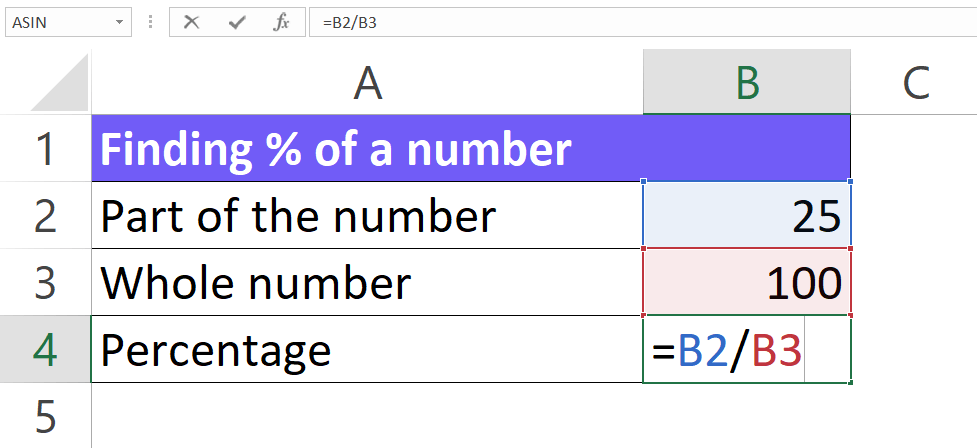
- Formula: (Part / Whole) × 100 = Your answer (%)
- Part: This is the number you want to express as a percentage of the whole.
- Whole: This is the total amount or reference value.
- Example: Let’s say you scored 80 points on a test out of 100 possible points. What percentage is your score (80) of the total (100)?
- Part = 80 points
- Whole = 100 points
- (80 points / 100 points) × 100 = 80%
Related Article: Generative AI For Data Analytics: What You’re Missing Out
how to calculate percentages in Excel
Here’s a step-by-step guide to help you calculate percentages in an Excel spreadsheet:
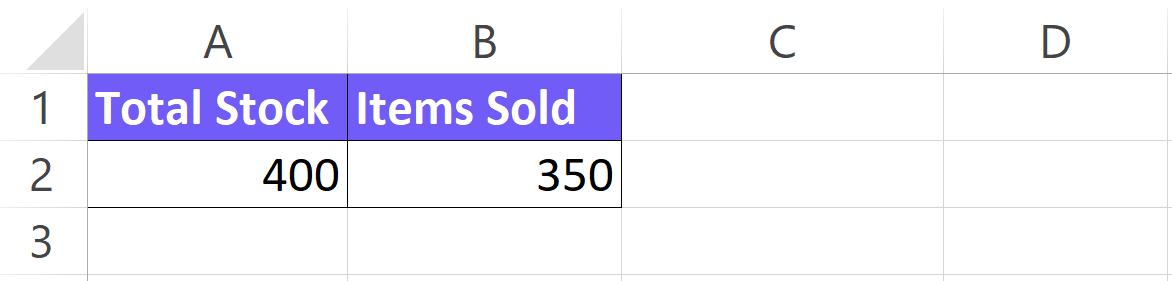
- Enter your data:
Start by entering your data into the spreadsheet. For example, if you’re calculating the percentage of items sold out of total stock, you’d have a column for “Items Sold” and another for “Total Stock”.
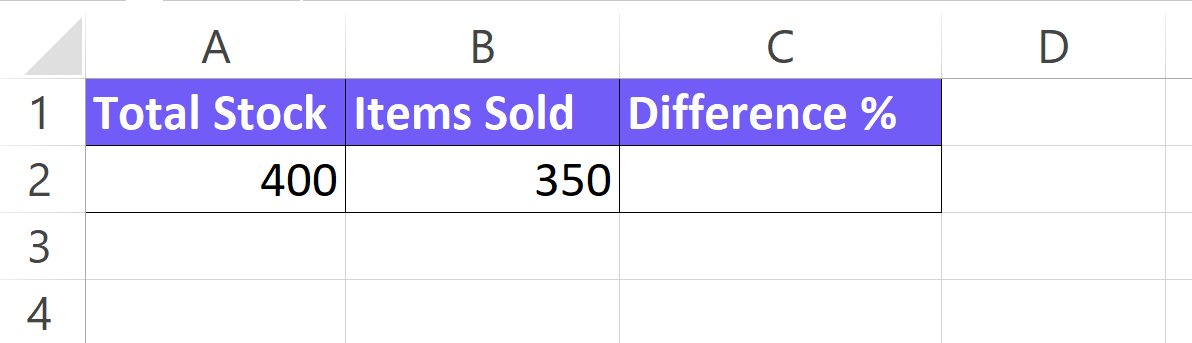
- Choose a cell for the percentage
Select a blank cell where you want the percentage value to be displayed.
- Apply the formula
In the chosen cell, type the following formula:
=part/total*100
– Replace “part” with the cell reference containing the value you want a percentage of (e.g., cell B2 for “Items Sold”).
– Replace “total” with the cell reference containing the total value (e.g., cell C2 for “Total Stock”).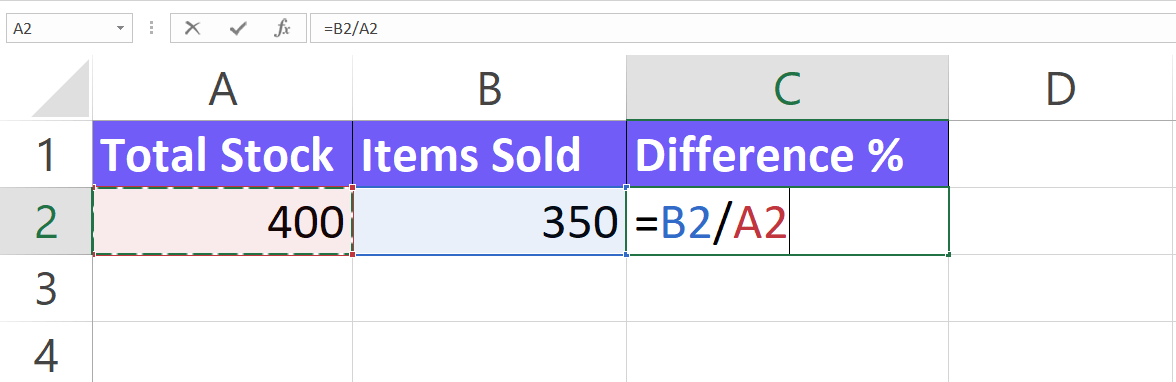
- Format cell as a percentage
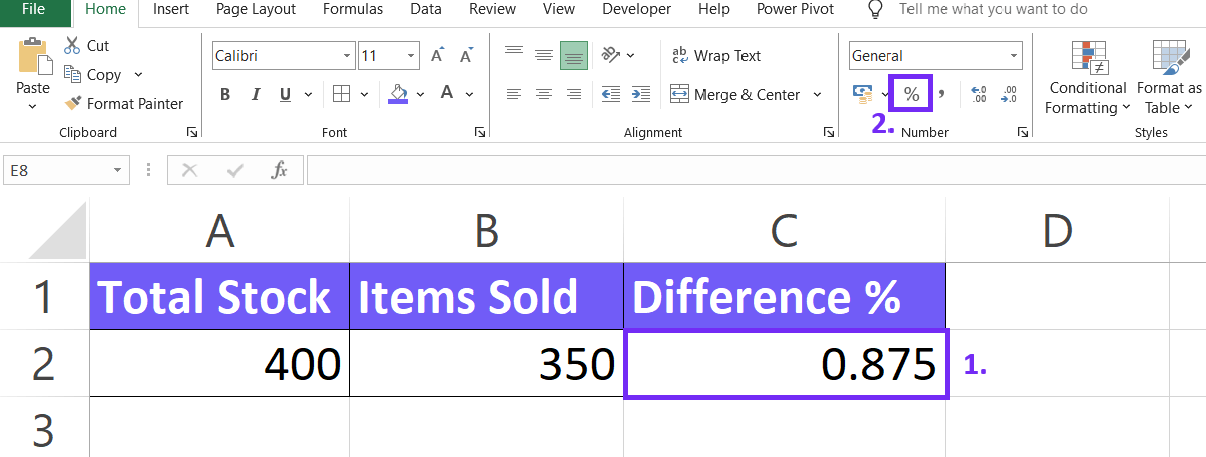
By default, Excel displays the result as a decimal. To format it as a percentage, select the cell and click on the “Percent Style” button (%) in the Home tab. This will convert the decimal to a percentage with two decimal places (e.g., 20.00%).
- Autofill (optional)
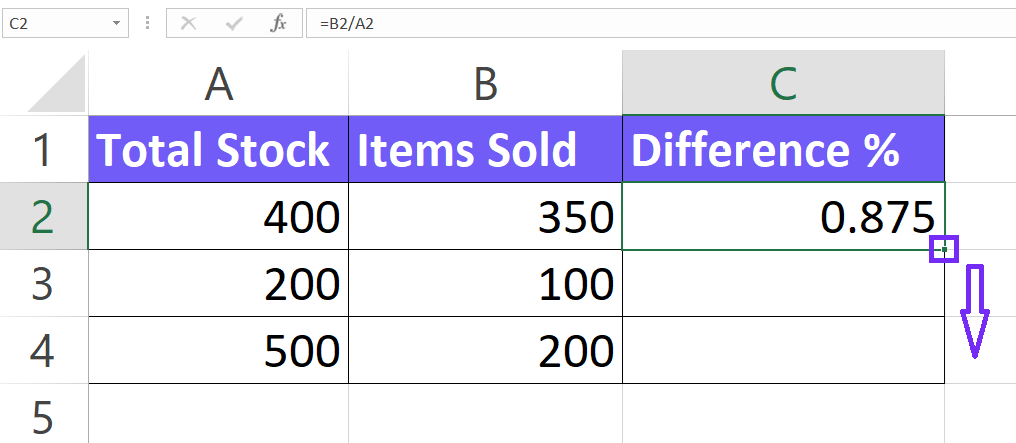
If you need to calculate percentages for multiple rows with the same formula, you can simply copy the formula down to the other cells. Drag the corner of the cell containing the formula downwards to fill the formula in the following cells. Excel will automatically adjust the cell references within the formula for each row.
Related Article: Data Analytics For Small Business Best Practices With Examples
How To Calculate Percentages With AI?
Even spreadsheets are getting smarter! AI can now help with percentage calculations by automatically generating formulas based on your descriptions.
1. Create a free Ajelix account
Ajelix provides a workspace of AI agents that can create projects from scratch. You can start with a free trial before committing to anything.

2. Write a clear and concise prompt
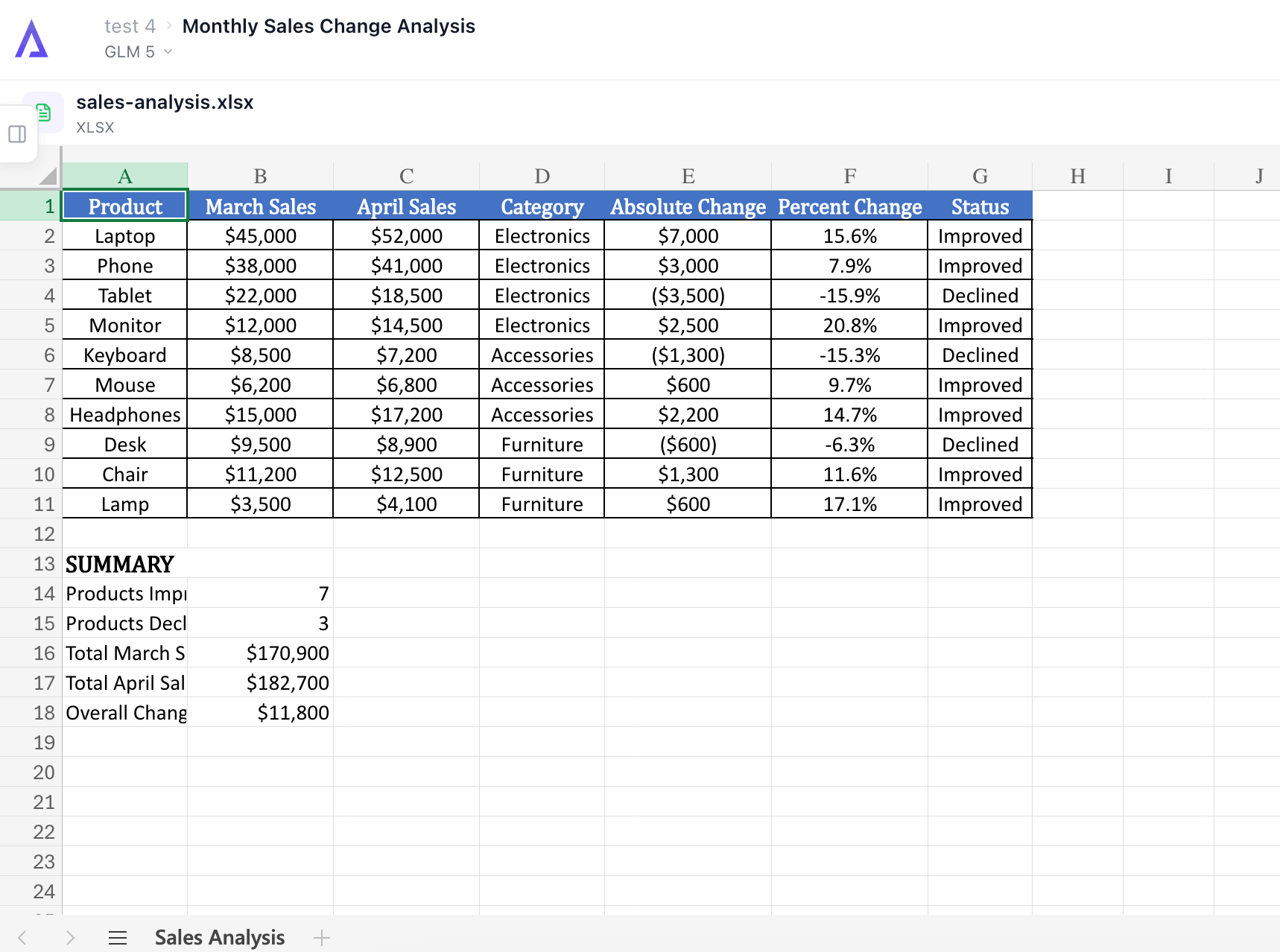
Simply describe what you want to calculate, for example, if you want a percentage formula, write “I have March sales in cell B2 and April sales in C2 and I want to understand the change in sales between these months”. AI then takes care of the complex formula for you, ensuring accuracy and saving you time.
Don’t forget to upload your data before pressing send.

3. Get your formula
Once you have the prompt AI will give you a ready-to-use formula to insert in your spreadsheet. You can also use our Google Sheets add-on for easier formula writing. In the answer below you can see that AI gave the correct formula to calculate the percentage change.

Related Article: Free NPV Calculator Online: Calculate Net Present Value
Download Percentage Calculator In Excel Template
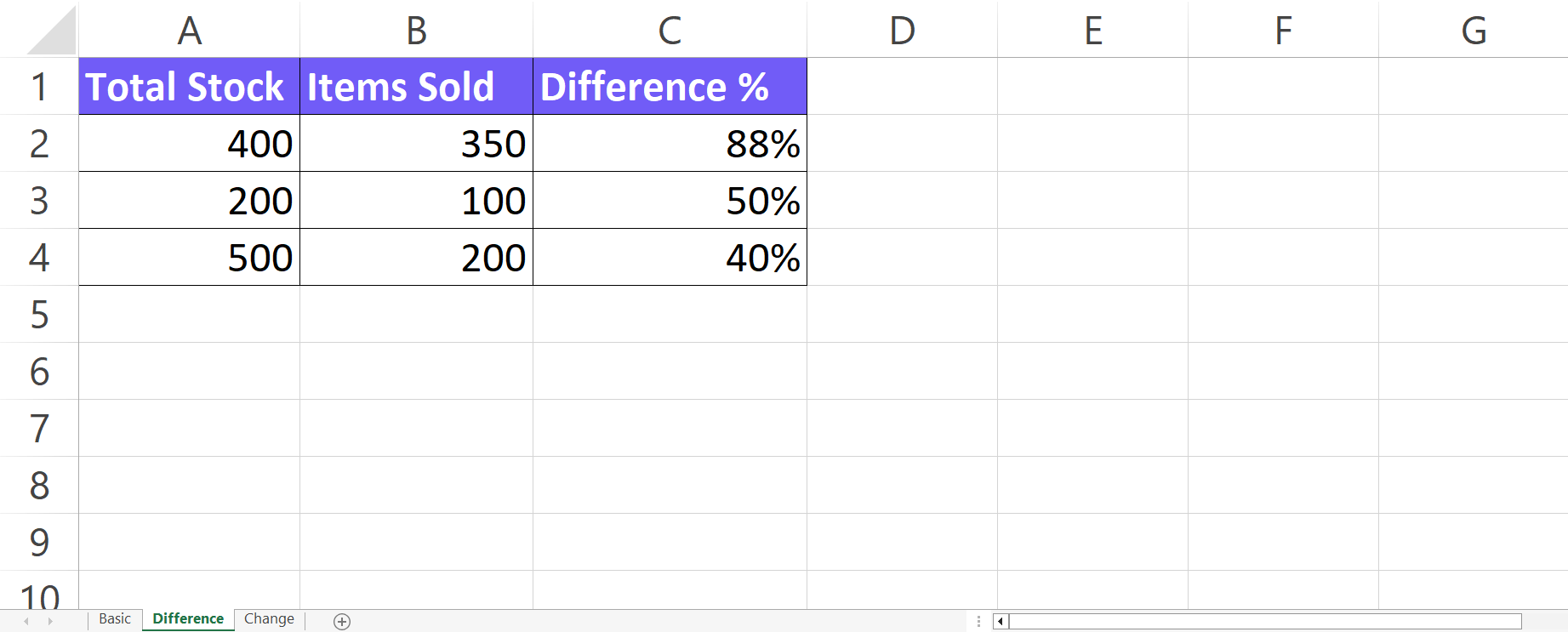
Download your free percentage calculator below 👇
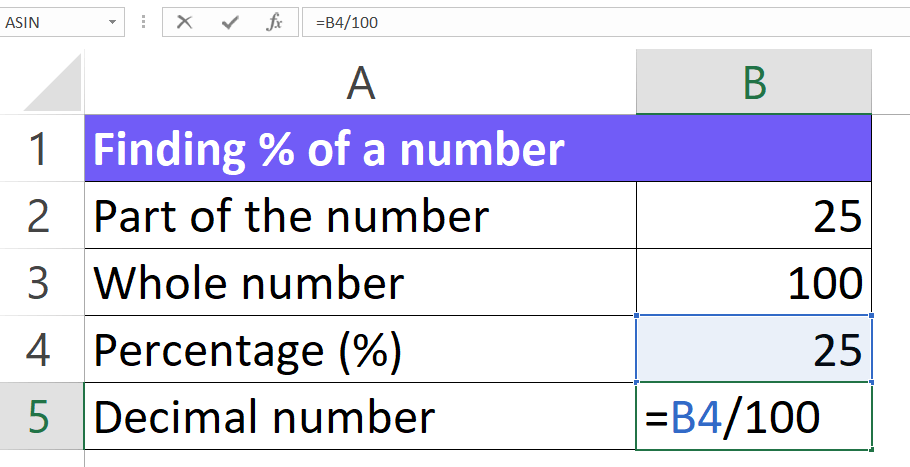
How To Convert Percentage to Decimal?
Divide the percentage by 100 (or move the decimal two places to the left) and remove the percent sign (%):
Example: Convert 25% to a decimal.
25% / 100 = 0.25
Related Article: Top 10 Best Business Intelligence Tools Comparison
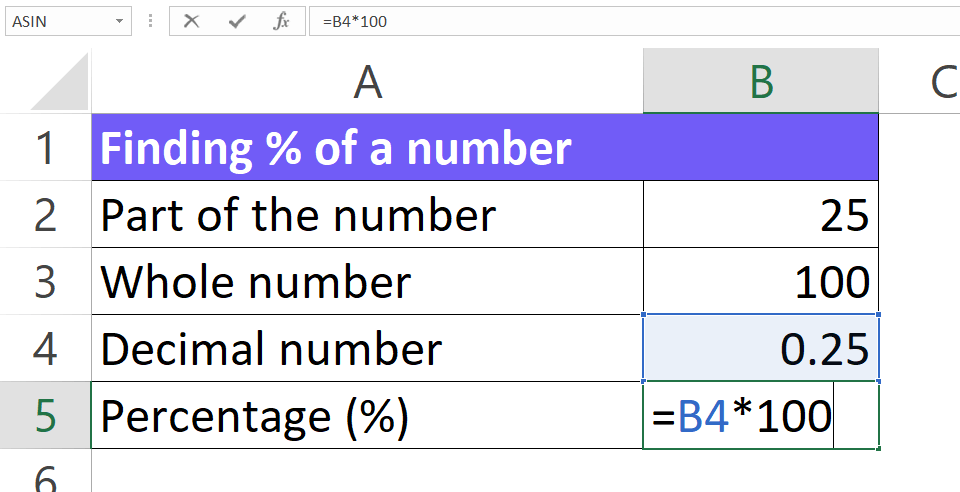
How To Convert Decimal to Percentage?
Multiply the decimal by 100 (or move the decimal two places to the right) and add a percent sign (%):
Example: Convert 0.75 to a percentage.
0.75 x 100 = 75%
Remember:
- Dividing by 100 essentially reduces the number by a factor of 100 (like moving the decimal left) because a percentage represents a part out of 100 parts.
- Multiplying by 100 increases the number by a factor of 100 (like moving the decimal right) to express it as a part out of 100 (percentage).
Related Article: How To Add Checkboxes In Excel
Most Common Mistakes Calculating Percentages
- Misunderstanding percentages: People might forget that a percentage represents a part of a whole divided by 100. This can lead to confusion about what numbers to use in the calculation.
- Adding or subtracting percentages directly: When dealing with consecutive percentage changes (discounts, markups), it’s tempting to simply add or subtract the percentages. This is incorrect because each percentage is based on a different starting value. You need to calculate them sequentially.
- Converting between percentages and decimals: Not converting percentages to decimals (dividing by 100) before using them in calculator functions can lead to wrong answers.
- Confusing part and whole: Especially in word problems, it can be tricky to identify which number is the part (represents the percentage) and which is the whole.
- Misplacing the decimal point: Percentages are often expressed as decimals, and even a slight mistake in decimal placement can significantly alter the outcome.
Tips to avoid these problems
- Identify the whole and the part: Clearly define which number represents the whole quantity and which represents the percentage of that whole.
- Write down the formula: Depending on the problem, there might be a specific formula to follow. Writing it down can help structure your approach.
- Use a pen and paper for complex problems: If the problem has multiple steps or involves several percentages, working it out on paper can help avoid confusion.
- Check your work: After calculating the answer, take a moment to review your steps and see if it makes sense in the context of the problem.
FAQ
A percentage calculator is a tool that simplifies finding percentages. It can help you: Find a part of a whole (e.g., what’s 20% of 100?). Express a part as a percentage of a whole (e.g., what percentage of 20 is 4?).
Convert percentages to decimals first: Before using a percentage in a calculation, divide it by 100.
Double-check decimal placement: Pay close attention to where the decimal point falls in your answer. A small mistake in placement can significantly change the result.
Don’t directly add or subtract consecutive percentages. Calculate them one at a time:
Start with the original price (100%). Apply the first percentage change (discount or markup) as a multiplication or division (depending on increase or decrease).
Round the whole number or percentage to a nearby multiple of 10 or 25 for easier calculations. Benchmarks: 10% is roughly equal to 1 item out of 10. 25% is like 1 out of 4. 50% is simply half. 75% is around 3 out of 4. Adjust your answer based on how much you rounded the initial numbers.
Other calculators





Setup and monitor your KPIs regularly using Ajelix BI