How To Build AI Agents: A Comprehensive Guide By AI Experts

This guide on how to build AI agents covers every step of the building process, including how to prepare before building, a walkthrough using an enterprise AI platform, and common building mistakes.
Whether you’re exploring how to create an AI agent for IT support, finance ops, workflows, or any other field, the same fundamental aspects apply. Our team of AI experts will explain how below.
What Are AI Agents
AI agents are systems that take an input, reason about it using a language model, decide what to do, and then act, by calling a tool, running a process, or returning a result.
AI agents can look up data in your internal documentation or web, read files, trigger a workflow, call an API, or interact with users through a voice AI platform. They are autonomous, powered by *agentic qualities.
Agentic qualities are the ability to plan across multiple steps, retain context between them, and decide which action or tool to use next.
Before You Start Building
Before opening up an AI agent builder, answer these questions:
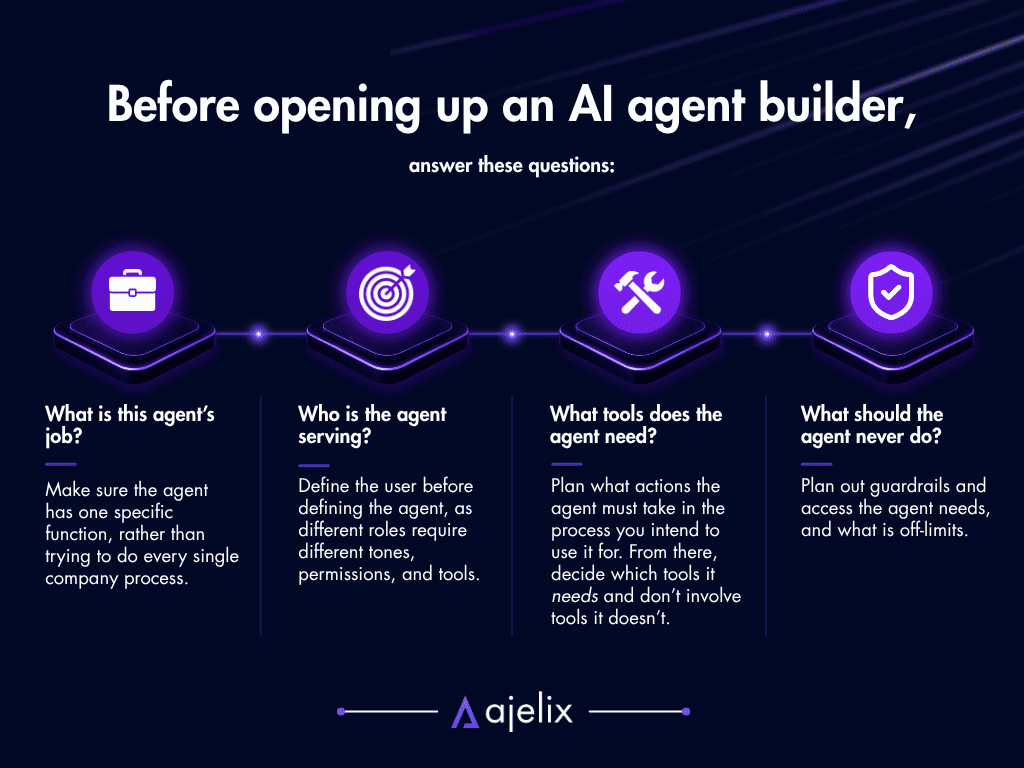
- What is this agent’s job? Make sure the agent has one specific function, rather than trying to do every single company process. Specialized agents are easier to build, test, and fix if something goes wrong.
- Who is the agent serving? Define the user before defining the agent, as different roles require different tones, permissions, and tools. For example, the tone for a customer service agent and a finance ops agent will greatly vary.
- What tools does the agent need to access? Plan what actions the agent must take in the process you intend to use it for. From there, decide which tools it needs and don’t involve tools it doesn’t.
- What should the agent never do? Plan out guardrails and access the agent needs, and what is off-limits. This matters especially when thinking about how to build more secure AI agents for enterprise environments.
Core Principles Of Building A Good Agent
The same principles of building AI agents apply whether you’re using a no-code platform or writing code yourself:
- Give the agent a clear role: The system prompt you type in defines what the agent is, how it behaves, and what it’s responsible for. Don’t be vague, make it a specific role, such as “Data Analyst”.
- Pick the most appropriate model: You don’t always need the most powerful model, especially for simple agents. Faster, lighter models are more fitting for lighter tasks. Save the powerful models for processes that require multi-step logic.
- Give the agent only the tools it needs: As every tool you add to an agent is a potential cause of an unneeded failure, build custom AI agents with precise scope of tools they can use.
- Build guardrails before you start using the agent: Part of the agent design is its guardrails – add them initially, so that you don’t run into compliance and access issues when it’s already running.
- Always test the agent before deployment: Run a trial for the agent of the process it should be executing before introducing it to the team for usage. This will help you spot any potential errors and failures.
How To Make/Build AI Agents (Ajelix Enterprise Walkthrough)
Ajelix Enterprise plan includes a visual AI agent builder, designed for teams that need security and governance. Here’s how the builder works, step by step:
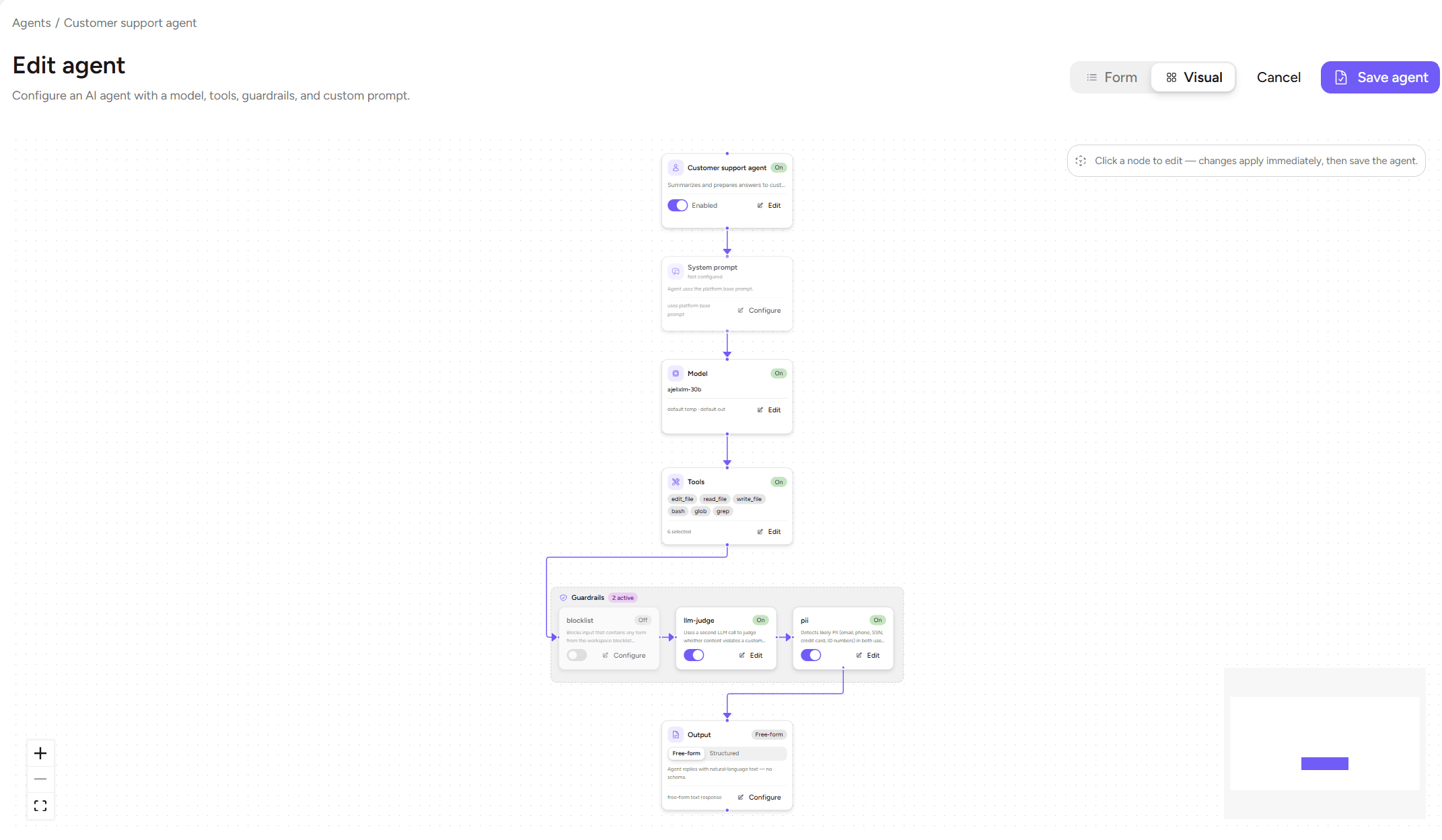
1. Create the agent and define its basics
Start by creating a new agent in the platform by giving it a name, description, and its basic identity. The more clearly you write it, the better it will perform its purpose.
2. Select the AI model
Choose the model that will power the agent. Ajelix Enterprise offers open-source and self-hosted models.
For high-volume but fast tasks, choose a lighter model. For complex reasoning and multi-step processes, choose a more powerful one.
3. Write the system prompt
The system prompt defines the agent’s role, tone, constraints, and how it handles exceptions. A good system prompt answers: Who is this agent? What does it do? What does it not do? How should it respond when it doesn’t know something?
A vague prompt makes agents go off-track in production. Write the prompt as you would a detailed job description.
4. Assign tools and workflows
In Ajelix Enterprise, you can assign built-in tools, custom tools, or attach specific workflows the agent can trigger.
Be sure to only assign what the agent truly needs, and nothing unnecessary. Limiting tool access makes the agent more predictable and easier to audit.
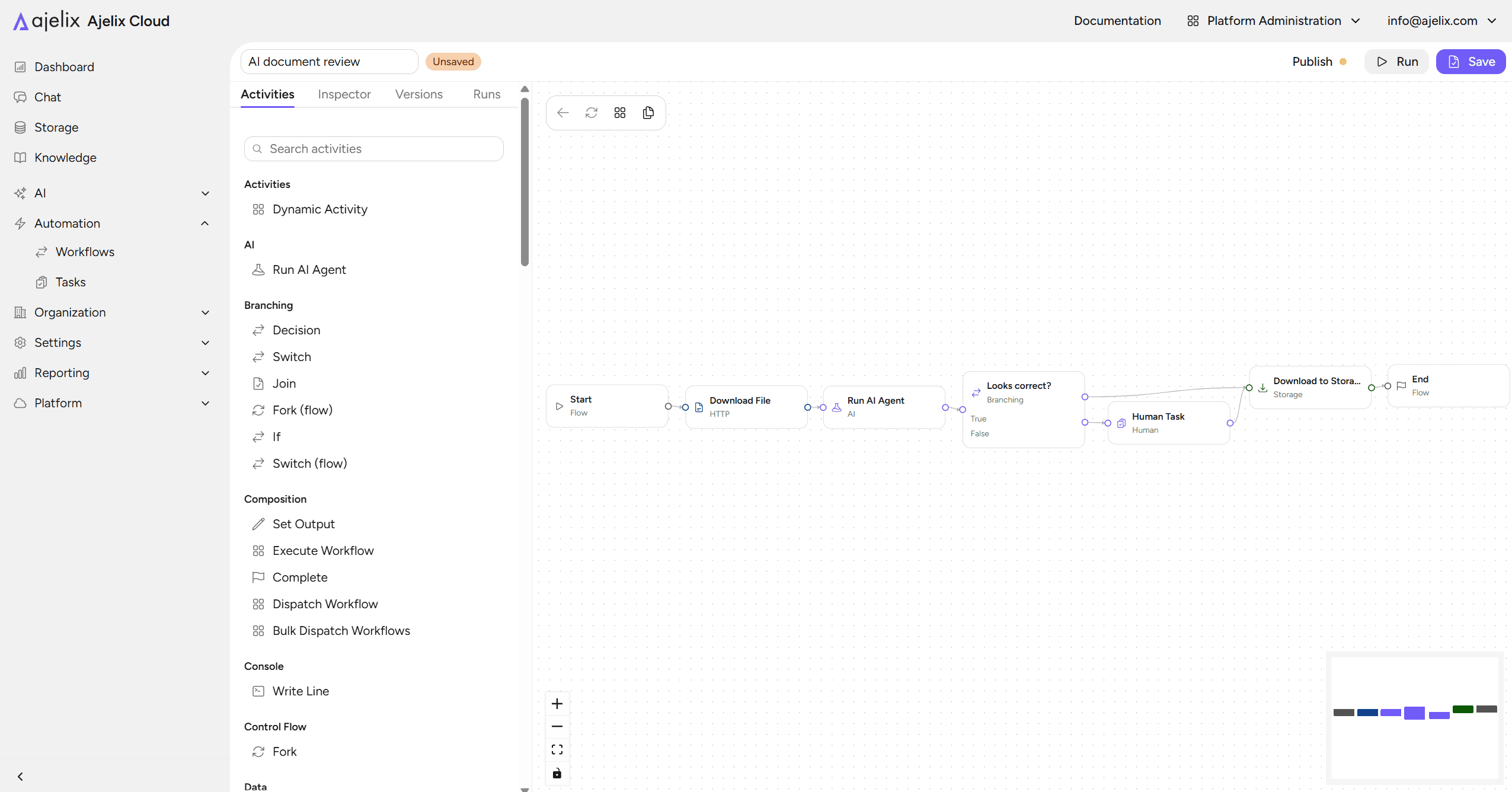
5. Set guardrails and assign file access
Ajelix Enterprise lets you configure guardrails, such as what the agent can and can’t say, what topics are restricted, and how it handles sensitive inputs.
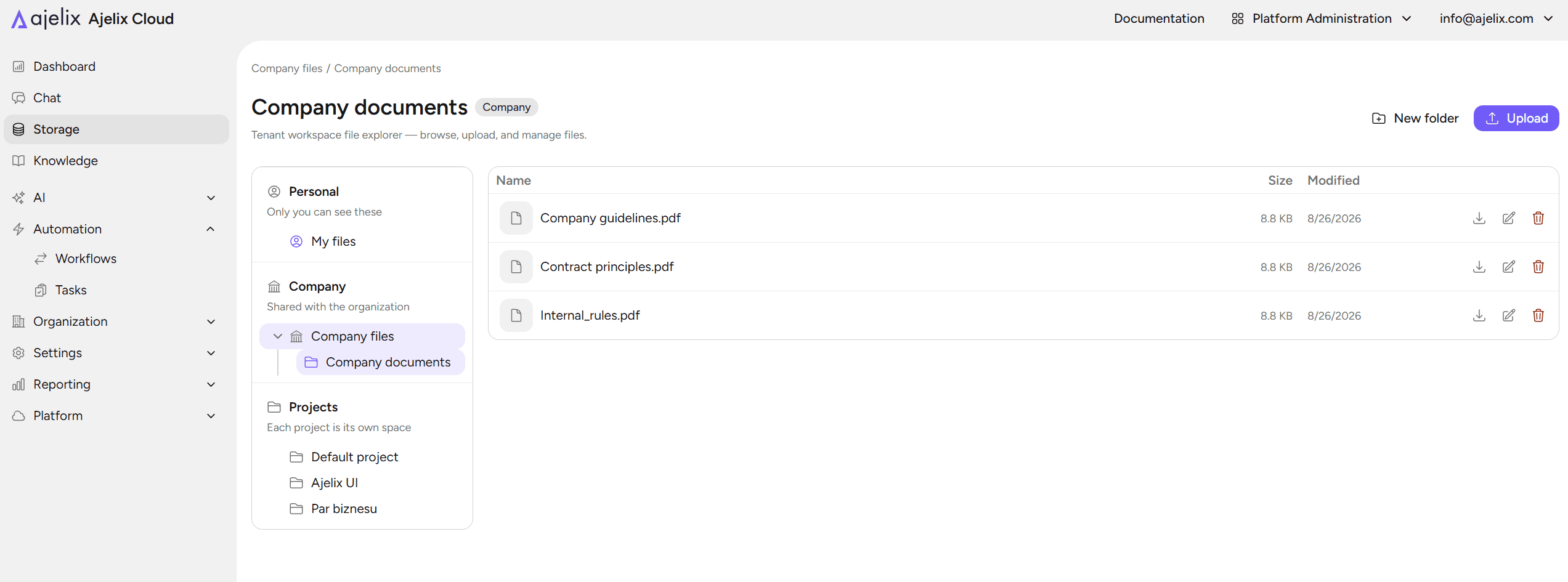
Here, you also define file access, what documentation, knowledge base or internal files the agent can read, so the agent only “sees” what it’s allowed to.
Enterprise platforms like Ajelix let you build agents with the governance controls that allow deployment in regulated fields.
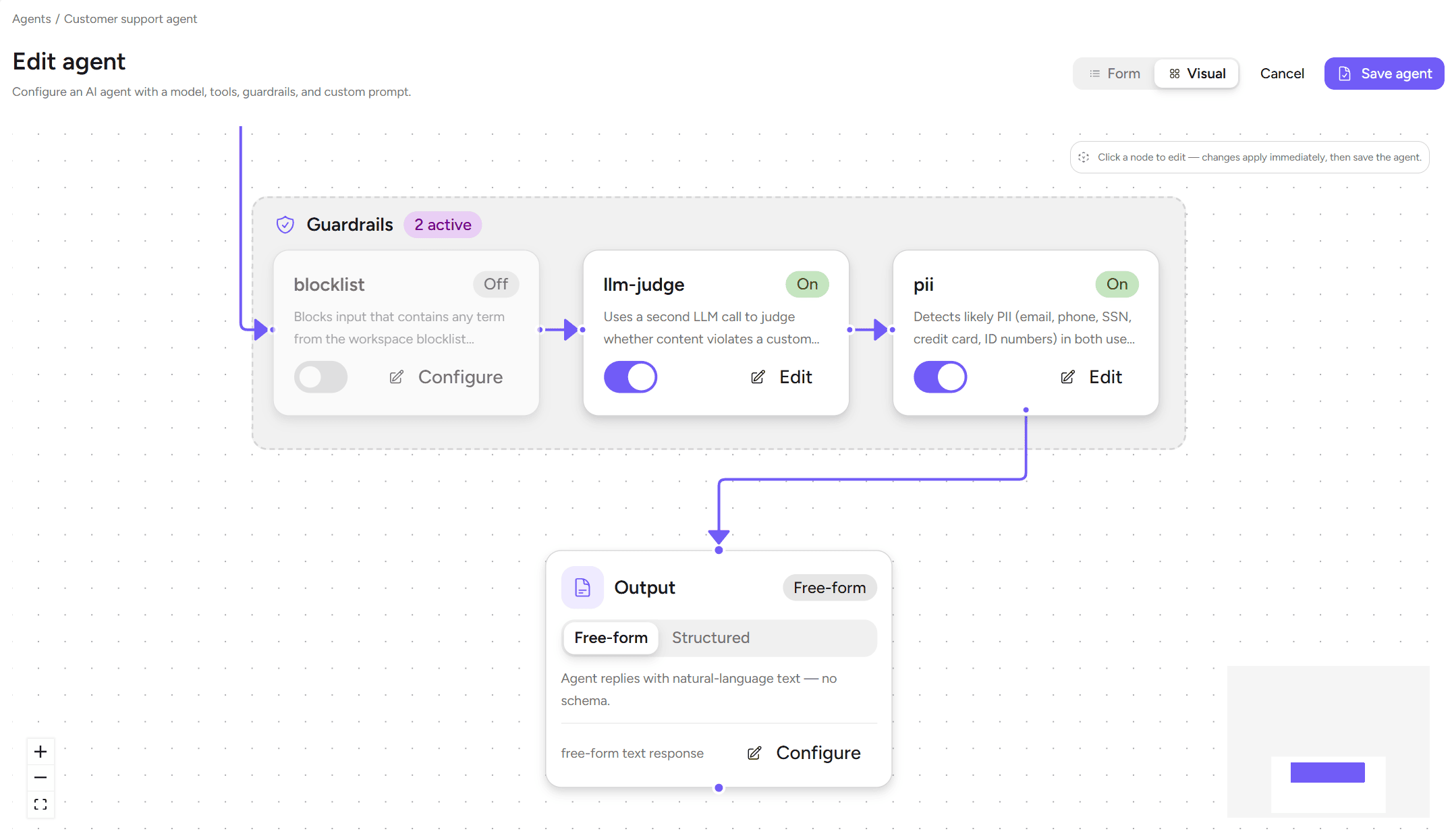
6. Deploy for chat, workflow, or both
Once the agent is configured, choose how it will be used. Ajelix Enterprise supports three deployment modes:
- Chat: the agent is available in a conversational interface for direct user interaction;
- Workflow: the agent runs as a step inside a larger automated process;
- Both: it can handle questions from users and also execute as part of automated workflows.
Thanks to this flexibility, using AI agents with Ajelix is practical across different teams and use cases. A single agent can answer questions from your support team in chat while simultaneously running as part of an automated workflow in the background.
Ajelix Enterprise pricing is a transparent custom contract, tailored to team size and the scope of the deployment. Contact the team for a quote.

No-Code vs. Custom-Coded Building
If you decide to build on a no-code platform or you’re looking for how to build AI agents from scratch using custom code, we have suggestions for both.
Choose no-code building if:
- Your team doesn’t currently include coding specialists;
- You need agents running as soon as possible;
- You want to build, test, and customize the agent yourself without waiting on an engineer.
Choose custom-coded building if:
- You need specialized multi-agent systems with complex orchestration logic;
- You’re building deep integrations with platforms that aren’t supported by the builder;
- You have engineering manpower, time and willingness for maintenance.
For most enterprise teams, building custom-coded agents can take up resources that could instead go somewhere else. Building from scratch can and will take several months.
No-code platforms handle the coding for you, meaning you simply need to focus on what the agents should and shouldn’t do, light maintenance, and audits.
Common Mistakes To Avoid
Errors can and will be made in the agent building process, but you can prepare for the most common ones:
- Vague system prompts: Agents with vague prompts are more likely to hallucinate facts and data, go off-topic, and are harder to correct. Make sure to spend an appropriate amount of time on the system prompt to make it specific.
- Too many tools: Every added tool increases the chances of unexpected behavior and complexity. Start with the minimum amount of tools the agent needs, and add more only if it’s truly required to fill a gap.
- No guardrails added before launching: Avoid the risk of compliance and access violations by adding the guardrails in the initial building process, not only after an incident occurs.
- Skipping testing for exceptional cases: Run the agent through realistic scenarios to catch potential issues. Make sure the agents know how they should behave before giving access to them to your employees or, more importantly, clients.
- Trying to do too many things at once: Start with a specific focus, and expand only once the core behavior has become reliable.
The most important part of building AI agents is in your precision and attention to detail, rather than using the most powerful models. Make sure your agents know what they should do, give them exactly what they need to execute that, and restrict them to your desired controls and access, so that they don’t go off-track.
The Ajelix Enterprise agent builder is designed around a logic that follows a structured sequence moving you through model selection, system prompt, tools, guardrails, and deployment in the right order.
Contact us to get a conversation started about deploying enterprise AI in your company.
FAQ
An AI agent is a system that takes an input, reasons using a language model, and then acts by calling a tool, triggering a workflow, or returning a result.
Define what the agent’s job is, choose an AI model, write a system prompt that describes its role and constraints, assign only the tools it needs, set guardrails, and deploy. Platforms like Ajelix Enterprise let you do all of this without writing code.
Use a no-code agent builder like Ajelix Enterprise. You configure the agent through a visual interface – picking the model, writing the system prompt, assigning tools, and setting guardrails.
For enterprise use, the most important factors are security controls, governance features, and integration depth. Ajelix Enterprise is built specifically for this, with guardrails, file access controls, and support for both chat and workflow deployment. Other options include IBM watsonx Orchestrate and Microsoft Copilot Studio, depending on what your company already uses.
No. With no-code platforms, you can build, test, and deploy an agent without any development background. Custom-coded frameworks like CrewAI or LangGraph are available if you need complex multi-agent orchestration, but most enterprise use cases don’t require them.
A chatbot responds to questions, while an agent takes action. An agent can query a database, trigger a workflow, read a file, or call an API based on what the input requires. The key difference is autonomy and tool use.
Set guardrails during the building process, not after deployment. Restrict file access to only what the agent needs, limit tool scope, and define what topics and outputs are off-limits in the system prompt. Enterprise platforms like Ajelix include these controls as part of the standard build process.
Agentic AI chat that helps you complete projects
AI for work that ingests, transforms, and delivers the exact deliverables your team needs, while you stay focused on strategy. No more chatting, agents can get the job done.