How To Prompt AI (With Examples and Mistakes To Avoid)

Tired of your AI’s responses being generic and not useful for what you need them for?
It’s easy to blame the tool, but the quality of your AI results heavily depends on the quality of your prompt. As an expert working for an agentic AI platform, I’m here to teach you how to prompt AI to receive the best possible results.
The #1 Mistake People Make When Prompting AI
A strong AI prompt gives the model a clear role, a specific task, the context it needs, and a format to follow. If you skip any of these factors, the AI result may be full of AI tells, fluff, and maybe even hallucination.
The most prominent mistake people make is treating an AI like a Google search. AI should be given more specific treatment – it yearns for context.
Here’s what a vague prompt would look like:
Write a LinkedIn post about our new feature.
Let’s take that same idea but give more context to the AI:
You're a B2B SaaS marketer. Write a LinkedIn post announcing our new AI report generator. Audience: data analysts who hate manual reporting. Tone: confident, not sales-y. Under 150 words, end with one question.
You’re probably noticing that the prompt with more context is much longer. The point isn’t to make it longer, but it’s what will happen if you add more details. This doesn’t mean that your prompts need to be exhaustive – too much context can become a different issue altogether.
The way I see it, it takes less time to write a more detailed prompt initially than to go back and forth with AI when it asks you for more context.
Research backs this up: roughly half of the performance gains from upgrading to a better AI model come from users improving their prompts, not from the model itself. Before you switch tools, try changing your prompt.
How To Format An AI Prompt
Almost every effective prompt comes down to five core parts:
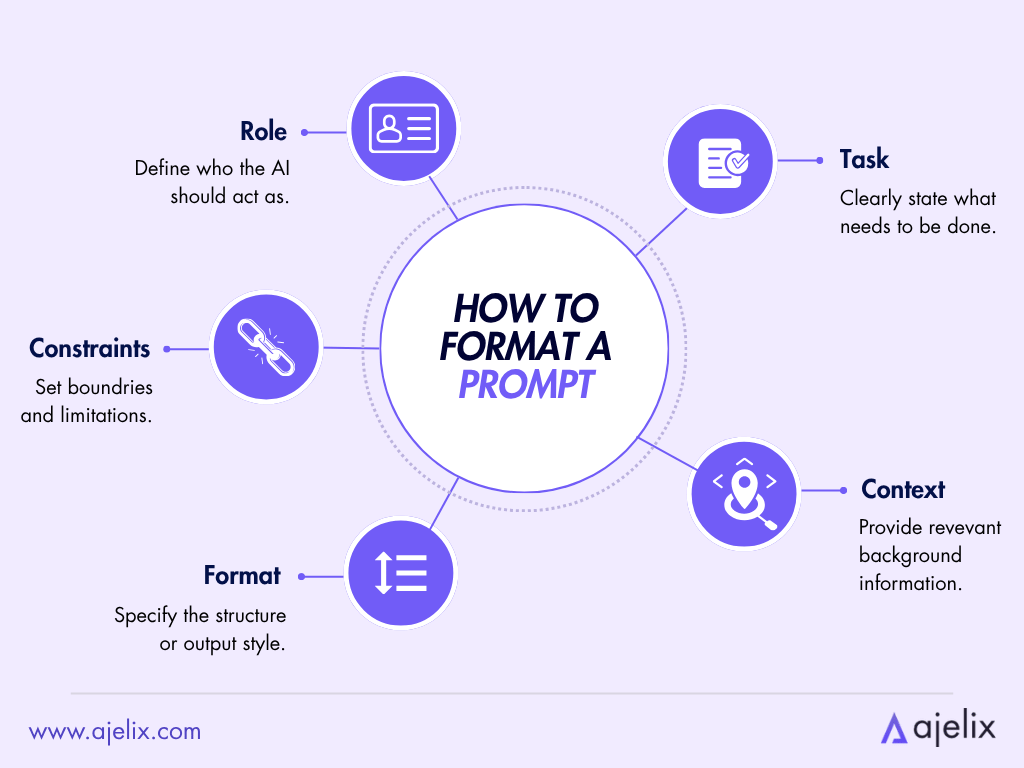
- Role: which employee the model should act as.
- Task: what you want it to do.
- Context: the background, such as details about the company or project.
- Format: how the output should be structured.
- Constraints: limits, such as length, tone, or what to avoid.
Simpler tasks may not need all five, but if your output seems off, something is likely missing.
Let’s use the five-part structure with a real example:
- Role: You’re a digital marketing specialist.
- Task: Write a LinkedIn post about the company’s latest blog article.
- Context: Ajelix is an agentic AI tool. You need to push for the usage of AI through our platform specifically.
- Format: Social media post with short sentences, 2 lines max per paragraph.
- Constraints: Professional, not sales-y, but prove the product’s worth. Under 150 words, end with a question for the audience.
Based on the prompt, you can already expect what the AI’s output will look like. That means nothing will be confusing for the AI either. And that’s the entire point – don’t be vague with your prompts. If you are, expect hallucinations.
Write the prompt in the order of what makes the most sense. The five parts don’t need to be in that exact order. If something’s unclear to you, it will be unclear to the AI.
AI Prompt Examples: Bad vs Good
For the examples, I will use some of the most common tasks people go to agentic AI for:
| Use case | Bad prompt | Good prompt | Why it works |
|---|---|---|---|
| Email rewrite | “Rewrite this email to sound better.” | Assigns role (email coordinator), specifies tone (warm, not corporate), gives context (reply to a frustrated client), sets format (under 100 words). | Shows role + context + constraints in action |
| Meeting summary | “Summarize these notes.” | Specifies audience (project lead who missed the meeting), format (3 bullets + action items), and what to cut (small talk, off-topic). | Demonstrates format + constraints, meaning AI knows what to leave out |
| Data cleaning | “Clean this data.” | Gives the tool context (CSV with messy date formats), specific task (standardize to YYYY-MM-DD), and an instruction (handle null values). | Shows that good prompts are precise about rules, not only tone |
| Blog outline | “Write an article about prompting.” | Sets role (B2B marketer), task (outline only), context (1500-word target, avoids generic intros), and format (H2s with 1-line descriptions). | Shows constraints in order to make the article readable |
The evident pattern across the prompts is that the good prompts are specific. They do become longer, but each word earns its place.
How To Write AI Prompts For Images
If you wish to create visual material with AI, you will also need to follow a structure, consisting of five parts:
- Subject: what the image is of.
- Style: photo, illustration, 3D render, oil painting.
- Lighting: soft, harsh, golden hour, studio.
- Composition: close-up, wide shot, top-down.
- Mood: calm, dramatic, playful, minimal.
A vague prompt for generating an image would be:
A coffee cup on a desk.
A strong prompt, on the other hand, would be:
Flat-lay photo of a white ceramic coffee cup on a light oak desk, soft morning light from the left, minimal style, warm tones, shot from above.
Several AI image generation tools also offer the chance to add what you don’t want the image to look like. Use the negative field to note aspects such as, “blurry, text, watermark, distorted hands” or whatever else it is you don’t want.
Do’s And Don’ts Of Prompting
Here’s a reference guide based on everything I’ve covered so far, plus a few things I’ve picked up on while working with AI in my professional life:
Do’s
- Be specific. The more precise you are with the prompt structure I covered, the less room AI has to fill the rest in with something generic, or worse, hallucination.
- Frame instructions in a positive manner. Instead of saying “don’t use made-up data”, say “only use my real, attached data”. As soon as you tell AI to not do something, it will hyperfocus on that part. Reframe every negative instruction as a positive one.
- Give the AI data or information to work with. This is crucial, especially if you’re looking for analysis. Attach your company data – the AI will not have it, and without real data, hallucinations start happening.
- Iterate the prompt. The first prompt rarely produces the perfect output. Adjust and tweak it until it looks good.
- Use specific parameters and timeframes. For example, “What are the AI trends for 2026?” works better than “What are the AI trends?”. Make sure the most relevant, reputable, and up-to-date information is searched by the AI.
Don’ts
- Don’t dump everything at once. It’s best not to overwhelm the AI with a wall of context and instructions. It makes it harder for the model to prioritize what needs to be done. If your prompt is getting too detailed, split it into steps.
- Don’t expect the same prompt to work for every AI tool or model. A prompt that works well in ChatGPT might not work so well in Claude. Tweak the prompts according to the model you’re using – you can learn this by prompting a new AI model and analyzing what changes in its output.
- Don’t overcomplicate simple tasks. Start with just the role, task, context, format and constraints, and only escalate if the output doesn’t fit your expectations.
And most importantly:
- Don’t treat the output as final. AI gives you a draft that needs manual human review, not a finished product. Always edit the output to your liking.
How An Ajelix Team Member Prompts AI [Video]
To help visualize the process, here’s how an Ajelix team member usually prompts AI in their work:
Ajelix is an agentic AI tool that turns your drafts into finished projects and deliverables. If you want to get started with an AI agent and haven’t yet decided on which one to use, I recommend Ajelix.
Try it now → chat.ajelix.com

FAQ
A clear role, a specific task, relevant context, a format, and constraints. If your output feels off, one of these is usually missing.
Long enough to be specific, short enough to stay focused. There’s no ideal word count, what matters is that every part of the prompt earns its place. A one-liner is fine for a simple task, while a complex request might need 5-8 sentences of context.
Not always. Different AI models reason differently, so a prompt that performs well in one tool may not in another. Start with the same structure, then tweak tone, format, or detail level based on the model’s output.
Hallucinations happen when the AI fills in gaps it doesn’t have data for. The most common cause is a vague prompt that doesn’t give the model enough context, role, or constraints. Providing real data and clear boundaries reduces the risk.
No. Image prompts are descriptive, not instructional – you describe what you want to see (subject, style, lighting, composition, mood) rather than what you want the AI to do. Negative prompts (what to exclude) also play a bigger role in image generation.
Yes, but it’s changed. AI tools have gotten better at interpreting intent, so you don’t need rigid templates as often. But knowing how to structure a prompt – role, task, context, format, constraints – still gives you more consistent, higher-quality results.
Agentic AI chat that helps you complete projects
AI for work that ingests, transforms, and delivers the exact deliverables your team needs, while you stay focused on strategy. No more chatting, agents can get the job done.