AI Memory: Everything You Need To Know About What AI Remembers

ChatGPT, Perplexity and Grok all released AI memory features in the past year. Right now, the focus is turning to AI memory within enterprise AI solutions.
It comes with data security questions for many users. In this article, we’ll get into those, how exactly AI memory works and what AI remembers.
What Is AI Memory and How Does It Work
AI memory is a feature that lets AI agents and chatbots retain memory across different conversations. AI recalls user preferences and picks up where the user left off without needing a fresh start each time.
If you were to use an AI tool that doesn’t have a memory feature, it wouldn’t already know the answer to the same question you asked last week. It would need to research the answer from scratch, whether based on your provided data or the web.
There are two types of AI memory, with one having two sub-types:
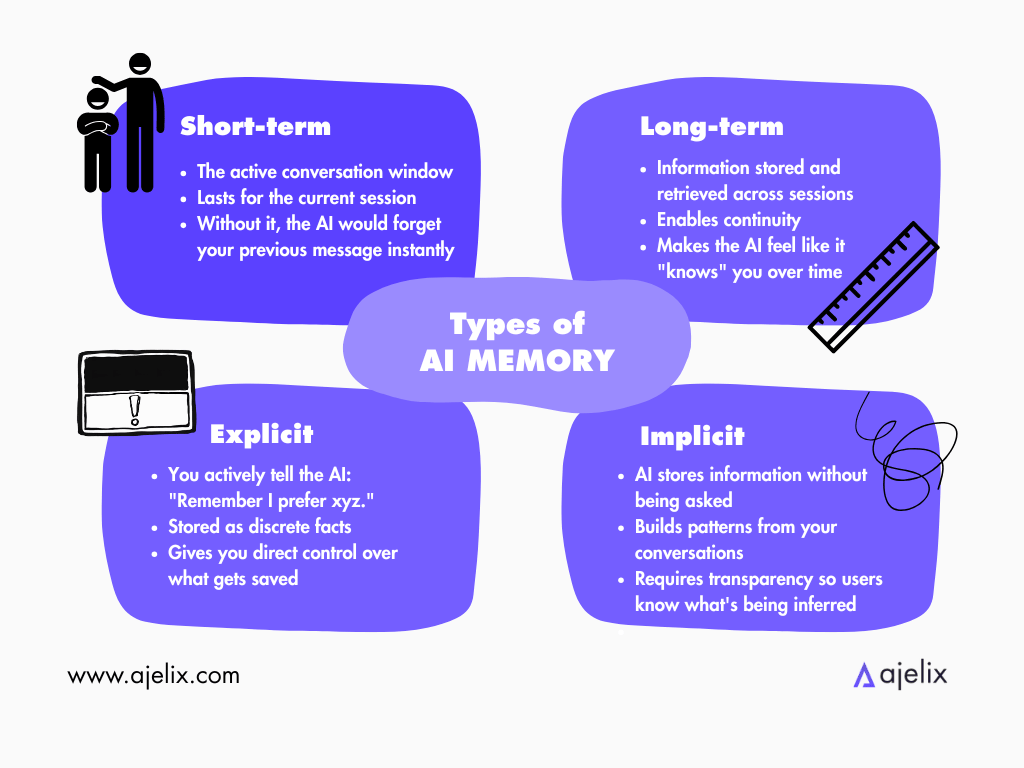
Short-Term Memory
This is what most AI tools have by default, known as the context window. This applies to the current conversation you’re having with AI, the back and forth messaging. With this type, AI remembers what you said three messages ago, but perhaps not what you said three sessions ago.
Without it, the AI would instantly forget your previous message.
Long-Term Memory
AI tools that have long-term memory store information across multiple sessions, which enables continuity. The two main approaches are Explicit and Implicit.
The explicit approach is when you plainly tell the AI tool that you want it to remember something, for example “My name is Richard, remember that” or “Remember that I prefer Python code.” AI stores it as facts to reference at a later point.
The implicit approach is when AI stores information on its own, without you instructing it to. It builds a profile of your preferences, and remembers them during a different session. For example, you tell AI that you prefer PDFs over .doc files, and it always creates your file as a PDF.
Where AI Memory Is Stored
The most common ways AI stores information are:
- Cloud-Based Storage. The memory stays in encrypted databases in secure servers. It’s the same infrastructure banks and healthcare systems use. Data is encrypted when being stored, and going into a transit mode when prompted by the user.
- On-Service Storage. Tools like Apple Intelligence store memory locally on your device. Nothing leaves it unless explicitly allowed. It’s limited to what your device can handle, but ensures maximum privacy.
- Hybrid Models. AI stores sensitive preferences locally, while general context is stored in the cloud. You control what goes where.
You’re probably wondering if it’s safe. The short answer is yes. Because of encryption, access controls and the general requirement of “not giving away your data” that companies have to follow, your data shouldn’t be sold to anyone.
Most AI tools offer control over their memory features. Based on what you use, you should be able to control the following:
| Control | What It Does |
|---|---|
| View memories | See everything the AI has stored about you |
| Delete specific memories | Remove individual facts you don’t want kept |
| Clear all memory | Wipe everything, start fresh |
| Turn memory off | Stop storage entirely, session-only mode |
| Incognito/private mode | No storage for a specific conversation |
Rather than being a security concern, I would wonder about the AI remembering too much and drawing wrong conclusions. Let’s take the PDF example. You usually want your file to be a PDF, but a specific situation requires you to get a .doc file. You might need to re-prompt specifying that you want a .doc file this time.
But if you’re still worried, you can regularly follow these steps:
- Use incognito mode for sensitive topics you don’t want remembered.
- Review your memory summary monthly – delete anything outdated or wrong.
- Turn off memory if you’re researching something you don’t want associated with your profile.
- Check the privacy policy – look for “we do not sell your data” and “we do not train on your data without consent”.
- Use enterprise/business tiers if handling company data – they typically have stricter data handling contracts.
Examples of AI Agents That Already Use AI Memory
The best-known AI platforms already have AI memory features, but each takes a slightly different approach:
ChatGPT
ChatGPT (OpenAI) first launched AI memory features back in 2024. Back then, they were manually kept – users had to tell ChatGPT what to remember. It created problems, such as memories becoming irrelevant by users forgetting to update them and memories disappearing entirely due to overload.
In mid-2026, OpenAI launched a major memory update. Now ChatGPT reads across the user’s entire conversation history in the background, extracts what’s important, and keeps it current. For example, if you were to tell ChatGPT that you are heading to the Bahamas in March, after March it would remember that you went to the Bahamas.
Users also can access a memory summary page letting them know what ChatGPT remembers, with the ability to edit any inaccuracies.
Grok
Grok (xAI) recently introduced AI memory under the name Skills. Their memory features aren’t just about user personalization, but rather a support system for multi-session, ongoing projects, specifically for teams.
Because Grok also has direct integrations with other apps, the memory isn’t limited to just the chat, but puts it into context across your entire workspace.
This feature isn’t currently available in the EU and UK due to privacy regulations.
Claude
Claude (Anthropic) handles memory through their token Context Window. Just their AI assistant, not agent, can hold a book’s worth of conversation, making Claude exceptional at long and complex tasks.
For cross-session continuity, Claude has a Projects feature. The data users upload can be referenced across multiple conversations. It’s controlled by the users, specifically those who value precision over automation.
Perplexity
Out of the tools in this list, Perplexity’s memory system is intentionally limited, due to their focus on real-time research accuracy. AI memory has never been their priority.
It doesn’t mean Perplexity doesn’t use memory features at all. Users can save preferences, view what’s been stored, and delete it at any time. If the user is in incognito mode, memories are automatically disabled.
Their 2026-launched Perplexity Computer does, however, include persistent memory as part of its infrastructure, allowing it to carry context across projects and tools.
How Ajelix Remembers You
Similarly to other AI agents, our platform Ajelix retains memory with a built-in memory tool.
The memory is kept inside two text files within the interface that are invisible to users – project file and user file. They are accessible to the AI agent at any time. If the files are asked to be deleted, the agent will no longer be able to use the information.
Ajelix will remember facts about you that you have explicitly told it to remember. For example, when asked where I work, Ajelix knows it from past sessions we’ve had:
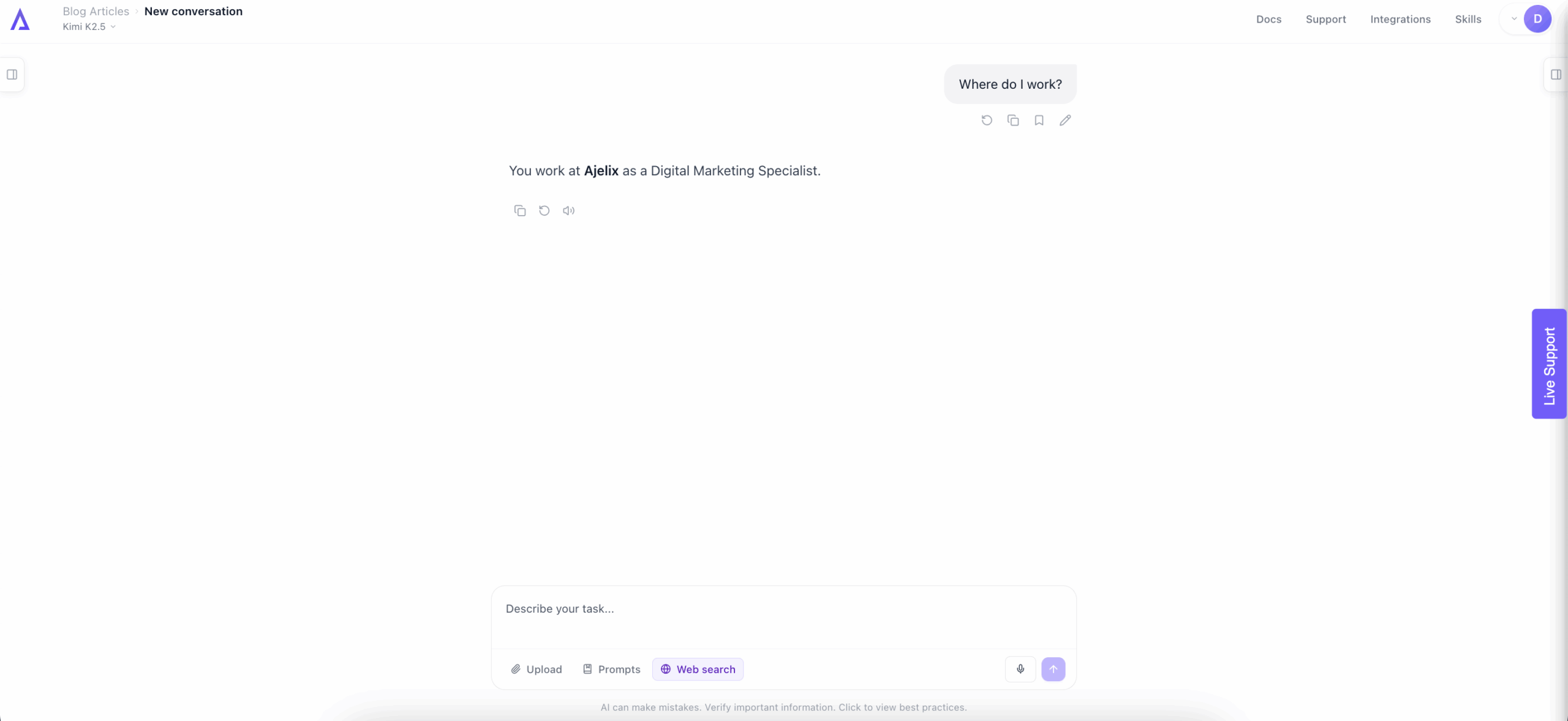
It is not an exact science what Ajelix or any AI agent will remember, but explicit commands are going to be stored in the AI memory.
Ajelix also learns from its mistakes – if it runs into an error, it will remember how it corrected the error for the rest of the session, and likely even across future sessions.
Here’s how an Ajelix team member explains our tool’s memory:

When AI Does and Doesn’t Remember
As we’ve learned, AI is great at remembering facts you’ve stated directly. It’s also good at remembering preferences that turn up repeatedly. If you always ask for bullet points or always write in British English, the AI picks up on those patterns. It learns how to anticipate without you having to mention it in your prompt.
Here are situations when AI is less likely to remember:
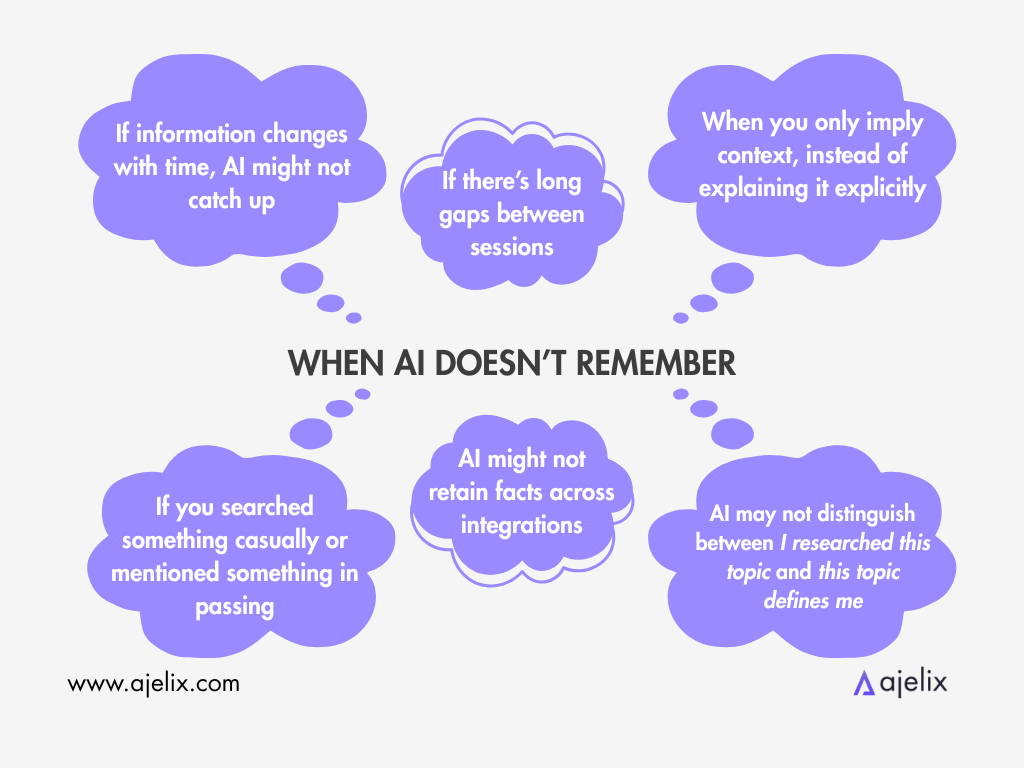
- Implied context. You mention “the redesign project” three times across separate conversations. You know what you mean, but the AI might not link those references together.
- Changing information. If you told the AI your company had 20 employees in January and now you have 40, it might still be working with the old figure.
- Sensitive or one-off conversations. If you searched something casually or mentioned something in passing, AI may think you haven’t intended it to be stored. The AI can’t always distinguish between I researched this topic and this topic defines me.
- Cross-platform context. Though some platforms might carry your memory forward, most of the time your AI memory is locked to the tool you built it in.
- Long gaps between sessions. Most memory systems degrade over time if they have no new signals to work with. If you don’t use an AI for six months, the memories may have become stale or irrelevant.
As a regular AI user, I recommend that you keep refreshing the AI agent’s memory by repeating your preferences every once in a while. The current reality is that AI doesn’t remember everything you’ve ever told it.
If the platform you use offers a memory summary page, I suggest you regularly review it and edit if necessary.
Why AI Memory Is Important for How You Work
We’ve learned that without the memory, every conversation resets and you start from scratch. Here are the benefits of AI memory:
You stop repeating yourself
If you’re someone who prefers answers in bullet points, AI will remember it by the third time you mention it. That applies to any preferences you may have.
Projects don’t die between sessions
If you start a project on Monday but only have time to finish it on Friday, the AI will remember your Monday session without you having to re-prompt or re-upload anything. It picks up mid-thought instead of starting over.
AI learns your context
If you tell AI about where and how you work, it uses that information to deliver results according to your team’s context.
Teams get continuity
If you get sick and your colleague has to take over, you won’t need to debrief them on what you were working on – the AI will remember your project.
AI changes what you delegate
With AI memory, you can delegate ongoing work. For example, if you tell AI your competitor’s pricing last month and ask it to track their pricing onwards, it can tell you about meaningful changes.
AI memory means you spend less mental energy managing the AI and more on the actual work.
Where AI Agent Memory Is Heading
Based on developments from early 2026, here’s where the technology is likely going over the next 12 to 24 months:
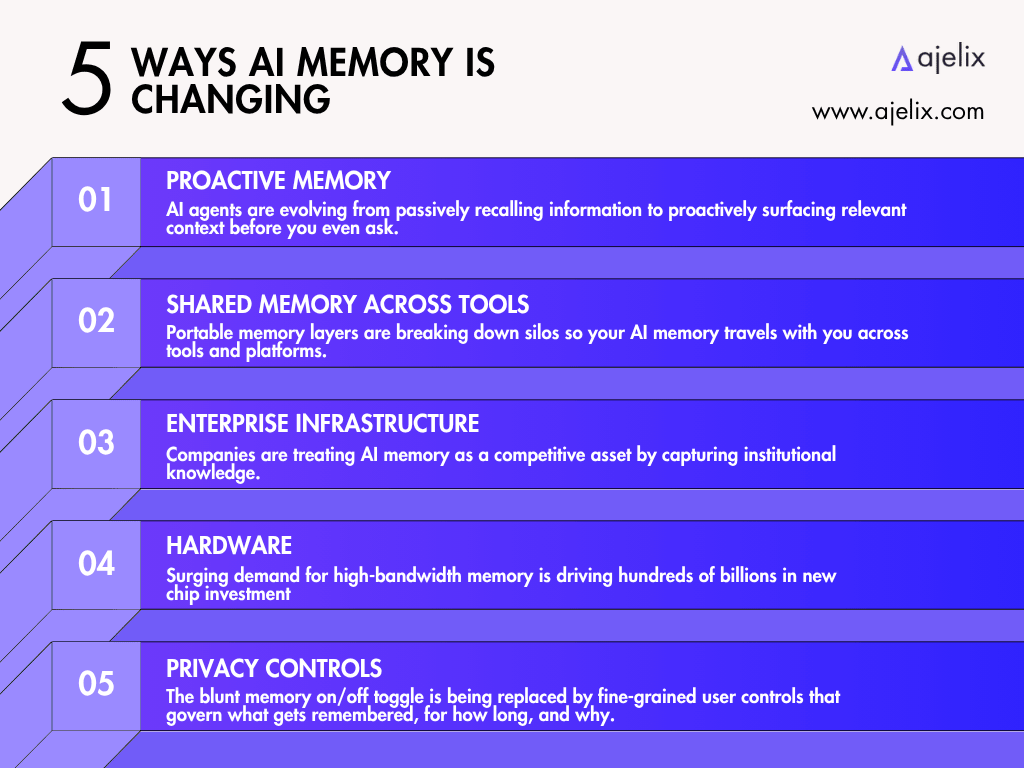
Proactive Memory
While current systems remember when prompted and recall when needed, the near-future idea is that AI will anticipate what’s next. That way, it will update memories automatically as circumstances change.
Shared Memory Across Tools
There is an emergence of portable memory layers, such as what Grok has just come out with. In the future, it’s likely user memory will be carried across tools and integrations.
Enterprise Infrastructure
AI memory is becoming a requirement for enterprises. Snowflake’s Cortex Agents operate with memory tied to the enterprise’s systems rather than isolated chat histories. Microsoft’s unified Agent Framework integrates memory deeply into Windows and Office environments.
Hardware
You may’ve heard about current AI chip shortages. One of the reasons behind that is AI companies trying to achieve more capable memory within their AI models.
Privacy Controls
Because privacy is a reasonable concern that users have, it’s likely users will gain more control over what the AI does and doesn’t store. Some AI agents have already introduced the option to view and edit the memory summary.
As the AI world is changing at the speed of light, most of this might already be consumer reality in the next couple of months.
At Ajelix, we are continuously implementing new AI memory practices, anticipating the future.
FAQ
No. AI memory is most reliable for facts you state directly or preferences you repeat consistently. Implied context, one-off mentions, and information from long-ago sessions are far less likely to be retained accurately.
Generally yes. Most platforms encrypt stored memories and operate under strict data handling policies. That said, you should always check a tool’s privacy policy, specifically for clauses about whether they train on your data or sell it.
Yes, on some platforms, but more are likely to implement it soon.
Short-term memory (the context window) covers only the current conversation – once you close the session, it’s gone. Long-term memory persists across sessions, either because you explicitly told the AI to remember something, or because the AI stored it automatically based on your patterns.
Memory systems can degrade over time without new signals, struggle to connect the same topic across separate sessions, and may not always recognize that passing information was meant to be stored. The AI also can’t always tell the difference between something you mentioned casually and something that defines how you work.
Not yet in most cases. Memory is currently stored within the platform. Portable memory layers are emerging, but cross-tool memory sharing isn’t widely available to consumers yet.
Yes, using incognito or private mode for sensitive research is a good habit. It prevents the AI from associating that content with your permanent profile, while still letting you use the tool normally.
Chat history is temporary – it only covers the current session and disappears when you start a new one. AI memory is a persistent, curated store of facts and preferences that the AI actively references across all future sessions, regardless of when you last used it.
Agentic AI chat that helps you complete projects
AI for work that ingests, transforms, and delivers the exact deliverables your team needs, while you stay focused on strategy. No more chatting, agents can get the job done.