All You Need To Know About AI Agent Workflows (By Experts)
AI agent workflow automation is becoming more prominent in business processes worldwide – and for good reasons. AI is now capable of automating multi-step tasks with no manual human involvement, apart from required human escalations and permissions.
To help your business know how to get started and make the best out of it, our team of AI experts has compiled a guide of everything you must know.
Let’s dive in.
What Is An AI Agent Workflow
An AI agent workflow combines structured automation (like RPA) and AI agents to create a multi-step workflow. The automation executes pre-written steps, such as triggering, fetching, routing, and storing. The AI agent (or agents in more complex workflows) applies reasoning, decision-making, and autonomy.
Without an AI agent, workflows that rely solely on automation are only capable of carrying out the same paths each time, and break if something doesn’t match the script. Without automation, the AI agent can still reason but is missing a defined start, end, audit trails, and guardrails.
Only together do they make an AI agent automation workflow.
How It Works
Most workflow AI agent platforms share the same structure:
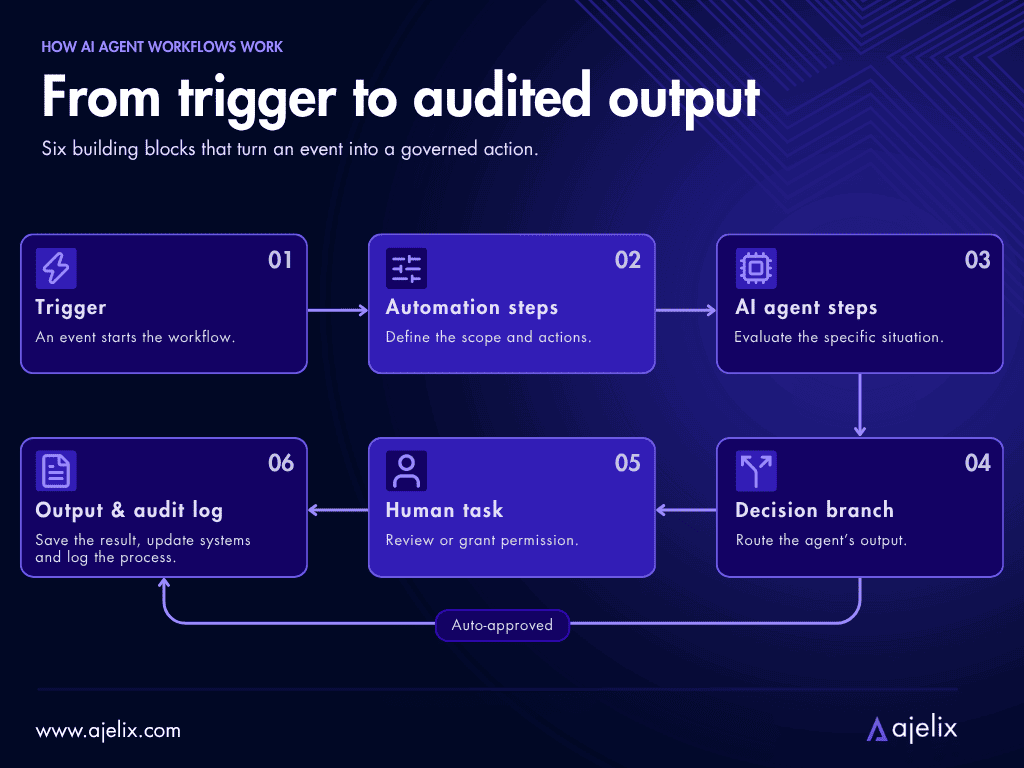
- Trigger: an event that starts the workflow;
- Automation steps: steps that determine the scope of the workflow;
- AI agent step: where the model evaluates the specific situation;
- Decision branch: where the agent output is routed to either be approved or flagged for human review;
- Human task: in cases where a manual approval or permission is needed;
- Output & audit log: the result is saved, the system is updated, and the whole process is logged for audit.
The core AI agent orchestration workflow design has automation as its backbone, and the AI only at points that require judgment. The AI agents are only running at dedicated steps, keeping the cost of the technology under control.
The human step is necessary in cases where an agent might misjudge a situation, that way making it possible to refine the instructions without rebuilding the entire workflow. Each step of the workflow is independent.
Rule-Based vs. Agentic Automation
Rule-based automation is responsible for fixed, predictable sequences. They run the same way each time, responsible for routing, storage, notifications, and data movement.
Agentic automation handles open-ended tasks, such as reading documents, researching, drafting, and dealing with inputs that don’t follow a specific template.
A Gartner analyst sums this up like this: use AI agents when decisions are needed, automation for routine workflows, and assistants for simple retrieval. An AI workflow is built for this hybrid architecture.
AI Agent Workflows In Action (With Ajelix Enterprise)
To help you understand how workflow building looks like, we will take you through four different scenarios that real businesses build workflows for. The visual workflow builder you will see is part of the Ajelix Enterprise platform.
Document Review
This is what a workflow for document reviewing may look like:
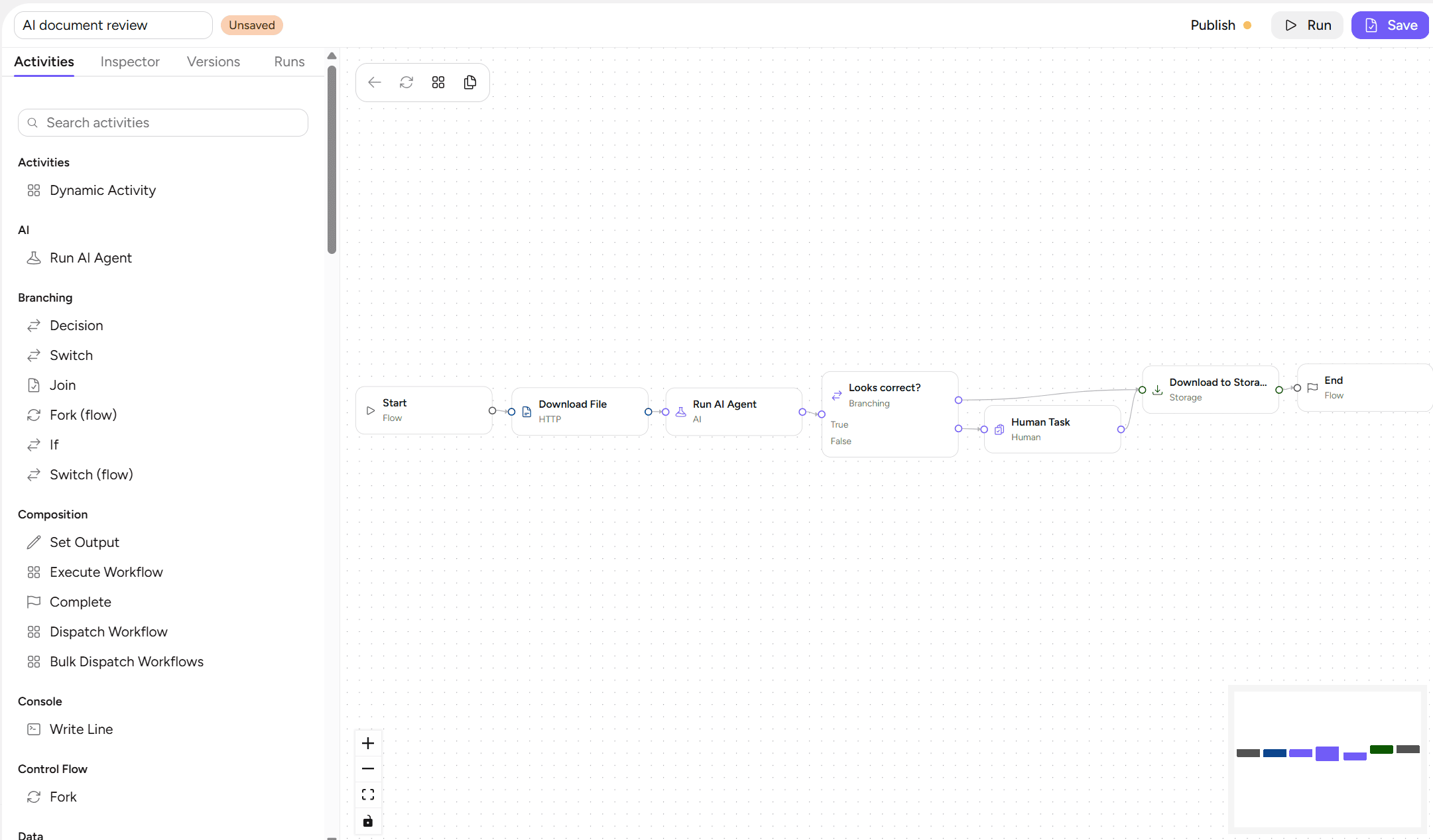
- Start: Kicks off the document review process.
- Download File: A classic automation step that takes a document from a given URL.
- Run AI Agent: Here an AI agent checks the document for consistency; this is the agentic step where the model reads and evaluates content.
- Looks correct? (+Decision): The AI agent’s output is routed into a branch, so a human only gets involved when the AI is uncertain or flags a problem.
- Human Task: If the AI’s check fails, the document is sent for manual review.
- Download to Storage: Once approved (either by the AI or by a human), the file is saved to secure storage.
- End: Process is completed.
Data Extraction
These are two different ways for what a workflow for extracting data may look like. First, a simple data extraction automation without needing AI resources:
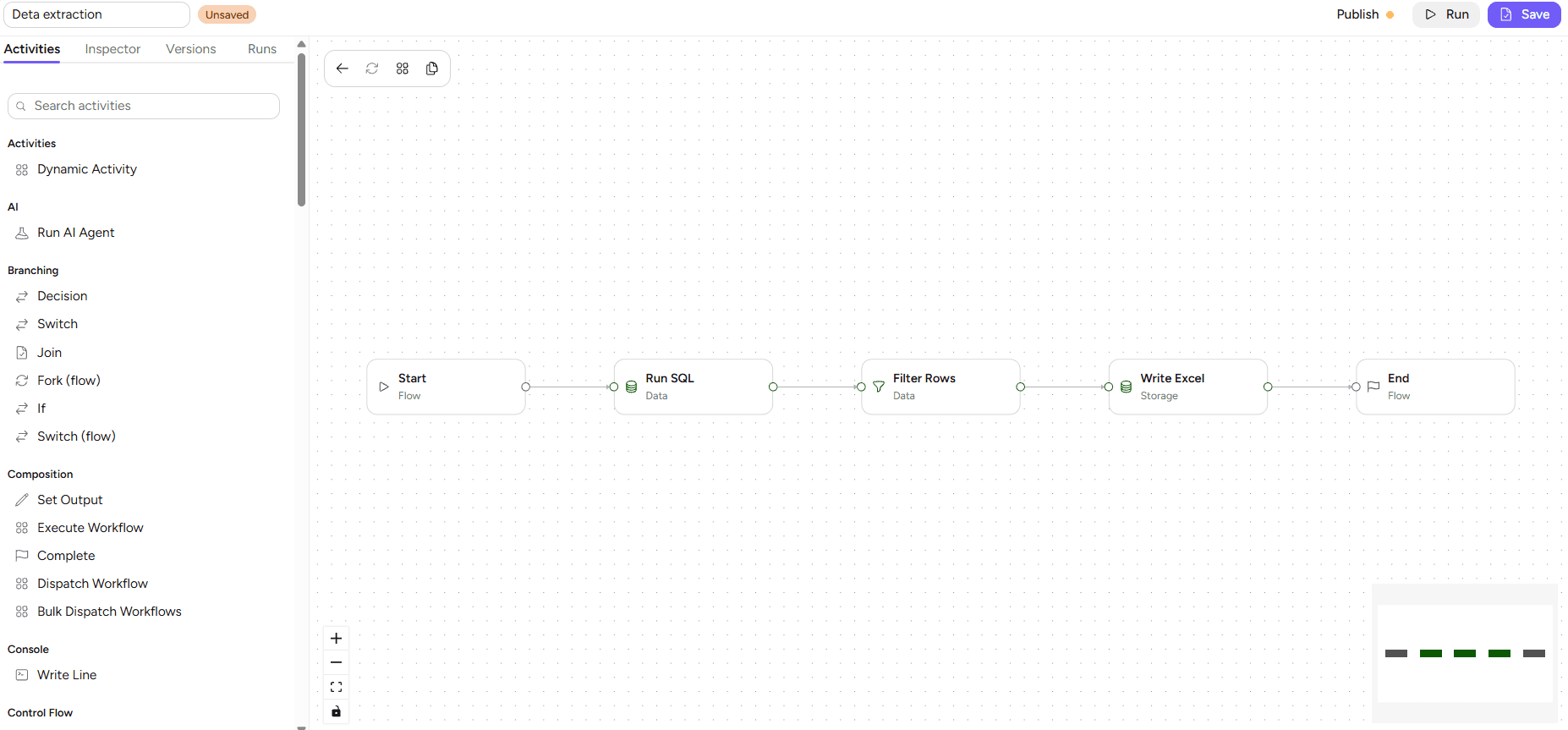
- Start: Kicks off the data extraction process.
- Run SQL: Queries the connected database and pulls out the records to extract.
- Filter Rows: Keeps only the rows that match the pre-set conditions.
- Write Excel: Saves the extracted rows into an Excel file in your storage.
- End: Process is completed.
Second, a slightly different data extraction workflow with an AI agent:
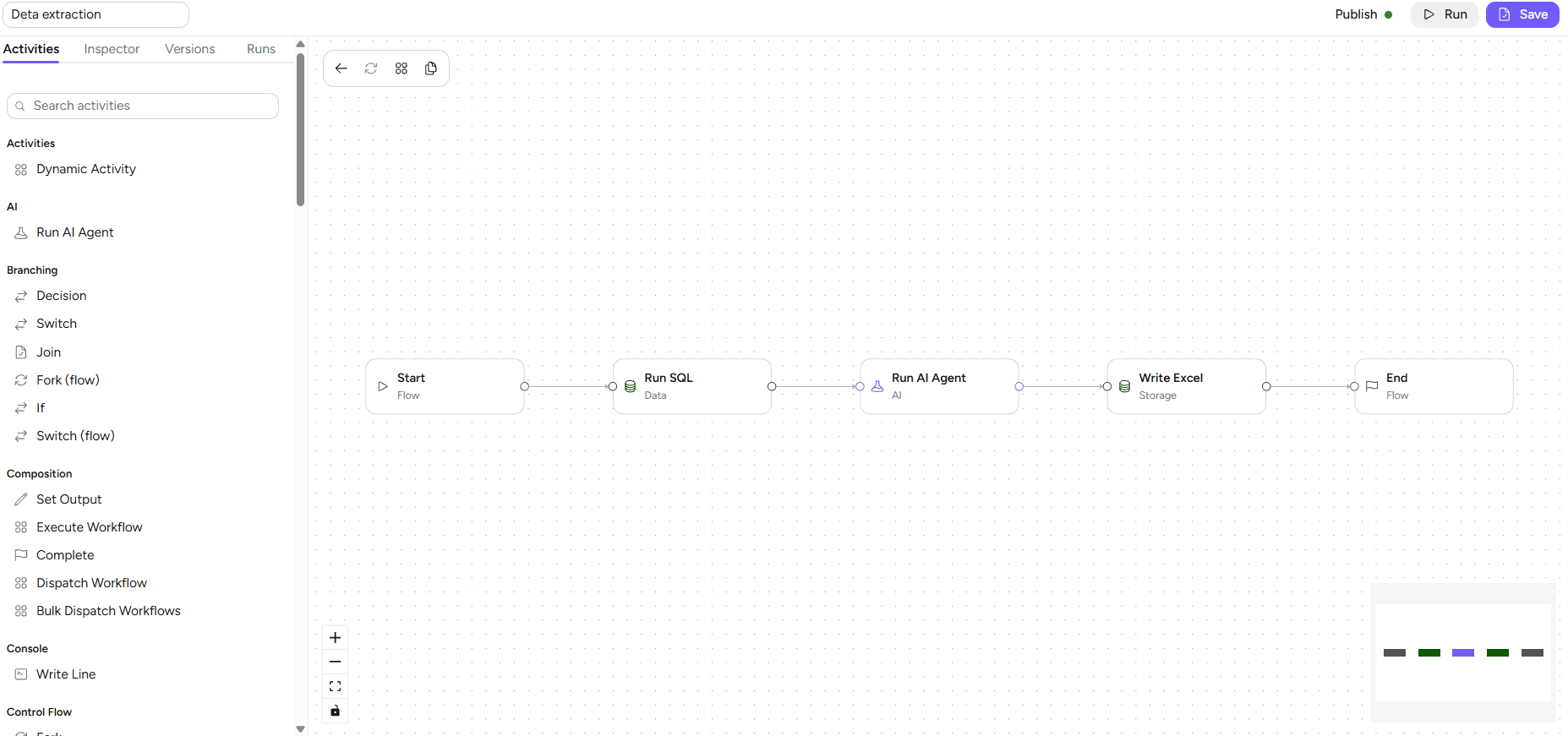
- Start: Kicks off the data extraction process.
- Run SQL: Queries the connected database and pulls out the records to extract.
- Run AI Agent: An AI agent evaluates the queried records and keeps only the data that meets your extraction requirements.
- Write Excel: Saves the finished output into an Excel file in your storage.
- End: Process is completed.
Invoice Processing
This is what a workflow for invoice processing may look like:
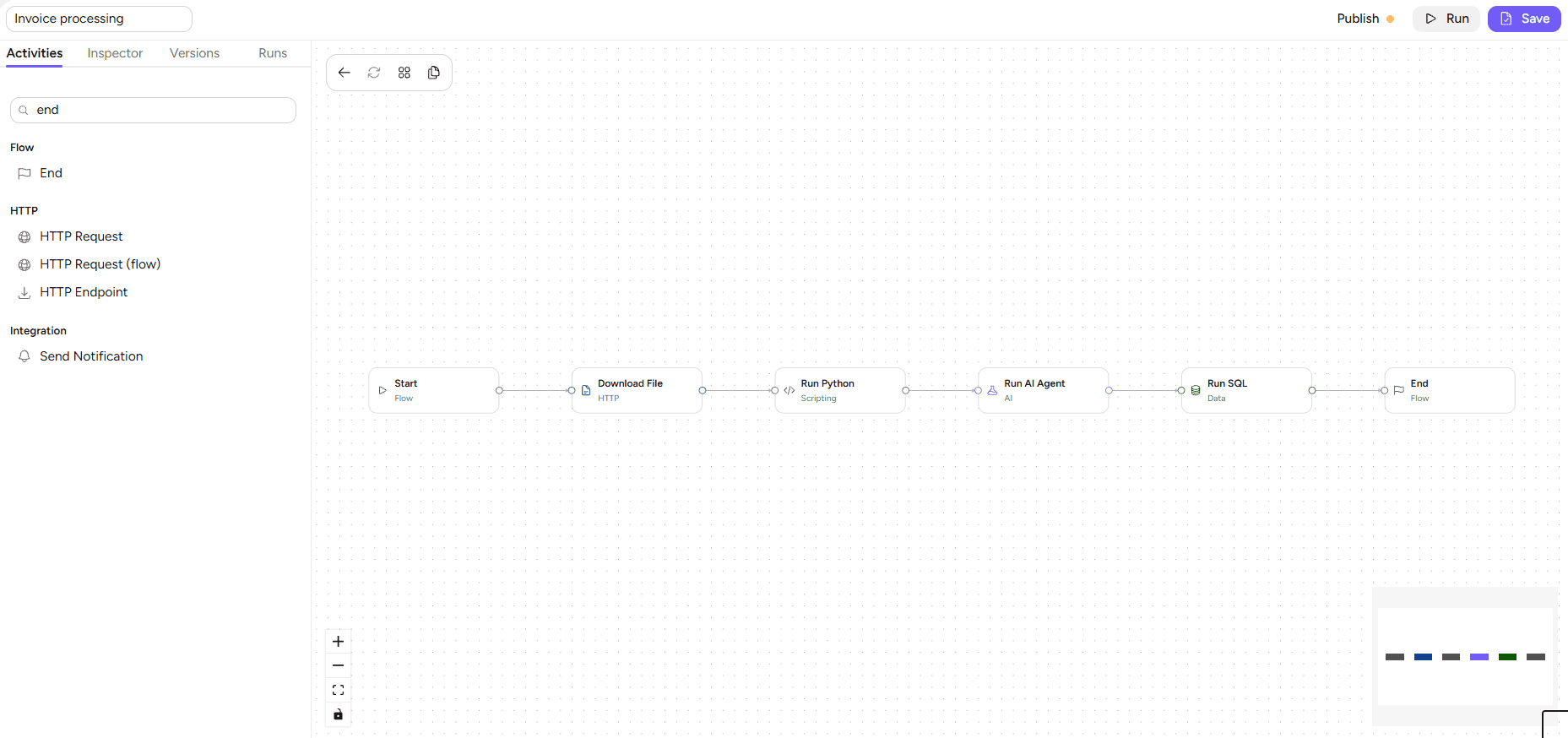
- Start: Kicks off the invoice processing process.
- Download File: An automation step that takes the incoming invoice document from a given URL.
- Run Python: A scripting step that prepares the invoice for AI processing.
- Run AI Agent: Here an AI agent reads the invoice and extracts key details, checking them for consistency.
- Run SQL: The validated invoice data is written to the connected database.
- End: Process is completed.
Data Analysis/Review
This is what a workflow for data analysis and review may look like:
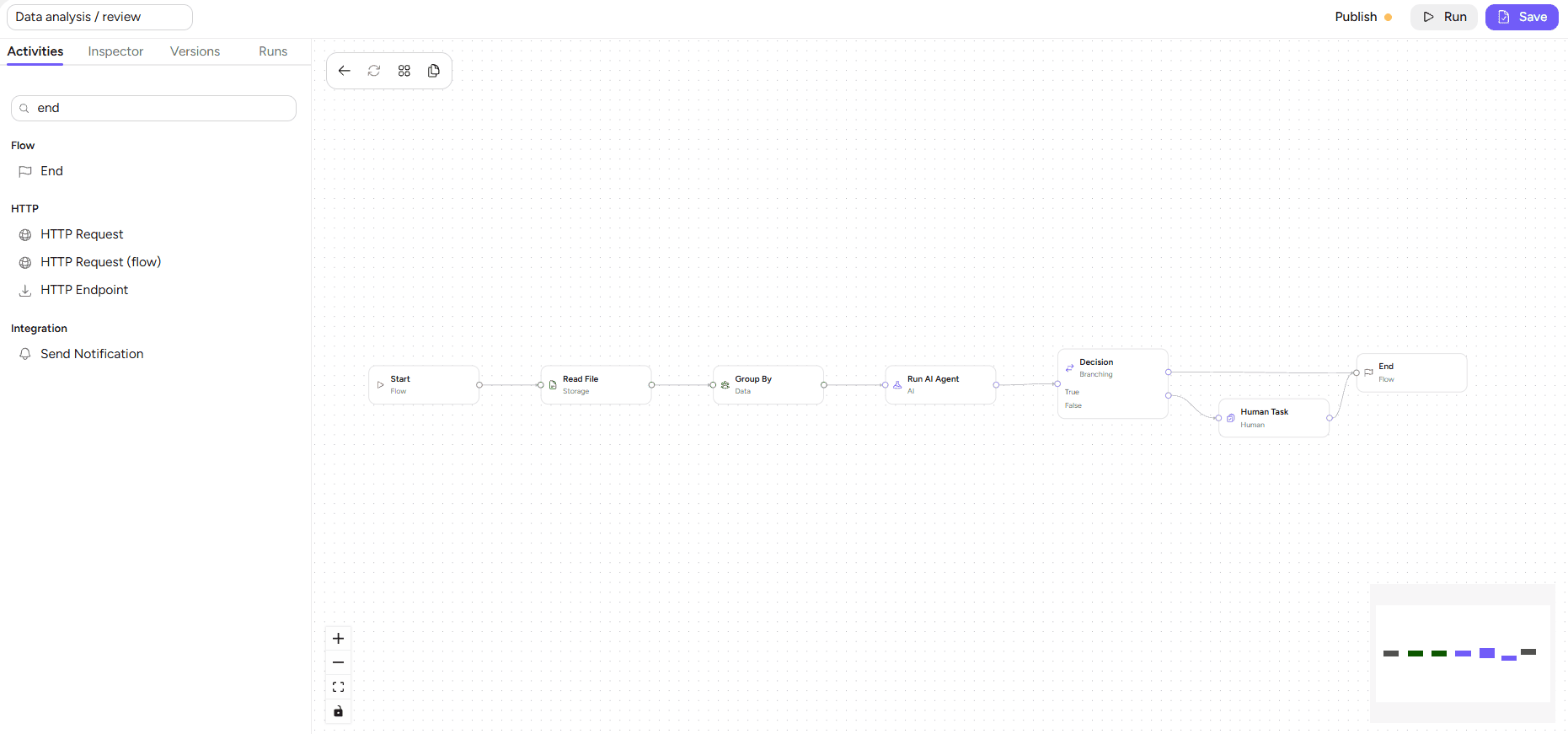
- Start: Kicks off the data analysis/review process.
- Read File: A storage step that reads the data file from your storage.
- Group By: Groups the data rows by the fields needed for the analysis.
- Run AI Agent: Here an AI agent analyzes the grouped data and checks it for accuracy.
- Decision: The AI agent’s output is routed into a branch, so a human only gets involved when the AI is uncertain or flags a problem.
- Human Task: If the AI’s check fails, the analysis is sent for manual review.
- End: Process is completed.
Similar workflow structures apply to any business process. Ajelix Enterprise can automate your business regardless of your field and needs.

How To Build An AI Agent Workflow
With a visual AI agent workflow builder, such as Ajelix Enterprise, the process looks like this:
- Plan the process: write down every step and mark which ones require judgment, which will become agent or human steps.
- Build the backbone: set up triggers, data steps, outputs, audit, and guardrails.
- Add the AI agent step: make sure to give it one specific job with clear instructions and a fixed format for outputs, for example, “check this document for consistency, return it by giving it a pass or fail, with reasoning”.
- Add the decision branch: if the agent is confident, it proceeds, if something is uncertain, it goes to a human for manual review.
- Insert the human task: decide who in your team reviews flagged actions, and what happens after the action.
- Test with real examples: try the workflow with historical documents before you release it to your team, to catch any possible errors.
Start with just one agent in a workflow. Only add more agents and decision options when you are certain the workflow is running accurately.
Benefits Of AI Automation
Here are the benefits of using AI agent workflow tools, reported by companies that use them in their daily operations:
- Humans only handle exceptions: the AI and automation handle everything else, so that employees only spend time on the cases requiring human judgment.
- Reliability that comes with adaptability: the automation backbone ensures the process gets completed even when revision is needed.
- Controlled cost: the agent only runs when its reasoning is adding value, not at every step of the workflow.
- Auditability: every step is logged for audit.
- Scaling without needing more people: once the workflow is designed, it runs no matter how much the volume may grow without involving more and more employees.
How To Handle Common Challenges
Even the best technology has its limitations and challenges, but here’s how to handle them:
- Agent errors and uncertainty. Agents cannot be guaranteed to be 100% accurate, meaning some outputs still benefit from corrections. To help this, build the review step into the workflow from day one.
- Unpredictable costs. Agent steps cost more than automation steps. Make sure to measure the exact value of each running workflow. Cost reporting is available in Ajelix Enterprise.
- Weak governance. Since agents act on your company data, choose a platform where every agent action is logged and possible to reverse.
Choose an AI Agent Workflow Platform
When evaluating AI agent workflow tools, make sure the one you choose includes the following features:
- Visual builder: for non-technical staff to build and edit workflows.
- Agent and rules in one flow: the platform should support automated steps and agent steps together, with decision branches between them.
- Human task handling: flagged items need a clean way of routing to reviewers.
- Integrations: the workflow should access the tools you use and need.
- Governance and audit: every agent action must be logged, every access policy – enforced.
Match your business needs to the best AI agent platforms for workflow automation:
| You need… | Choose |
|---|---|
| A multi-tenant platform to build custom agents and visual agent workflows for your company’s processes, with hash-chained audit logs, spend controls and custom guardrails, isolated code sandboxes and secure inference. | Ajelix Enterprise |
| AI agent workflows that run across the Microsoft 365 ecosystem, with Copilot-assisted flow creation and 1,400+ connectors. | Microsoft Power Automate |
| Governed agentic workflows through a low-code Agent Studio, with AI access via enterprise MCP across 1,200+ connectors. | Workato |
| Agent workflows running at enterprise scale, governed organization-wide by its AI Control Tower and Autonomous Workforce. | ServiceNow |
| Non-technical staff to assemble agent workflows from 9,000+ app integrations, with AI-powered steps and BYOM (Bring-Your-Own-Model). | Zapier |
| To generate agent workflows conversationally – describe the process, and the platform builds the flow without code. | Stepper |
| Agents any employee can build on a visual canvas, with multi-agent orchestration and 250+ hosted MCP servers. | Gumloop |
| Full developer control over agent workflows, with native AI agent nodes, 400+ integrations, and self-hosting. | n8n |
Unsure where to start? Consider Ajelix.
FAQ
A business process where structured automation and AI agents run in one flow. Automation handles fixed steps like routing and storage; the agent handles steps that need judgment, like reading and evaluating content.
RPA follows fixed scripts and breaks when the input isn’t structured. An AI agent workflow uses reasoning at decision points, so it can handle documents, language, and special cases RPA can’t.
Yes. Visual builders like Ajelix Enterprise let you connect automation steps, AI agent steps, decision branches, and human tasks without writing code.
Plan for a share of agent outputs to be reviewed. Industry experience puts well-scoped agents at 85-95% accuracy. Design the flow so humans only see flagged or uncertain results.
A workflow automation platform should have agentic and rules-based steps running together in the same visual flow – an AI agent step that reads and decides, a decision branch that routes its output, and a human task for exceptions. Ajelix Enterprise is built around this pattern, with custom agents, a RAG knowledge base, and self-hosted LLM support. The “leading” platform is whichever one fits your stack and lets non-technical staff build and maintain the flows.
Multiple agents, each meant for one job, working through a shared flow. For example, one extracts data, another validates it, and a third drafts an output document. Orchestration decides which agent runs when.
Agentic AI chat that helps you complete projects
AI for work that ingests, transforms, and delivers the exact deliverables your team needs, while you stay focused on strategy. No more chatting, agents can get the job done.