Best AI Workflow Automation Tools of 2026 (Reviewed By Our Team)

Most teams have tried at least one workflow automation tool, then quietly stopped using it because it needed more maintenance than the work it replaced. AI changed that, but, in most cases, only for the tools built around it from day one.
I reviewed the leading platforms across five criteria to help you decide what are the best AI workflow automation tools and whether you’d trust them to run a real business workflow without holding its metaphorical hand every step of the way.
What Are AI Workflow Automation Tools
An AI workflow automation tool is capable of connecting the apps, data sources and processes your company uses, then uses the autonomous qualities of AI technology to carry out the tasks that used to require human involvement.
Let’s take invoice processing as an example. The AI workflow automation tool would:
- Retrieve an incoming invoice from whichever platform it gets sent in.
- Identify the invoice as what it is and route it accordingly.
- Extract the needed information from the invoice.
- Validate it.
- If everything is correct, post it where necessary. Or, if something doesn’t match, send it to a human for manual review.
- Queue the invoice for payment, and store the full audit of the workflow execution.
The difference between traditional automation and AI-powered one is that the latter is capable of “deciding”. Tools without AI followed strict, predefined rules and weren’t able to adapt to anything new or unexpected. AI tools are capable of navigating unfamiliar circumstances due to their autonomy. They adapt, whereas non-AI workflow tools would break.
What Makes A Tool “The Best”: My Evaluation Criteria
The best AI workflow automation tools are built to be AI-native. Meaning, the AI aspect isn’t an add-on, but how the platform thinks.
To make comparing tools more fair, I evaluated them based on the five following criteria:
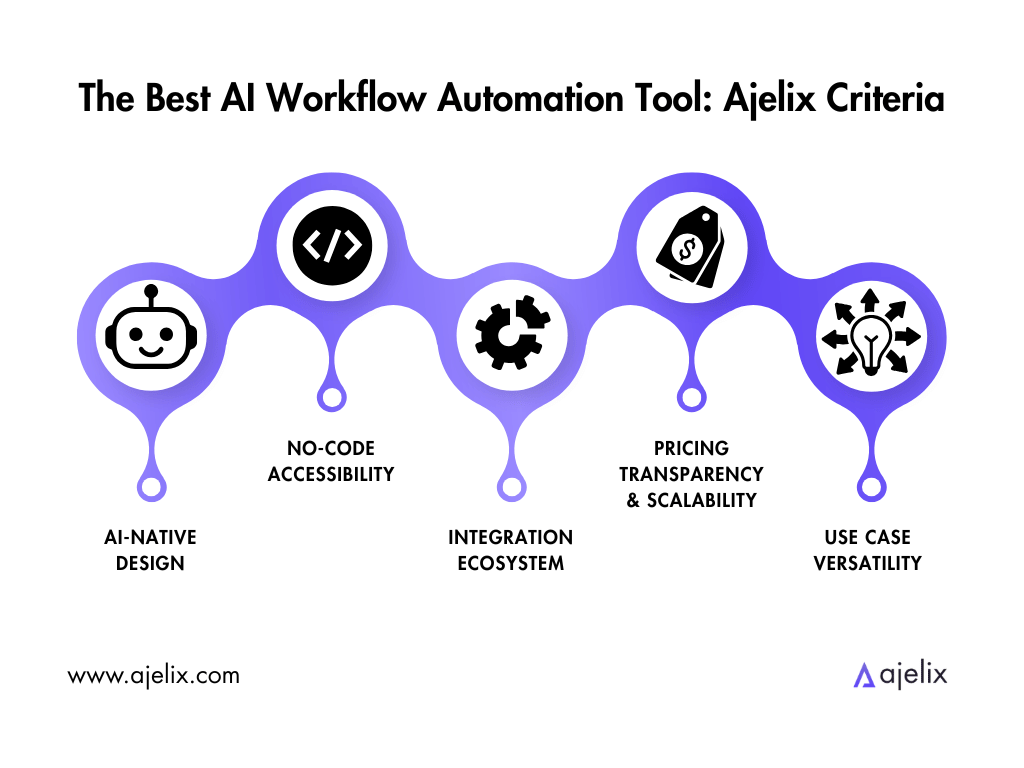
- AI-Native Design: Is AI built into the platform’s core, or is it an added feature? Tools built with AI from the start are better at adapting, and also make the setup and AI connection easier.
- No-Code Accessibility: Can a non-technical user build and maintain workflows without needing to use code? Platforms that require technical expertise are not accessible to the majority of business users.
- Integration Ecosystem: How many apps and services can the platform connect to, and how difficult is that process? A tool can have thousands of integration options, but if the set-up is complex, a tool with less integrations but a universal connector would be more accessible.
- Pricing Transparency & Scalability: Does the pricing model stay predictable as your workflow volume grows? Pricing models that are based on a flat-rate, execution and credits that don’t expire score higher than those who charge per task.
- Use Case Versatility: Can the platform handle workflows across different industries and functions, including regulated industries, such as AI workflow automation tools for medical office or legal workflow automation? The best tools adapt rather than locking you in one niche.
My core question is: would a company I work for implement this into our processes?
The 4 Best AI Workflow Automation Tools Now
Here is the Top AI Workflow Automation Tools comparison at a Glance:
| Platform | Best For | Key Features | Pricing Model |
|---|---|---|---|
| Ajelix | Use Case Versatility, Transparency and Scalability, AI-Native Design | Offers self-hosted LLMs Custom agents and connectors for enterprise workflows Knowledge base trained on your company documentation Custom workflow designer Granular Role-Based Access Control, full audit trail and reasoning logs | Free trial; Lite $39/mo; Pro $99/mo; Max $199/mo; Advanced AI Workflow automation available in custom-priced enterprise contract |
| Stepper | AI-Native Design, Pricing Transparency and Scalability, No-Code Accessibility | Conversational AI editor Reusable modular components across unlimited workflows Skill Sets that work with Claude, Cursor and any MCP client Build-Your-Own API keys plus built-in AI, email and SMS services | Free (200 steps/mo). Pro $19/mo (unlimited steps under fair use, credits never expire). Team plan coming soon. |
| Gumloop | AI-Native Design, No-Code Accessibility, Integration Ecosystem | AI-first visual canvas with pre-built nodes for scraping, summarization and content generation MCP server hosting – any MCP-compatible agent plugs into your workflows Built-in agents with reflections, skills and artifact generation | Free 5K credits/mo. Pro $37/mo (unlimited seats, 20K+ credits). Enterprise custom. |
| n8n | Integration Ecosystem, Pricing Transparency and Scalability, Use Case Versatility | 400+ native integrations with a visual workflow builder Self-hosted Community Edition – source-available, unlimited executions, full source code access | Free self-hosted Community Edition. Cloud from €20/mo Starter (2.5K executions) to €50/mo Pro (10K) to €667/mo Business (40K). Enterprise custom. |
Some immediate insights from the table above:
- All tools offer some sort of a free tier to let you test it first. More advanced workflow automation is available for Ajelix under the Enterprise plan.
- Ajelix offers self-hosted LLMs. This makes it a convenient platform that allows flexibility.
- Both Stepper and Gumloop feature MCP compatibility, meaning AI agents have the ability to communicate across platforms.
The rankings below reflect full-workflow performance, not a single standout feature.
I cover what each one does well, what not so much, and who it’s built for.
1. Ajelix
Who is it built for? Business teams that need finished projects, custom agents and workflows.
- Pros: Native AI connection, connects to any app, the capability of building agent workflows. The first setup is built by the Ajelix team or the IT experts in a company.
- Cons: Run by a smaller team than platforms that are enterprises.
Here is a preview of Ajelix’s workflow engine, as part of their Enterprise plan:
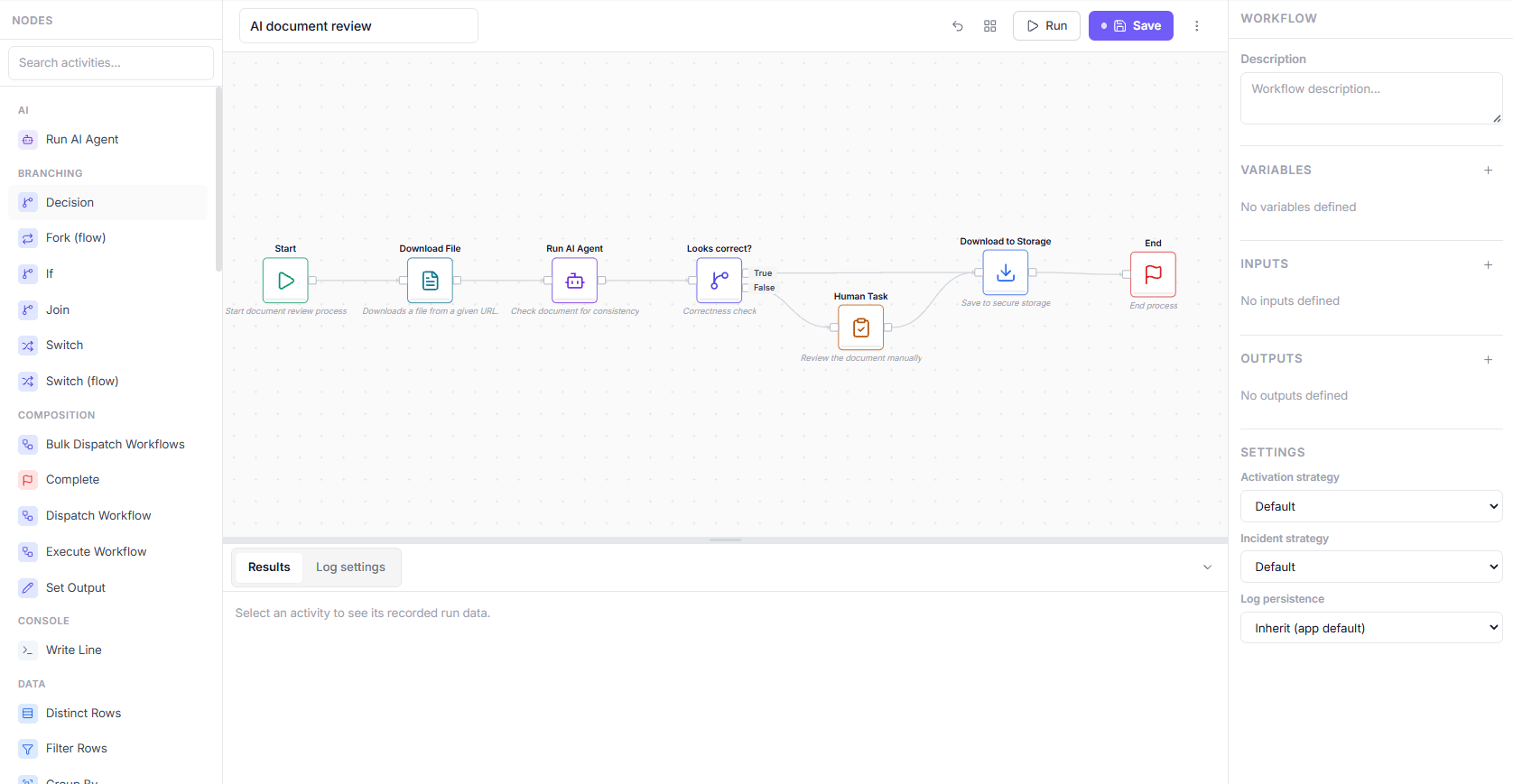
This shows a workflow titled “AI document review”, built in Ajelix’s visual workflow designer. It’s a good example of agentic AI and rules-based automation working in the same flow:
- Start: Kicks off the document review process.
- Download File: A classic automation step that takes a document from a given URL.
- Run AI Agent: Here an AI agent checks the document for consistency; this is the agentic step where the model reads and evaluates content.
- Looks correct? (+Decision): The AI agent’s output is routed into a branch, so a human only gets involved when the AI is uncertain or flags a problem.
- Human Task: If the AI’s check fails, the document is sent for manual review.
- Download to Storage: Once approved (either by the AI or by a human), the file is saved to secure storage.
- End: Process is completed.
Ajelix is the operational layer for enterprise AI. Aside from being an AI-first platform, it stands out for its Use Case Versatility and No-Code Accessibility. Each team has their own predefined workflows that each member of the team can manage as necessary, with minimal manual human review. The scope of these projects are endless – Ajelix works with clients independently to customize workflows tailored to their needs, regardless of the industry.
It offers custom agents and connectors, and a knowledge base (RAG system) trained on your company’s documentation, so that the experience works for your company’s processes and standards. On the security side, granular role-based access controls ensure employees only interact with what their permissions allow, while a full audit trail and reasoning logs make every agent action transparent.
Ajelix also supports self-hosted LLMs, any third-party API, and the entire platform – or selected components of your choice – can be deployed inside the team’s own servers.
Ajelix operates on a transparent custom enterprise contract basis, meaning the pricing is tailored to the team size and scope of the deployment.
If you’re looking for AI workflow automation tools for enterprise, Ajelix could be your fit.

2. Stepper
Who is it built for? Small businesses and operations teams who want AI-native workflow automation without the complexity of legacy platforms.
- Pros: Build workflows through describing what you want, with the AI generating a working first draft. Reusable components let you build logic once and plug it into any workflow.
- Cons: Team collaboration features are still in development. Still a relatively young platform, meaning some advanced features that enterprise teams expect aren’t there yet.
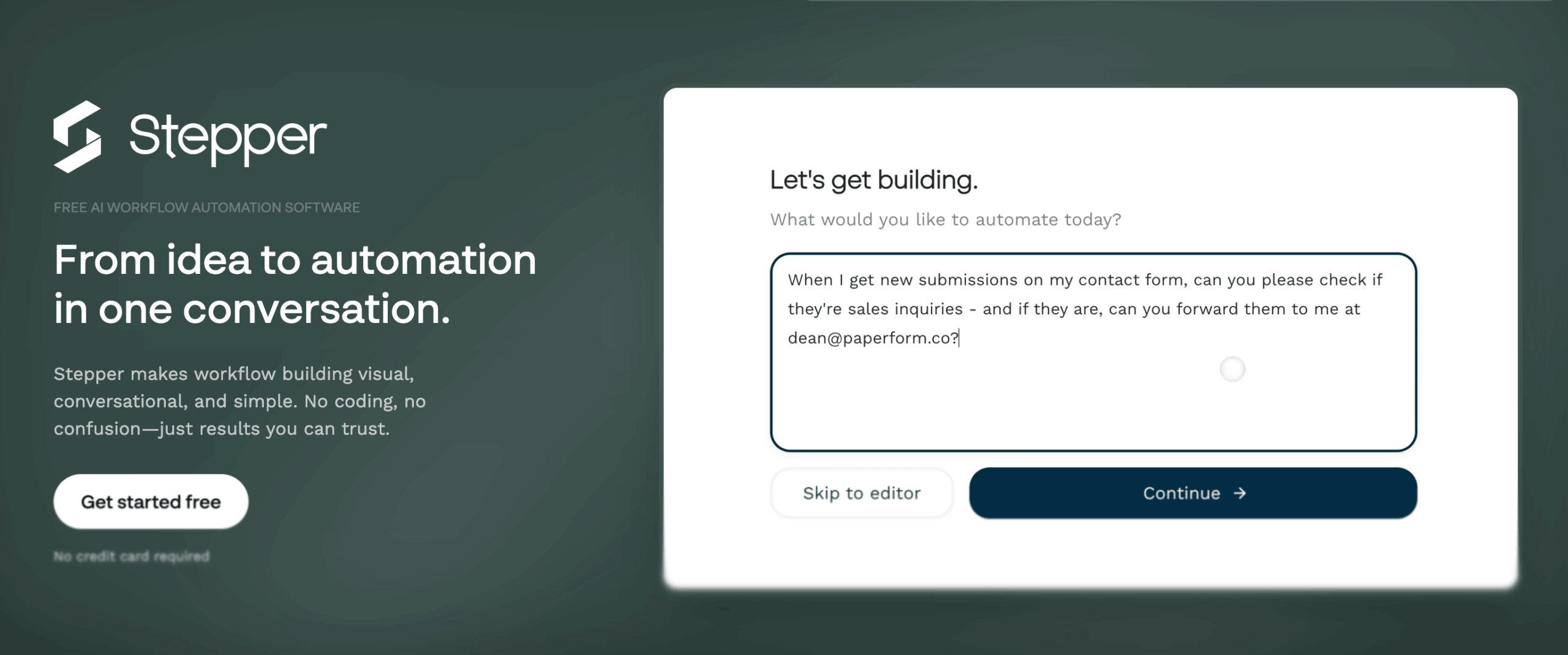
Stepper is an AI-native workflow automation platform that builds workflows conversationally. Instead of manually connecting nodes on a visual canvas, you only need to describe what you want, and Stepper creates the workflow for you. This makes it the best no-code AI workflow automation tool on this list.
Stepper reuses components of the workflows it’s created for you previously and turns them into unlimited ones. It offers MCP Skill Sets, making it work together with any MCP-compatible client, such as Claude. On the integration side, Stepper supports 410+ apps, and the platform offers built-in AI, email, and SMS services alongside a bring-your-own-API-keys model.
Stepper’s self-funded approach allows it to keep pricing lower than its competitors, positioning it as a cost-effective alternative for small to mid-sized businesses that want to automate heavily.
3. Gumloop
Who is it built for? Teams that want to build and deploy AI agents across their organization, with non-technical employees being able to create and launch agents on their own.
- Pros: AI-native platform with deep MCP integration, 250+ hosted MCP servers.
- Cons: Credit-based pricing can become unpredictable for high-volume AI workflows.
Gumloop lets anyone in a company build agents using any AI model or integration, while the company’s IT team handles the centralized control, that way standing out for no-code accessibility. Gumloop’s agents operate as virtual coworkers, with access to tools like Slack, Teams and Gmail, making them feel embedded in your daily workflows.
Gumloop has a visual canvas with pre-built nodes for your agent and workflow building needs. This canvas supports multi-agent orchestration. Gumloop also hosts over 250 MCP servers that work with any MCP-compatible agent, such as Claude and Cursor, without the need for an API key.
The enterprise plan unlocks the full security and privacy measures that aren’t accessible to B2C clients. For pricing, Gumloom uses a credit-based system.
4. n8n
Who is it built for? Developers, technical teams, and IT/ops engineers who want maximum control and data sovereignty.
- Pros: Source-available and self-hostable. 70+ native AI/agent nodes with LangChain support and 400+ integrations, plus a universal HTTP connector.
- Cons: Self-hosting requires Dev and Ops resources and infrastructure management, the learning curve is the highest of the platforms mentioned, and non-technical users will need developer support to build and maintain workflows.
n8n is a source-available, self-hosted workflow automation platform that technical teams choose because they can control and own it. It treats AI as an integral component of workflow automation.
Alongside a universal HTTP node that can connect to virtually any API, it offers 400+ native integrations, local models, and major LLM providers, such as OpenAI, Anthropic and Gemini. n8n’s pricing is based on execution.
This is the hardest tool to navigate for non-technical business users on this list. Developer support is required to use it. n8n is powerful, flexible, and less expensive than the other tools, but only if you have the technical capacity to run it.
Choose The Right AI Workflow Automation Tool For Your Needs
The right AI workflow automation tool depends on your company’s manpower and needs. For that reason, I’ve compiled a list of use cases to help guide your decision.
| “I need finished business projects, while using custom agents, connectors and the AI as an operational layer for my team/enterprise.”→ Ajelix. Any employee can maintain the workflows under their access and in turn receive a finished project, with minimal manual human review. Ajelix works with clients independently to customize workflows tailored to the company’s needs. |
| “I’m a small business that wants to automate processes simply, without hiring a developer.”→ Stepper. Natural language workflow builder, reusable components, and reasonable credit-based pricing makes it the best entry point for SMBs. |
| “My workflows are AI-driven.”→ Gumloop. Built AI-native with impressive LLMs, making it best for teams whose automation wouldn’t exist without AI. |
| “I need maximum control, data sovereignty, and the lowest cost at high volume.”→ n8n. Self-hostable, source-available, execution-based pricing, making it best for technical teams who want to own their automation infrastructure. |
If Ajelix sounds like the right fit for your company, contact us.
FAQ
AI workflow automation tools connect your apps, data sources, and processes, then use AI to carry out tasks that previously required human involvement, for example, retrieving, validating, and routing documents without manual intervention.
Traditional automation follows strict, predefined rules and breaks when something unexpected happens. AI-powered tools can adapt, make decisions, and handle unfamiliar circumstances without human intervention.
Stepper is the best entry point for small businesses, with a conversational AI workflow builder, reusable components, and a $19/month Pro plan.
Ajelix is built for enterprise teams that need custom agents, self-hosted LLMs, role-based access control, full audit trails, and workflows tailored to their industry and processes.
Yes. Stepper and Gumloop are no-code platforms that non-technical users can build and maintain. n8n requires developer knowledge and is the least accessible for non-technical users. Ajelix’s workflows need to be built by devs, but can be maintained and uses by non-technical users.
Yes. Ajelix supports self-hosted LLMs and can be deployed on your own servers. n8n offers a free self-hosted Community Edition with unlimited executions and full source code access.
Pricing ranges from free tiers (Stepper, Gumloop, n8n) to enterprise contracts. Stepper Pro is $19/month, Gumloop Pro is $37/month, n8n Cloud starts at €20/month, and Ajelix offers custom enterprise pricing.
n8n leads with 400+ native integrations plus a universal HTTP connector for any API. Stepper supports 410+ apps, and both Stepper and Gumloop offer MCP compatibility for cross-platform AI agent communication.
Agentic AI chat that helps you complete projects
AI for work that ingests, transforms, and delivers the exact deliverables your team needs, while you stay focused on strategy. No more chatting, agents can get the job done.