Best AI Data Cleaning Tools In 2026 (Tested By Our Team)

People who work with data reportedly spend 80% of their time cleaning and preparing it. AI data cleaning is changing this, letting professionals focus on their analysis, strategy, and relationships instead.
AI tools today are capable of turning messy, inconsistent data sources into cleanly formatted sheets, ready for your analysis.
In this article, I will show you the top tools and practices that could change your workflow immediately.
What Is AI Data Cleaning And How It Works
AI data cleaning is the process of an AI model or tool detecting and correcting errors in your datasets. The AI removes duplicates, intelligently fixes the formatting issues, and flags any anomalies.
For example, if you had data where people referred to New York City as “New York”, “NYC” and “Ny”, the AI would understand that they all refer to the same location and alter the data to a combined, consistent name.
Manually, you would need to enter formula after formula in your Excel or Sheet, relaying specific rules to your data tool.
The core techniques of AI data cleaning are:
- Anomaly detection: AI flags values that are different from expected, such as a negative age or a transaction date in the future;
- Word matching: AI identifies similar records, even with typos or formatting differences;
- Predictive value replacement: Rather than inserting generic placeholders, AI fills missing values by analyzing trends in existing data;
- Automated standardization: AI converts inconsistent formats (“Jan 5”, “01/05/2024”, “5th January”) into unified structures.
AI also improves over time, learning from each correction to handle future requests.
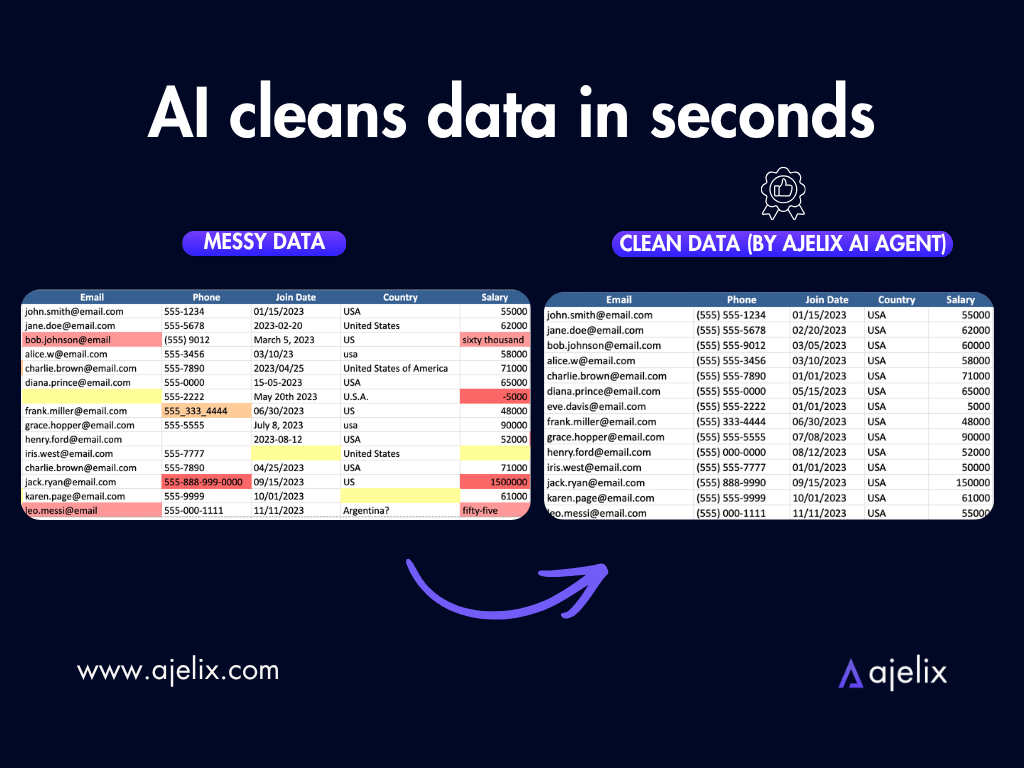
Here is what AI data cleaning looks like in practice, using the Ajelix AI Agent:
Testing Data Cleaning Tools: My Evaluation
I will be testing the tools on my list based on the four following criteria:
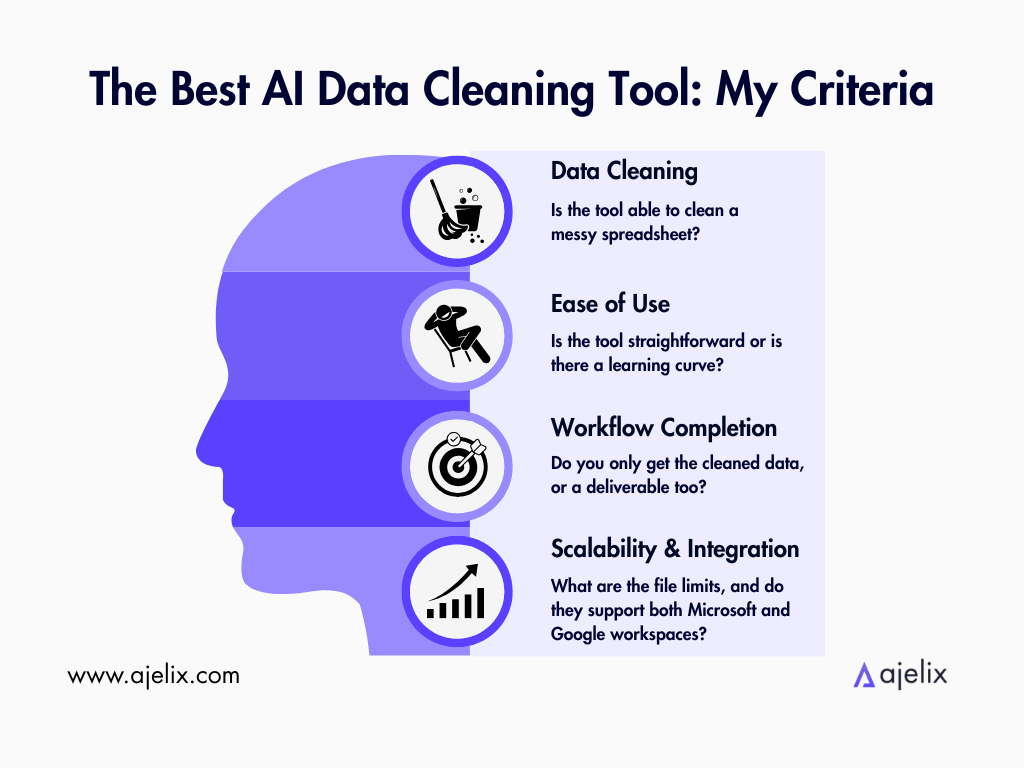
Data Cleaning: Is the tool able to clean a messy spreadsheet? I’m looking for cleanly formatted data, wherein the four core techniques of AI data cleaning are practiced.
Ease of Use: Is the tool straightforward or is there a learning curve? I’m looking for tools that could be accessible by any business expert with no deeper level of technical skills.
Workflow Completion: Do you only get the cleaned data, or a deliverable that you can immediately use? I’m looking for tools that can do both.
Scalability & Integration: What are the file limits, and do they support both Microsoft and Google workspaces? In the long term, the tool should fit all your needs.
Tools I’ll Be Testing At A Glance
I’ll be testing Ajelix, CleanMyExcel.io and Julius AI.
| Feature | Ajelix | CleanMyExcel.io | Julius AI |
|---|---|---|---|
| Pricing | Free trial; paid from $39/mo | Free | Free (15 messages/mo); paid from $20/mo |
| Best For | Business users cleaning spreadsheets, documents, pictures and web data | Quick one-off Excel/CSV cleaning | Data analysis + cleaning combined |
| Supported Formats | Excel, CSV, PDF, Images (OCR), Web data | Excel, CSV | CSV, Excel, JSON, PDF |
| File Size Limit | Free: 2MB; Lite: 20MB; Pro: 100MB; Max: 500MB | ~1MB (browser-based) | Small files only (free tier) |
| Learning Curve | Low | Very Low | Low |
| Integration | Excel add-in, Google Sheets, web interface | Export to Excel/CSV | Database connectors (paid), Slack |
- CleanMyExcel.io is the fastest for one-off Excel cleans, needing no signup or install, but it’s limited to small files.
- Julius AI shows its strength when you need analysis alongside cleaning, but doesn’t do everything in one answer.
- Ajelix covers the most ground with a persistent workspace that remembers your files across sessions and answers multi-step prompts.
Top 3 AI Cleaning Tools (+ Walkthroughs)
To test these tools, I needed a messy CSV/Excel file. Ajelix AI agent is capable of creating sample data, so I asked it to do it for me:
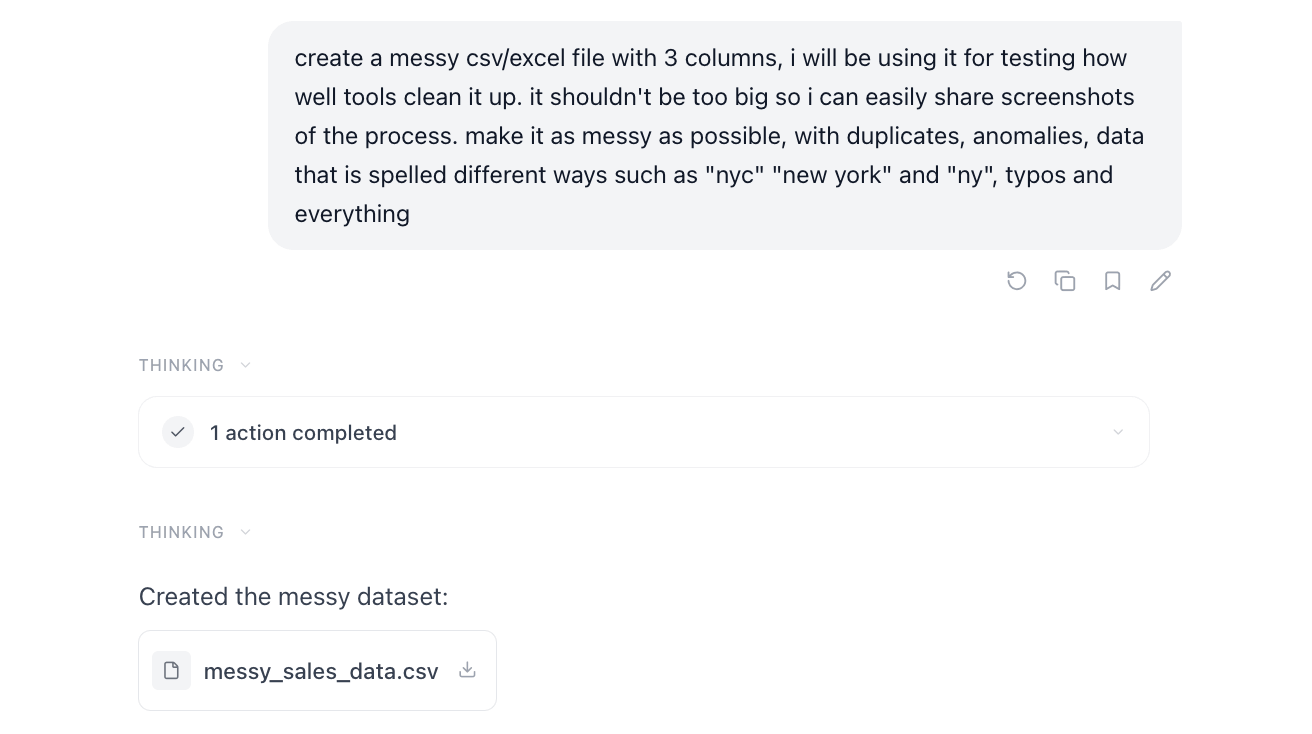
It created a file with duplicates, typos, anomalies and inconsistent formats.
I made sure it was simple for the comparison purposes, so that it’s easier to spot what the AI tools change. In real life, files are a lot messier.
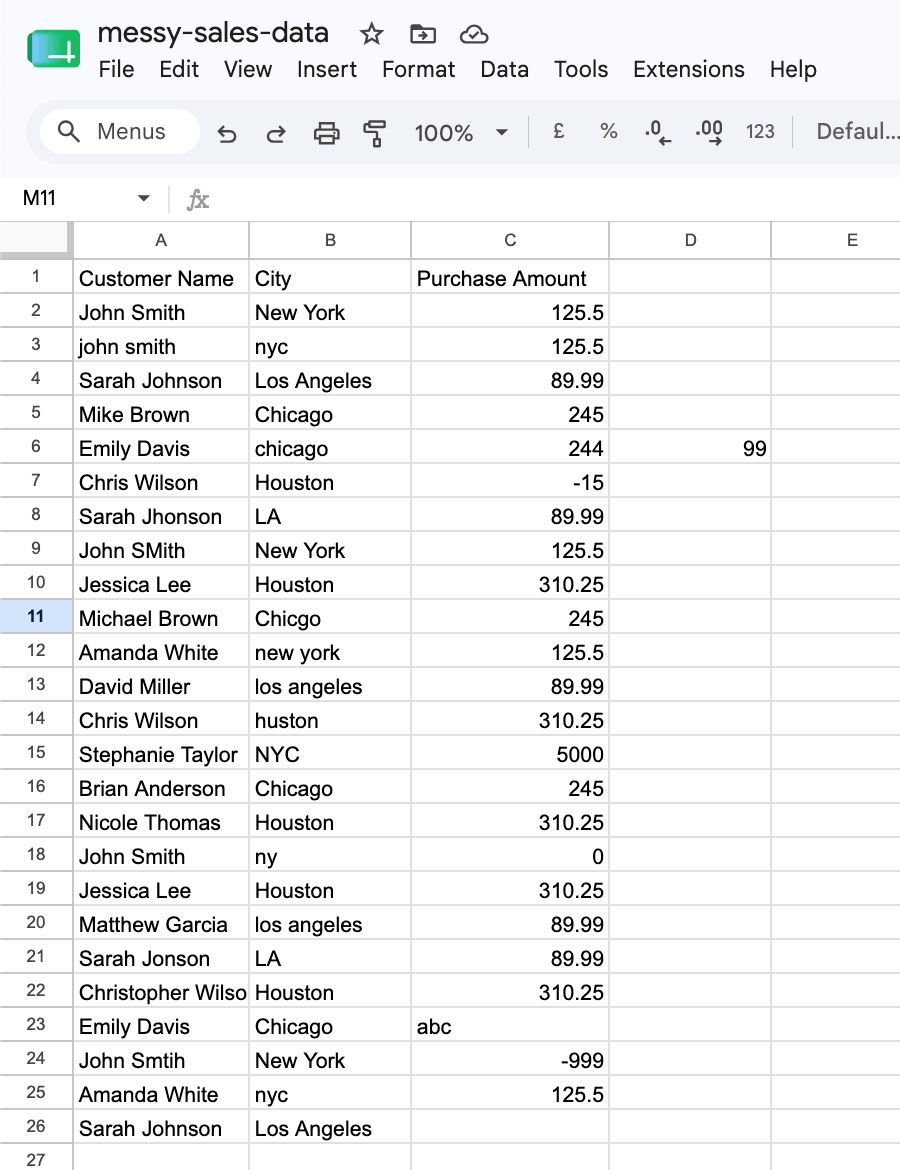
Here is a preview of the file:
Testing Ajelix
To start: Create an Ajelix account – it’s free to use and doesn’t require your card details.
Ease of Use is an immediate plus for Ajelix, as it directs you straight to the workspace as soon as you log in. I uploaded the spreadsheet file and typed in the prompt:
Clean up this messy spreadsheet.
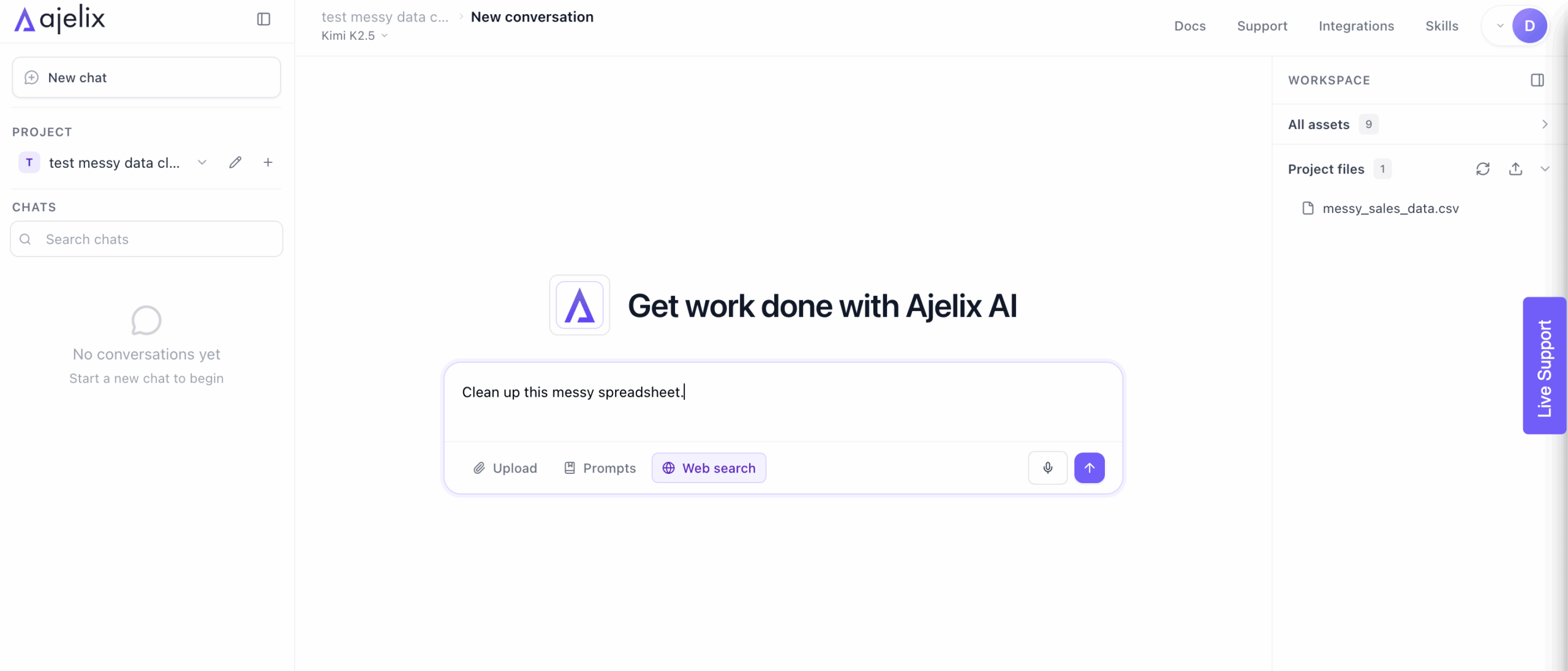
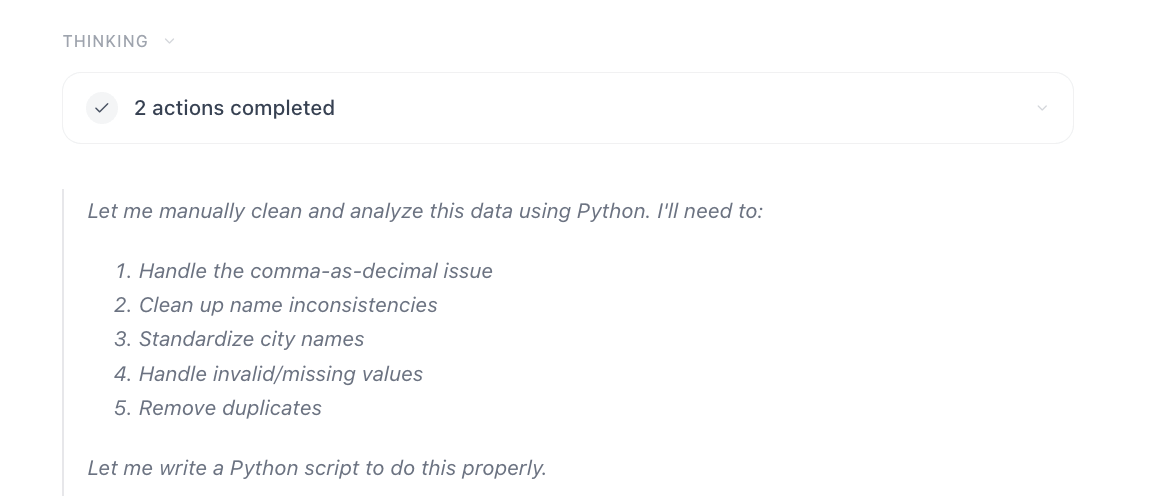
Immediately, the AI agent got to work and I could see it’s thinking:
In a few minutes, Ajelix responded with a summary, key insights and the cleaned CSV file, thus scoring well on Workflow Completion.
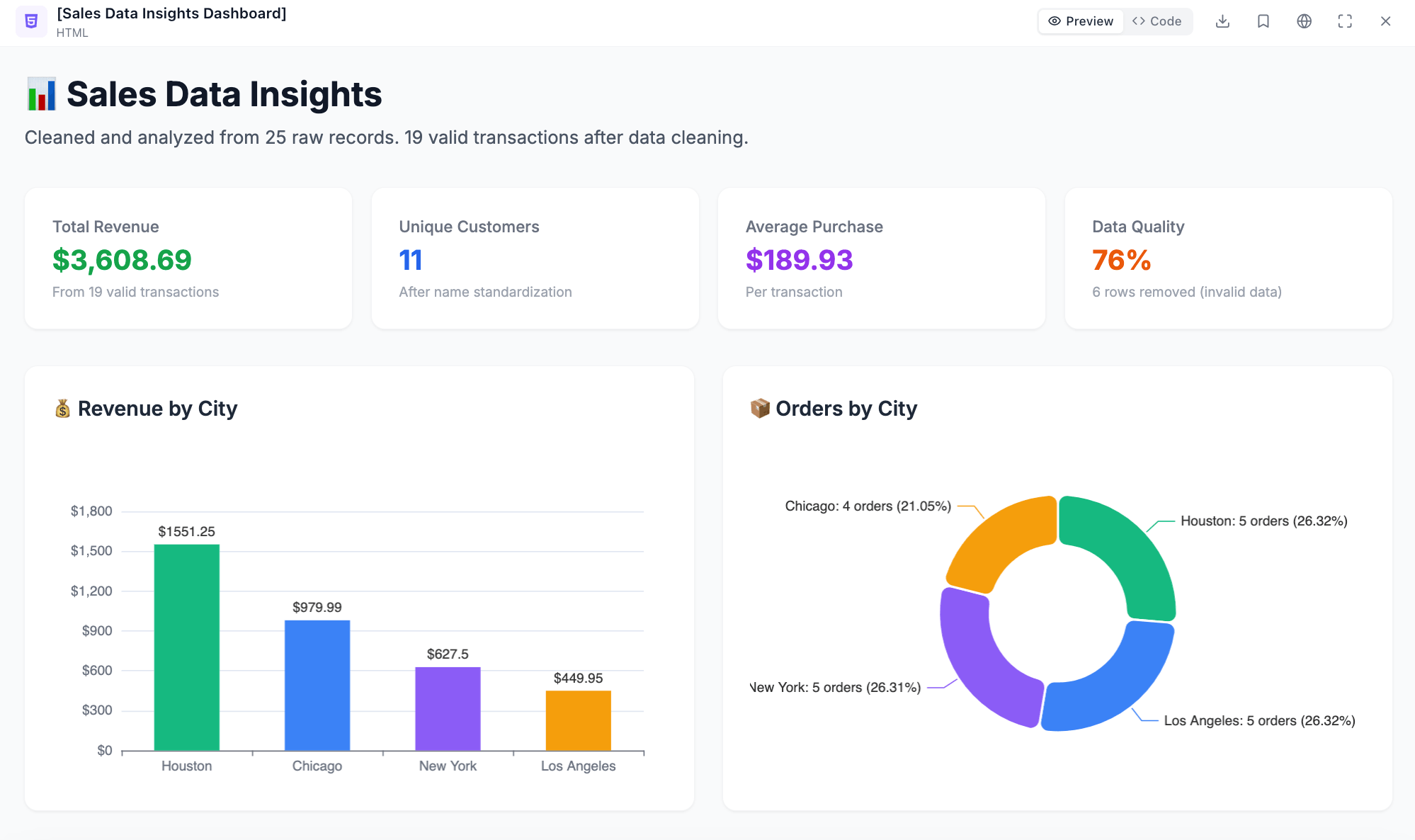
In my original testing prompt, I also asked it to provide me insights on the data and it created a dashboard visualizing the data, alongside the cleaned file. After consulting with my manager, we came to a decision that in real-life workflows, a data expert would first want to verify the cleaned data and ask for visualizations afterward.
Though Ajelix is capable of doing both tasks in one answer, this process isn’t recommended with real data. For the sake of honest testing, I kept the original screenshots, wherein you can see the initially created dashboard.
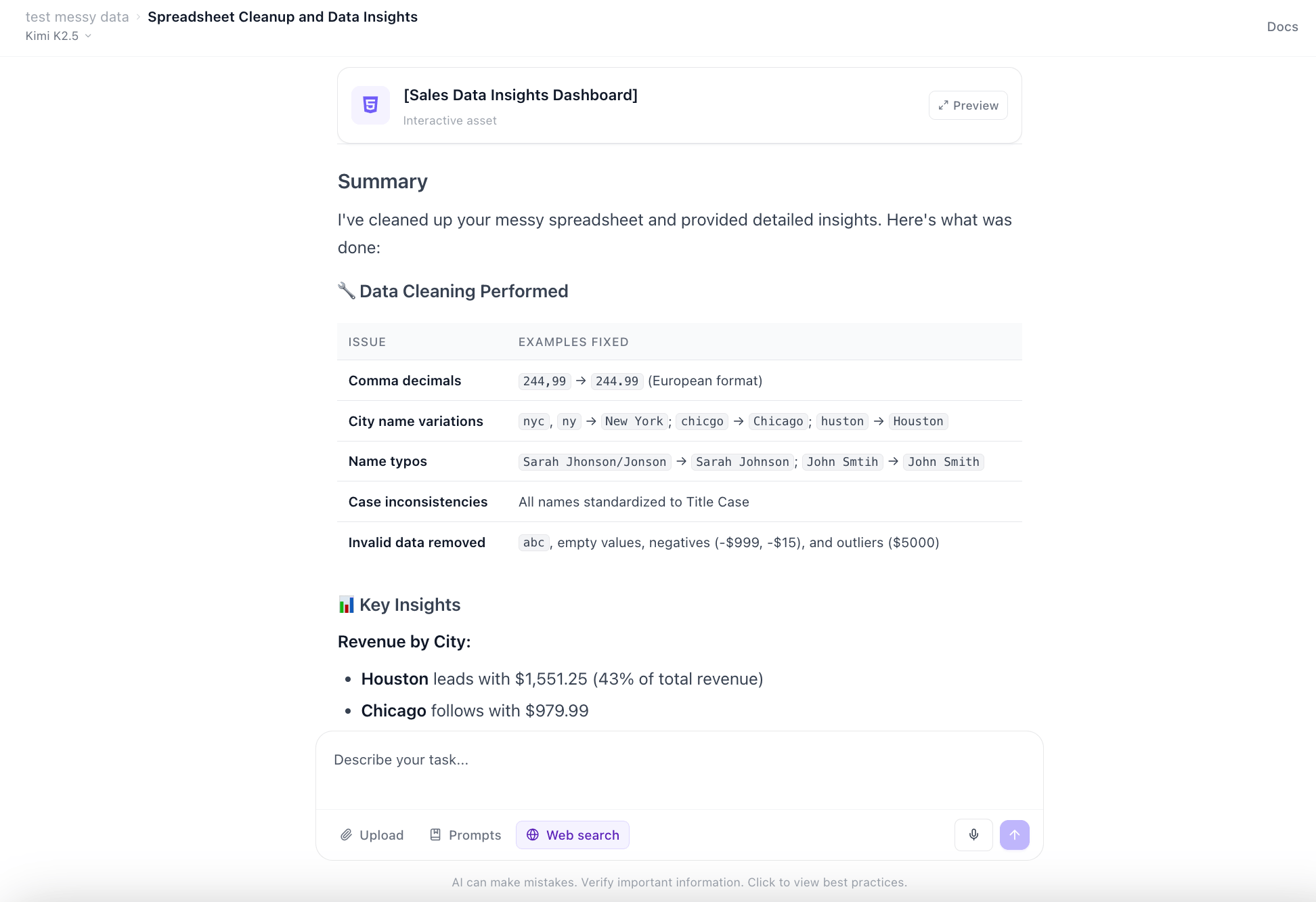
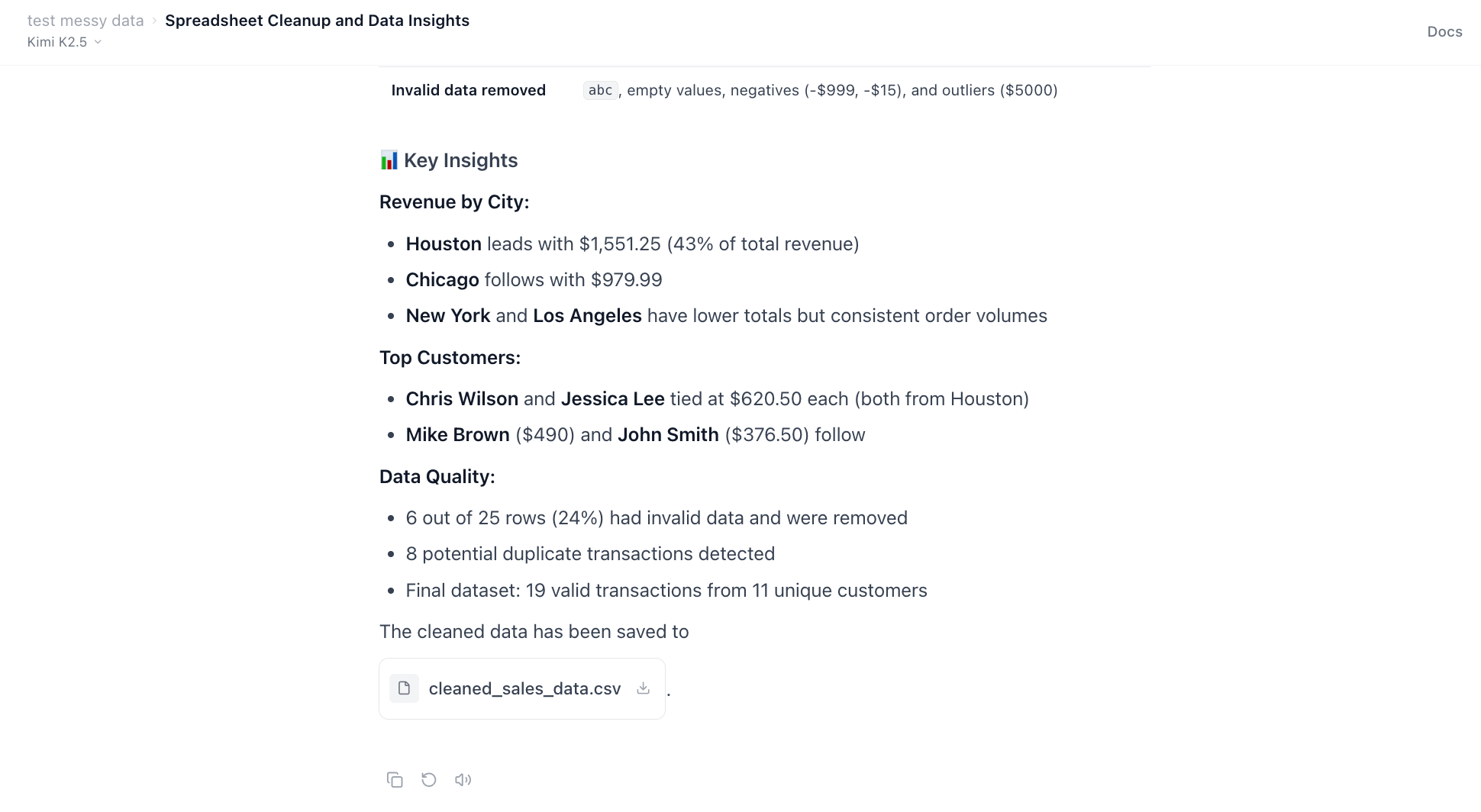
Here is a preview of the dashboard Ajelix created. You can check out the full dashboard here.
And now the most important part: did it clean the data in the CSV? Let’s take a look:
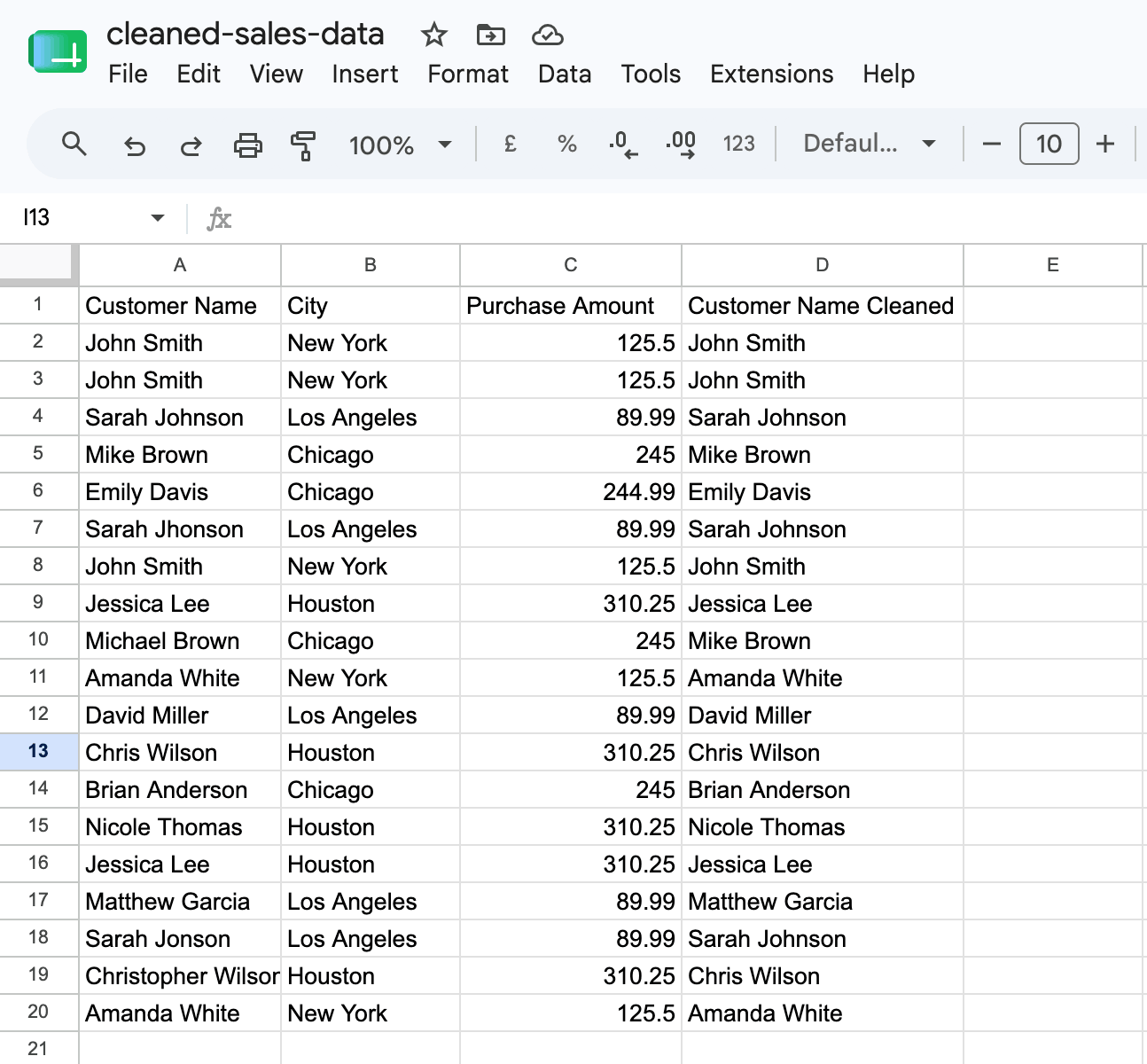
We can see that the city names are standardized, typos are corrected, and invalid/empty values are removed. Though it kept the duplicates just in case these were not mistakes, it let me know that as part of the Data Cleaning Summary:
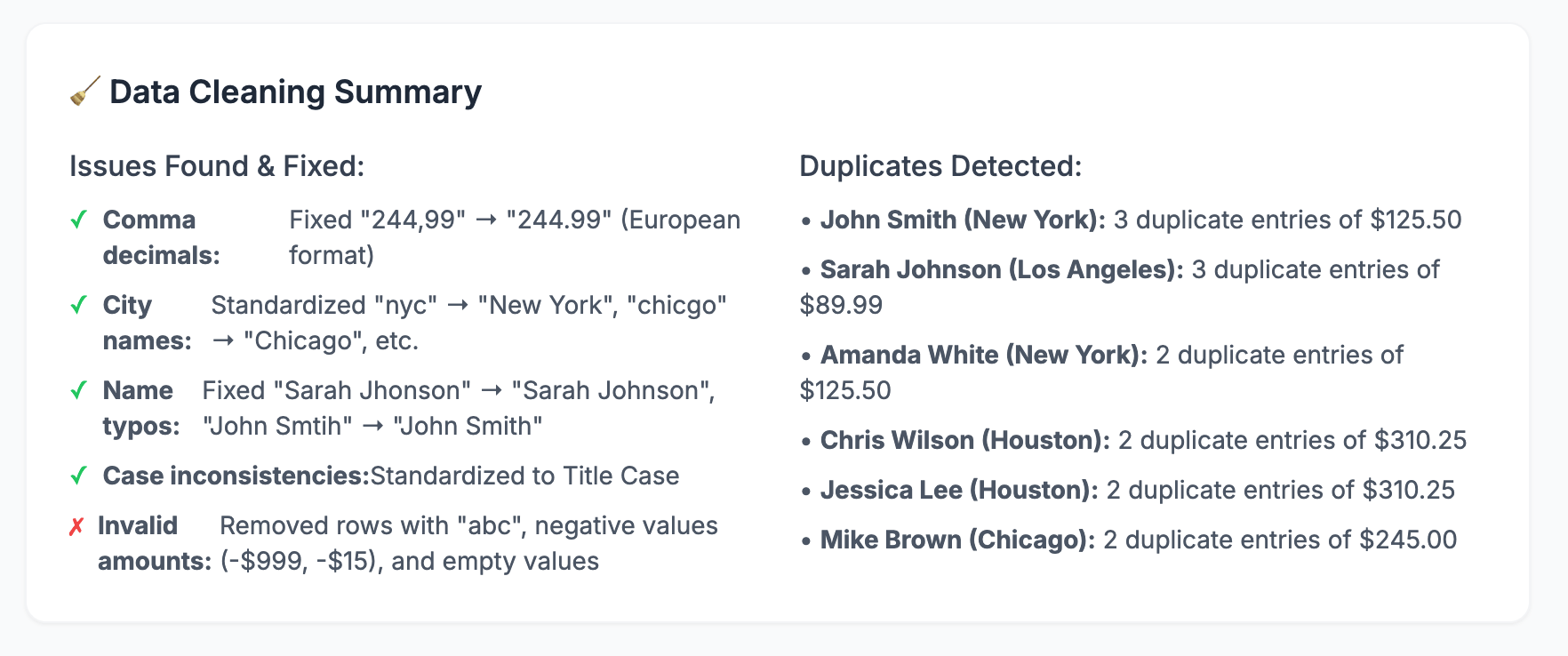
Ajelix cleaned the data successfully and even summarized everything it did, making the process transparent.
As for the Scalability & Integration, the file is in the CSV format and can be used in both Excel and Google Sheets. Ajelix is also available inside the Google Workspace as an add-on.
Overall, Ajelix scores remarkably high across all my criteria.

Testing CleanMyExcel.io
To start: You simply open their website, and upload your Excel file, showcasing perfectly its Ease of Use.
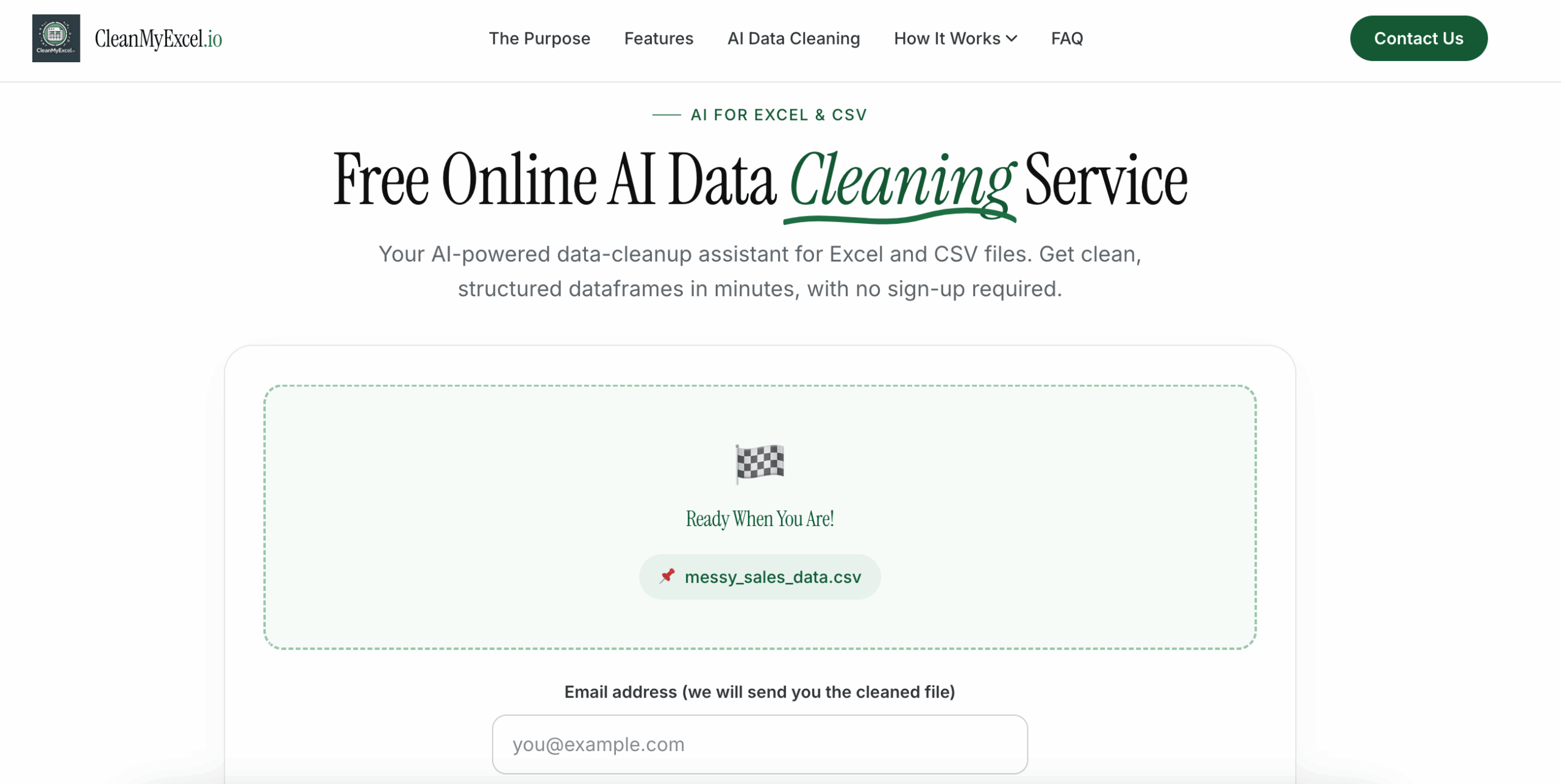
CleanMyExcel sent the file to my email in about a minute. I was surprised at how quick the process was done.
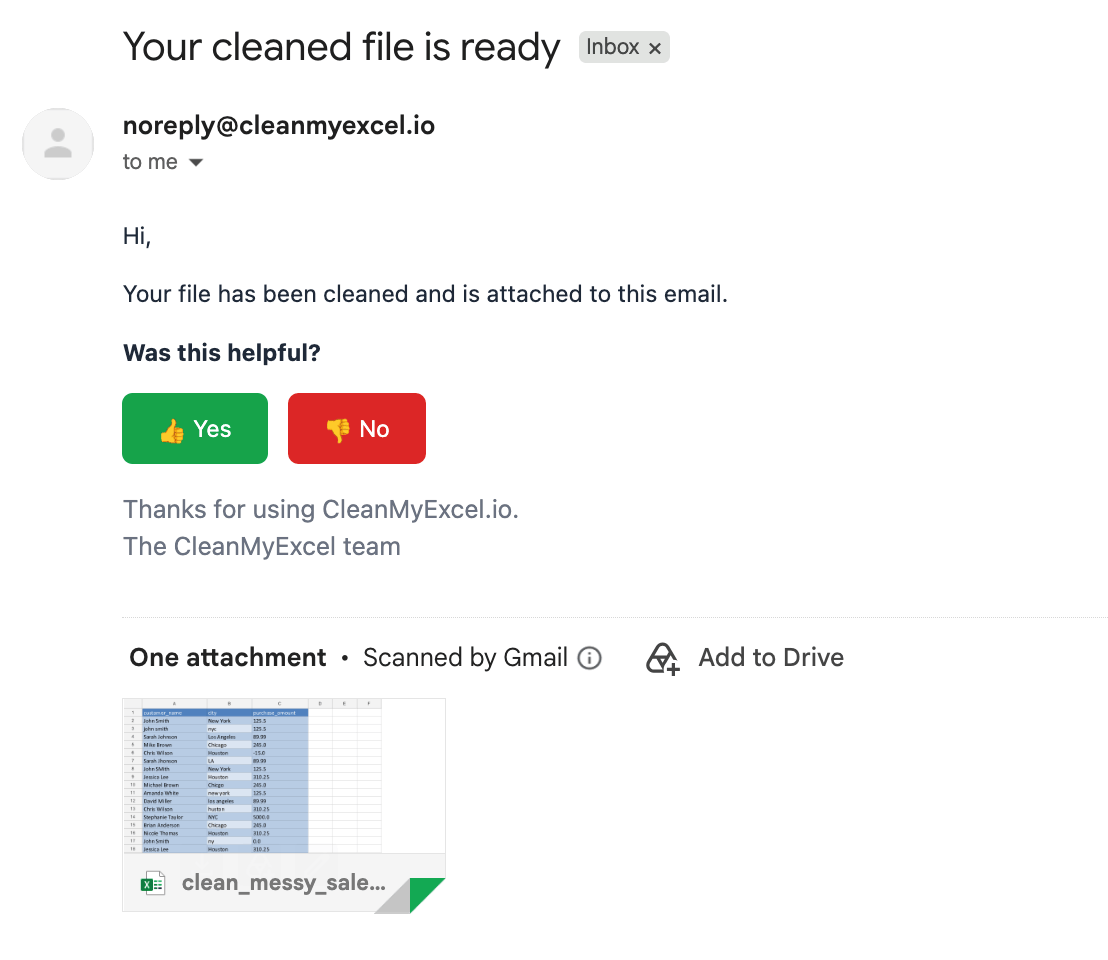
However, when I opened the Excel file, I was less thrilled. Barely anything about the file was cleaned up. The duplicates, typos, incorrect values and inconsistent city names remained.
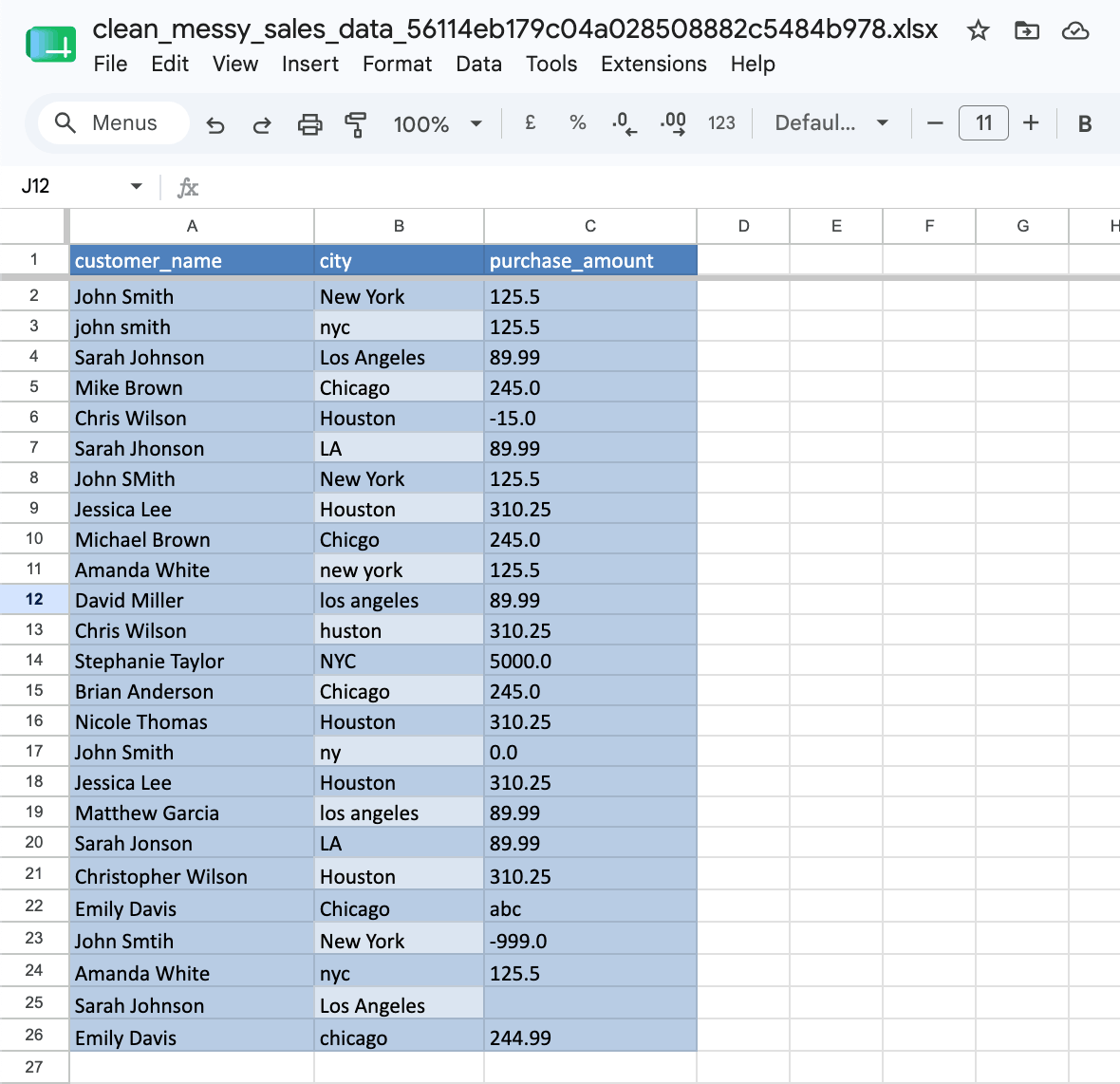
The only thing that changed was the Excel formatting – now colored blue. Some of the names got switched around for reasons I couldn’t identify.
While CleanMyExcel completed the workflow, it did not successfully clean this specific data, which is the main purpose I’m searching for in these tools. It might still be attractive to some as it’s a free, easy-to-use tool, and perhaps it only failed with this specific dataset.
As for Scalability & Integration, the file can be downloaded as an .xlsx and uploaded to both Excel and Google Sheets.
Testing Julius AI
To start: I logged in with my Gmail account. I have tested Julius previously, so no further setup was required. Ease of Use is the same as Ajelix – you create an account and can immediately get to work.
I attached the messy sales data file and entered a prompt.

After a few minutes, Julius responded with a long answer that included:
- What was messy in the original file,
- What it assumed while cleaning,
- Key business insights,
- Top customer takeaway,
- What to pay attention to next.
The message is too long to be shared, but it analyzed the full data alongside cleaning it, thus completing the workflow.
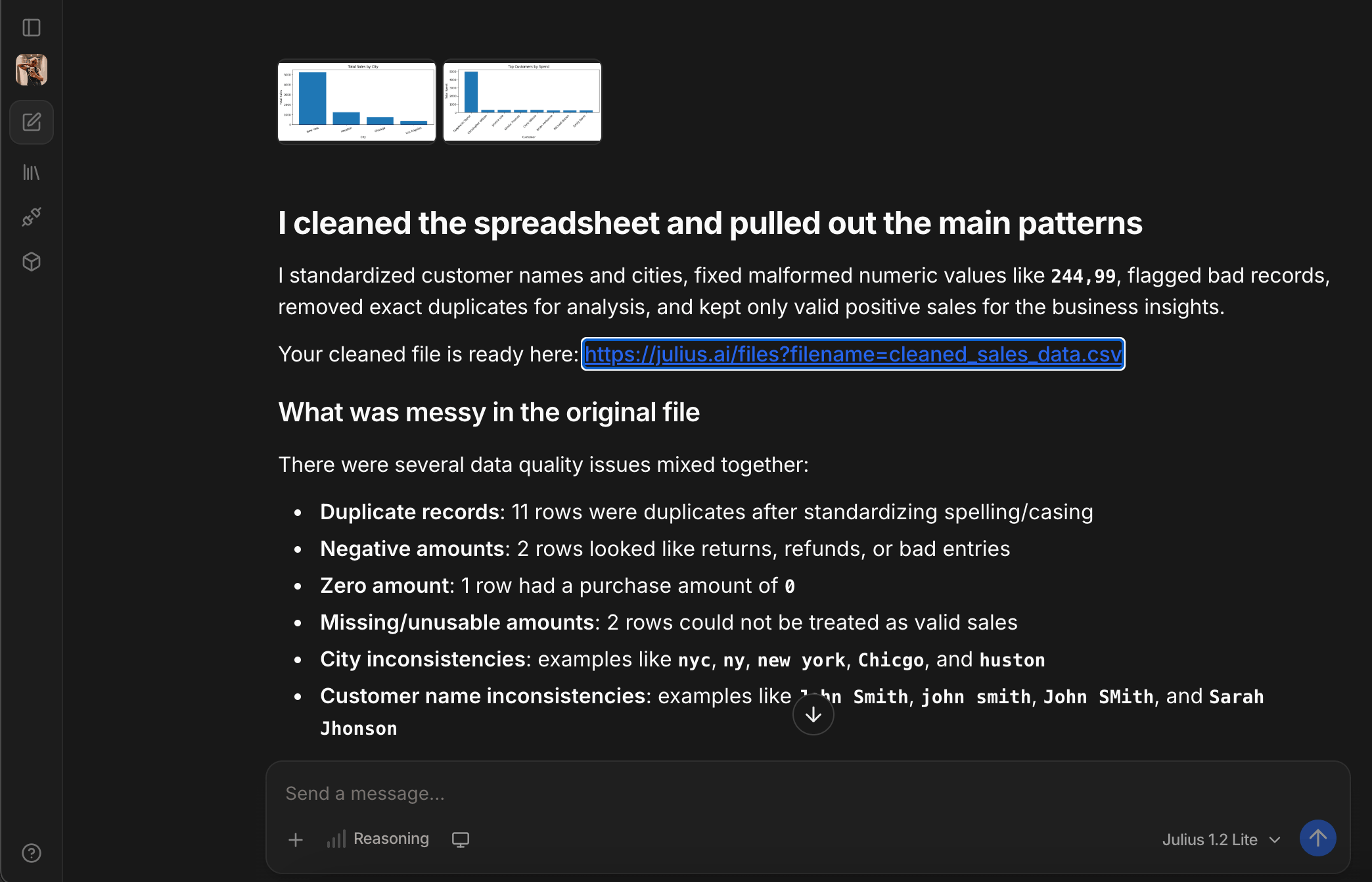
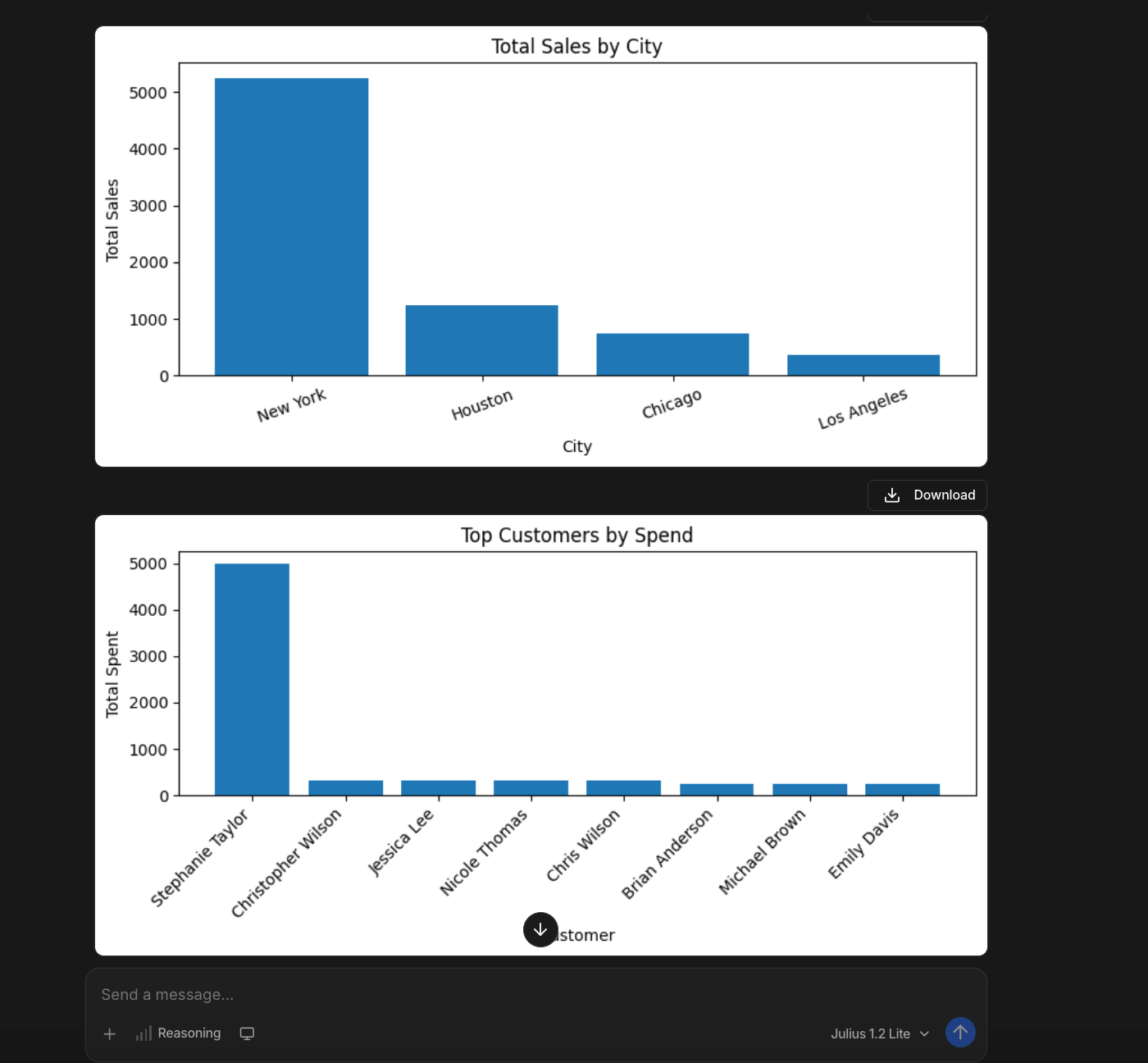
Julius created two graphs with the data analysis. Unlike Ajelix’s, they were in PNG format, not as an interactive dashboard.
It cleaned the data, but made the results a little confusing and overcomplicated, in my opinion. I had to look at it for several minutes to understand the structure and what was changed and removed.
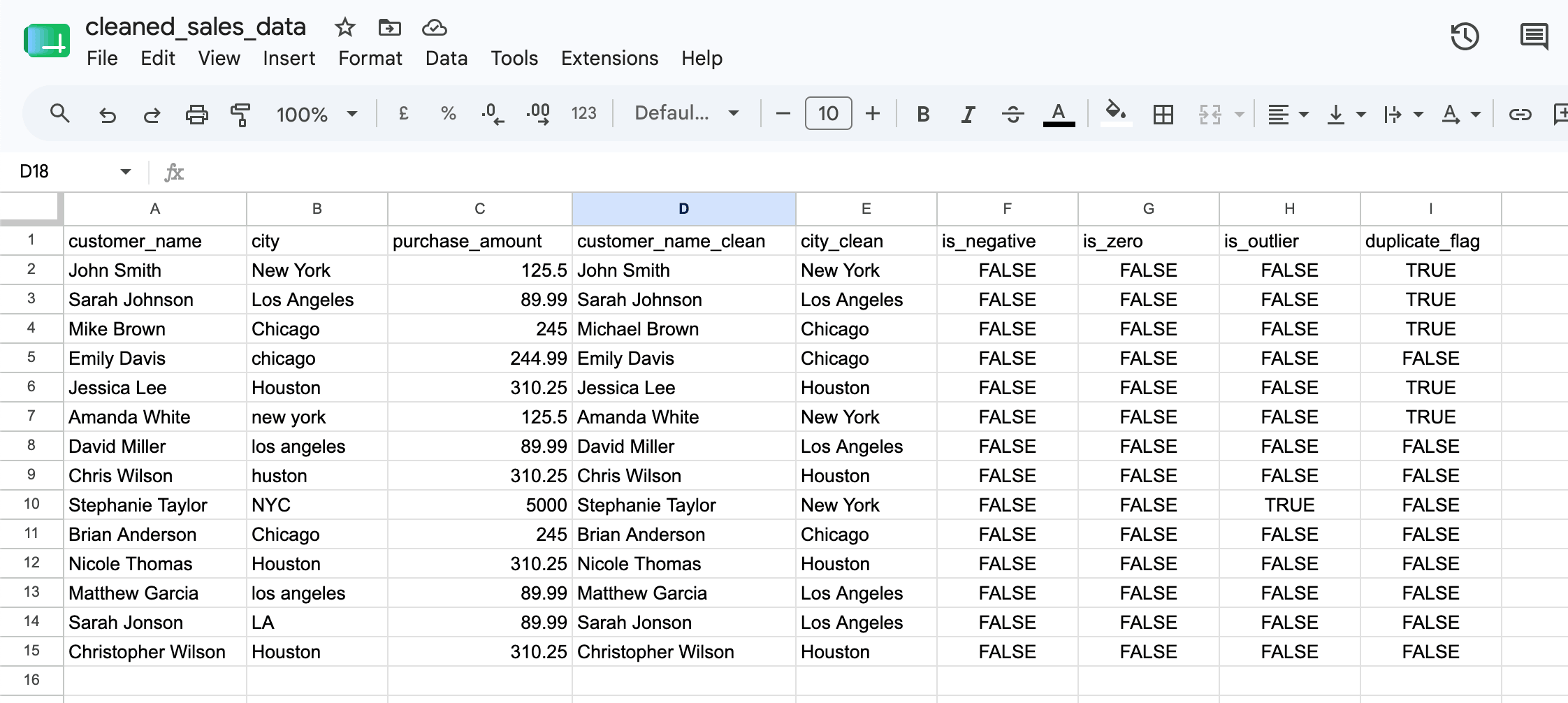
It was possible to download the file as a CSV, meaning it can be uploaded both onto Google Sheets and Excel.
As Ajelix and Julius are both AI agents, their results are pretty similar. It’s up to you to decide what analysis output you’d prefer – an interactive dashboard that Ajelix gave in the first prompt, or the graphs Julius created.
In the testing process, I considered adding OpenRefine to my list of the best cleaning tools – it offers an AI-assisted extension. While OpenRefine is free, it’s an open-source tool, and the learning curve was too extensive for testing purposes.
How Ajelix Cleans Data (With Video)
Before we get into how else AI is able to clean data outside spreadsheets, this is how an Ajelix team member uses our agent to perform data cleaning:
Ajelix is capable of more than just sorting out messy sheets. As an AI agent dedicated to project completion, it can also clean:
- Documents. Upload scanned PDF invoices → AI reads text, understands the table structure, recognizes headers, auto-detects dates, and even catches handwritten notes like “20% discount” and applies them correctly.
- Web Data. Paste competitor URLs → AI extracts, cleans, and structures pricing data, e.g., normalizing “$1,299” and “1299.00 USD” to consistent formats, flagging missing values instead of leaving them blank.
- Images & Screenshots. Upload a photo of a whiteboard, a screenshot of a data table, or a scanned receipt → AI extracts text via OCR, structures it into columns and rows, corrects skewed angles, and converts it into a clean spreadsheet.
OCR is a technology that converts images of text, such as scanned documents, photos of receipts, screenshots, or PDFs, into machine-readable and editable text that you can copy, search, and analyze.
The best part is that Ajelix can do the cleaning and visual analysis in the same response, meaning you don’t need to go back and forth with it.
How Data Analysts Use AI for Data Cleaning (Best Practices)
Data analysts don’t rely on AI tools for judgment – that is still up to the human. But AI can be used to simplify the mundane parts of cleaning. Here are the best practices:
Start With Data Profiling
Before uploading your data into any AI tool, check it yourself. That way you get to identify what needs fixing and understand whether AI made appropriate corrections. Before testing the tools with my dataset, I reviewed it to ensure I know what to expect from AI.
Balance Automation With Human Review
Remember that AI can make mistakes. While it may handle 95% of the cleaning flawlessly, there are still that 5% that it might have gotten wrong. For example, when a tool flags a duplicate, check it to make sure it wasn’t just two customers with the same name.
This is why I appreciated that Ajelix didn’t remove the duplicates from the cleaned data sheet, but simply informed me about them in its written response.
Use Cross-Validation Against Reference Datasets
Before trusting an AI tool with a new cleaning workflow or dataset, run it on a reference set – a file that you know is 100% correctly cleaned. Accuracy is incredibly relevant with data, especially in regulated industries.
Monitor Data Distribution Changes Over Time
If your incoming data starts looking different, you need to tell your AI about it. AI cleaning tools learn from patterns, and it will adjust to the new structure as long as you instruct it to.
This is where AI memory comes in and might work against you, unless you reset your preferences.
With AI, data cleaning can become a 10 minute task, instead of a 10 hour one. You just need to learn how to use it right and what works for your specific workflows.
Choosing The Right Tool For Your Needs
I will sort the tools by AI Data Cleaning use cases:
Quick one-off Excel/CSV cleaning = CleanMyExcel.io
No signup or install needed, results arrive in your email quickly.
Data exploration + instant visualization + statistical analysis = Julius AI
When you need to understand why your data looks the way it does, not just fix formatting issues.
Spreadsheets + dashboard + documents + web data + OCR images = Ajelix
Whether it’s a messy CSV, a scanned PDF invoice, a screenshot of a data table, or competitor pricing from a website, Ajelix delivers a finished project in one response.
Simple data cleaning only = CleanMyExcel.io
Having no learning curve, commitment or cost, it’s ideal for non-technical users who just need, for example, basic duplicates removed and formatting fixed.
End-to-end business workflows = Ajelix
The workspace remembers your files, connects to both Google Workspace and Microsoft Office, and creates deliverables.
If you want to get started with AI data cleaning and haven’t yet decided on what tool to use, I recommend Ajelix.
Try it now → chat.ajelix.com
FAQ
AI data cleaning uses machine learning to detect and correct errors in datasets automatically – removing duplicates, fixing formatting inconsistencies, filling missing values, and flagging anomalies without manual formulas.
Data professionals reportedly spend 80% of their time on data preparation. AI tools can reduce cleaning time from hours to minutes, freeing up time for the actual analysis and strategy.
Yes. Most AI data cleaning tools support Excel (XLSX/XLS), CSV, and increasingly PDFs and images via OCR. Tools like Ajelix offer a direct Google Sheets integration.
AI typically handles the cleaning tasks accurately, but human review remains essential. Always validate AI corrections, especially for duplicates that might be legitimate separate records.
Traditional cleaning requires manual formulas, pivot tables, and conditional formatting. AI understands context, for example, recognizing that “NYC,” “New York,” and “Ny” refer to the same location without explicit instructions.
CleanMyExcel.io requires no signup for simple tasks. For business users wanting integrated dashboards and document cleaning, Ajelix offers more comprehensive features with minimal learning curve.
Yes. OCR-enabled tools extract text from scanned PDFs, whiteboard photos, and screenshots, then structure them into clean spreadsheets. This extends data cleaning beyond traditional file formats.
No. Most modern AI data cleaning platforms operate through conversational interfaces, meaning, you describe what you need fixed, and the AI handles the technical work.
Agentic AI chat that helps you complete projects
AI for work that ingests, transforms, and delivers the exact deliverables your team needs, while you stay focused on strategy. No more chatting, agents can get the job done.