The 10 Best AI Chatbots of 2026: The Ultimate Comparison Guide

The AI chatbot market is projected to hit at least $11.8 billion in 2026, and nearly 987 million people now use one regularly. The best AI chatbots go far beyond answering FAQs – they write, analyze, code, and get real work done.
This guide covers the 10 best AI chatbots for business in 2026, ranked and reviewed. Whether you need a tool to boost team productivity, simplify internal workflows, or find a strong ChatGPT alternative, this comparison has you covered.
We evaluated each tool on capabilities, pricing, ease of use, and business fit.
Table of Contents
- What Is an AI Chatbot — and How Is It Different From an AI Agent?
- What Makes an AI Chatbot the “Best”? My Evaluation Criteria
- The 10 Best AI Chatbots Comparison Table (Scored)
- The Best AI Chatbots: Key Features Reviewed
- Best AI Chatbot by Business Use Case
- AI Chatbot Pricing for Business Teams: What You Actually Get At Entry-Level
- How to Choose the Right AI Chatbot for Your Team
- FAQ
What Is an AI Chatbot – and How Is It Different From an AI Agent?
An AI chatbot is software that simulates conversation using artificial intelligence. It understands natural language, responds to questions, and completes tasks through a simple chat interface.
Modern AI chatbots are powered by large language models (LLMs), which is why tools like ChatGPT feel far more fluid than the scripted bots of five years ago.
For business, that means you can use a chatbot to draft emails, summarize reports, write code, brainstorm strategies, or answer complex internal questions, all without any technical setup.
So what’s the difference between a chatbot and an AI agent?
In short – a chatbot responds, while an AI agent acts.
When you ask a chatbot a question, it generates an answer and stops. An AI agent sets a goal, plans the steps, uses tools, and completes the entire workflow on its own.
Think of it this way: a chatbot is like a knowledgeable colleague you can ask anything. An AI agent is like that same colleague, except they’ll also open the spreadsheet, run the analysis, write the report, and send it.
AI agents are defined by four core traits: they perceive context, plan actions, use tools, and execute tasks autonomously. We at Ajelix stress the importance of agentic AI and AI agents being related but distinct concepts. Agentic AI describes a behavior (proactive, goal-driven), while an AI agent is the system that exhibits it. Common examples include AI call agents that can handle customer conversations, schedule appointments, and update business systems without human intervention.
For the purposes of this guide, we focus on AI chatbots – tools you interact with through conversation to get business work done.
What Makes An AI Chatbot the “Best”? My Evaluation Criteria
I researched more than 15 AI chatbots across 8 criteria:
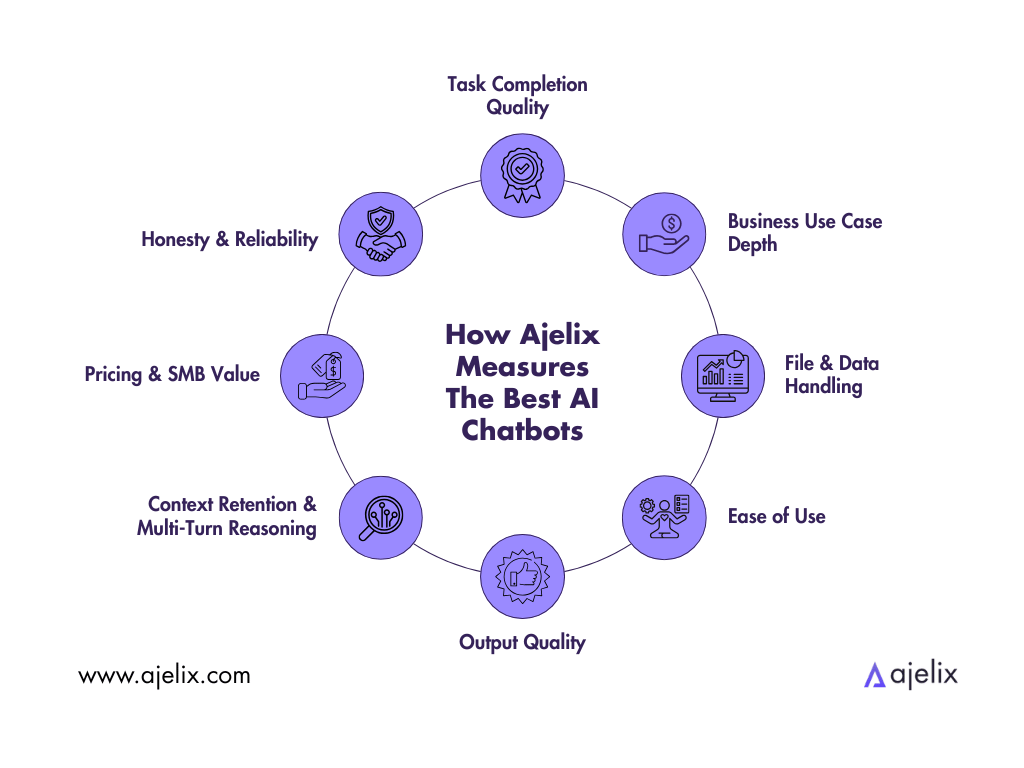
I based these criteria on what matters most when using an AI chatbot for real business work:
- Task Completion Quality. How complete and usable is the chatbot’s response for a real business task? Strong responses are structured, accurate, and require minimal follow-up editing.
- Business Use Case Depth. Does the tool go beyond general Q&A into real business tasks: data analysis, financial modeling, presentations, reporting? Generic tools that lack business depth score lower.
- File & Data Handling. Can it read CSVs, PDFs, and Excel files and do something useful with them, not just describe what’s in them? Tools that act on files save significantly more time than those that only summarize them.
- Ease of Use. Can a non-technical business user – manager, analyst, founder – get real results without prompt engineering or coding? Lower barrier = higher score.
- Output Quality. Are the responses accurate, structured, and ready to use?
- Context Retention & Multi-Turn Reasoning. Can it maintain context across a full working session and handle follow-up refinements without losing the thread?
- Pricing & SMB Value. Is it priced for real business teams, not just enterprises? We weighted tools that deliver serious value at $0–$40/month.
- Honesty & Reliability. Does it acknowledge limits rather than hallucinate? Trust matters more in business than in casual use.
My core question is: would I use this in my own professional workflow?

The 10 Best AI Chatbot Comparison Table (Scored)
After narrowing down my options, here are my Top 10 AI chatbots at a Glance:
| Chatbot | Score | #1 Strength | Biggest Weakness |
|---|---|---|---|
| Ajelix | 9.1/10 | Business file output across Excel, dashboards, PPT, reports, apps, and landing pages | Narrower general-purpose use |
| Claude | 8.5/10 | Best context window, writing quality, and honesty | Fewer native integrations, limited file delivery |
| ChatGPT | 8.3/10 | Versatility, output quality, massive ecosystem | Broad but shallow on any single use case; outputs often need follow-up formatting |
| Microsoft Copilot | 7.4/10 | Deep M365 integration, workflow automation inside Office | Only shines inside the Microsoft ecosystem |
| Google Gemini | 7.3/10 | Google Workspace integration, strong multimodal capability | Weak outside Google’s ecosystem |
| DeepSeek | 6.7/10 | Exceptional price-to-performance, strong reasoning | Data privacy concerns, limited business-specific tools |
| Notion AI | 6.5/10 | AI built directly into Notion’s project and docs workspace – no app-switching required | Limited to document/project work, requires Notion subscription |
| Perplexity AI | 6.3/10 | Best for cited research and low hallucination | File and deliverable creation is limited; core strength is research, not output production. |
| Grok | 6.1/10 | Real-time X/Twitter data, bold and direct responses | Standalone SuperGrok at $30/month*; not business-oriented |
| Meta AI | 6.1/10 | The core experience remains free, embedded in WhatsApp, Instagram, Messenger, Facebook, and a standalone app | Consumer assistant lacks native file/deliverable output; enterprise capability requires Llama API integration, not available out-of-the-box |
Scoring Reasoning — The 10 Best AI Chatbots
Evaluation criteria used:
- Task Completion Quality
- Business Use Case Depth
- File & Data Handling
- Ease of Use
- Output Quality
- Context Retention & Multi-Turn Reasoning
- Pricing & SMB Value
- Honesty & Reliability
1. Ajelix — 9.1/10
Ajelix scores highest on the criteria that matter most for business professionals.
On Task Completion Quality, it is the only tool on this list purpose-built around business file and data output as a native chatbot capability.
On File & Data Handling, it leads the entire list: it reads CSVs, Excel files, and databases and turns them into working outputs – formulas, dashboards, PowerPoint decks, and automated reports.
Business Use Case Depth is its core strength; every feature is designed for real business tasks like financial modeling, KPI tracking, and data visualization rather than general-purpose conversation.
Ease of Use scores high because no coding or technical background is required, meaning a non-technical manager can produce a board-ready dashboard from raw data.
Output Quality is strong and consistent for structured business outputs.
Context Retention is reinforced by a persistent workspace, meaning users can refine outputs across a session without losing progress.
Pricing & SMB Value is competitive given the depth of capability delivered.
The only reason it doesn’t reach a perfect 10 is Business Use Case Depth for tasks outside business workflows. Creative writing, open-ended research, and general conversational reasoning are narrower compared to ChatGPT or Claude.
2. Claude — 8.5/10
Claude secures the #2 position by combining exceptional output quality with enterprise-grade reliability.
Output Quality is Claude’s defining strength. Its writing, analysis, and reasoning are consistently superior for professional business content.
Honesty & Reliability: Anthropic’s Constitutional AI framework makes Claude significantly more resistant to hallucination and more likely to acknowledge the limits of its knowledge.
Context Retention & Multi-Turn Reasoning: Claude’s 1 million-token context window means it can ingest an entire contract, annual report, or large codebase and reason across the full document without losing thread.
Business Use Case Depth: Claude handles drafting, summarization, financial analysis, coding, strategy, and research at the highest level.
Ease of Use: The interface is clean, multimodal (text and file handling), and requires no technical setup.
File & Data Handling: Claude processes PDFs, CSVs, and images, and produces Excel files, PowerPoint decks, and Word documents natively.
The single gap that keeps Claude from the top spot is Task Completion Quality: while it generates files and structured outputs, each step requires user prompting. For complex multi-format automation, manual orchestration is still required.
For teams prioritizing accuracy, reasoning depth, and professional-grade output, Claude is the superior chatbot choice.
3. ChatGPT — 8.3/10
ChatGPT scores near the top because it excels across almost every criterion in breadth, even if it doesn’t lead any single one.
Output Quality is best-in-class for a general-purpose chatbot, but direct comparisons reveal limitations in professional business writing and analysis where precision matters most. Its 5.19 billion monthly visits (as of February 2026) signal user trust at an extraordinary scale.
Business Use Case Depth is wide. It handles drafting, summarization, financial analysis, coding, strategy, and more.
Ease of Use is among the highest on the list because the interface is familiar, multimodal (text, image, voice), and requires no technical setup.
Context Retention is strong, with long conversation memory and coherent multi-turn reasoning.
Honesty & Reliability has improved substantially with the GPT-5 family, with clear acknowledgment of uncertainty in most cases.
File & Data Handling is capable – it reads PDFs, CSVs, and images.
The two gaps that cost ChatGPT points:
Output Quality for professional use cases: while ChatGPT is excellent for general tasks, its reasoning and writing quality fall short when depth and precision matter.
Task Completion Quality: responses are text-first. It will write the code for a dashboard, but running it is on you. It will draft the report, but formatting and sending it remains your task.
For teams that need a highly accessible, versatile chatbot with mass-market polish, ChatGPT excels. But for teams whose priority is accuracy and reasoning depth, other chatbots offer measurable advantages.
4. Microsoft Copilot — 7.4/10
Copilot’s score reflects a tool that is genuinely excellent inside one environment and limited outside it.
Task Completion Quality and Business Use Case Depth score high for M365 users. It automates meeting notes in Teams, drafts emails in Outlook, summarizes documents in Word, and builds formulas in Excel without any app-switching. For enterprise teams already living in the Microsoft ecosystem, this translates directly into time saved inside the tools they already use.
Ease of Use is strong in context – no new tools, new logins, or learning curve for existing M365 users.
File & Data Handling benefits from native SharePoint and OneDrive access, which most competitors can’t match.
The score drops because of two factors:
Pricing & SMB Value. At $21-30/user/month on top of existing M365 licensing, the cost is among the highest on this list. Small businesses with limited budgets may not see sufficient ROI (Return on Investment) unless the entire team is deeply embedded in Microsoft tools.
Task Completion Quality also drops for any user or team not running M365 as their primary stack, where Copilot provides minimal standalone value.
5. Google Gemini — 7.3/10
Gemini’s score mirrors Copilot’s logic but reflects a slightly smaller enterprise footprint.
Task Completion Quality and Business Use Case Depth are strong for Google Workspace users. Native integration with Docs, Sheets, Gmail, and Meet means great automation for Google-first teams.
Output Quality is competitive, and Gemini benefits from Google’s search infrastructure for Honesty & Reliability on real-time information.
File & Data Handling inside Google Sheets and Docs is seamless because of that ecosystem.
The M365 ecosystem has a larger enterprise adoption footprint globally, meaning Copilot reaches more business users in their existing workflow. Gemini’s standalone value outside Google Workspace is limited. For businesses not running Google as their primary stack, there is little differentiation over ChatGPT or Claude.
Pricing & SMB Value is reasonable but dependent on Workspace subscription tiers, which adds cost for smaller teams.
6. DeepSeek — 6.7/10
DeepSeek scores its highest on Pricing & SMB Value. It is one of the most cost-efficient models available, with a free tier and pay-as-you-go API pricing that undercuts most competitors significantly.
Output Quality on reasoning and coding tasks is competitive with models costing multiples more, which is why it has gained traction in developer and AI communities.
Context Retention & Multi-Turn Reasoning is solid for technical tasks.
The score is held down primarily by Honesty & Reliability in a business context. DeepSeek is a Chinese company subject to Chinese data regulations, which may compel data disclosure to the government. Multiple security researchers have flagged data privacy risks for businesses handling sensitive internal, financial, or customer data. It is a documented, serious concern that disqualifies it for many regulated industries.
Business Use Case Depth, File & Data Handling, and Task Completion Quality score low at the consumer product level. The chat interface offers no native file delivery, dashboard generation, or integrations with business tools like Slack, Google Workspace, or CRM platforms.
Business users who need a ready-to-use productivity tool will find it falls short of Copilot or Gemini.
7. Notion AI — 6.5/10
Notion AI earns its place through strong performance on Ease of Use and a respectable Business Use Case Depth for document-centric teams.
It produces good business outputs – meeting summaries, project briefs, written reports, structured docs – inside a tool (Notion itself) millions of teams already use, eliminating the context-switching cost.
The Business plan at $20/user/month includes multi-model access – currently including GPT-5.2, Claude Opus 4.5, Gemini 3 – with Notion continuously updating available models. Notion offers an auto-select option that routes tasks to the most appropriate model. This makes Output Quality strong across writing, summarization, and reasoning tasks, and gives Notion one of the more flexible model selections of any productivity platform on this list.
File & Data Handling is reasonable within the Notion environment.
Task Completion Quality has grown to include AI-assisted task handling across Notion, Slack, Mail, and Calendar. However, Notion AI still cannot natively connect to live external systems like CRMs (Customer Relationship Management platforms), help desks, or inventory platforms without third-party connectors. For teams whose critical workflows live outside Notion, this isn’t beneficial.
Pricing is where smaller teams will feel squeezed: Free and Plus users receive a one-time lifetime trial of roughly 20 AI responses making the Business plan at $20/user/month effectively mandatory for any real use.
8. Perplexity AI — 6.3/10
Perplexity’s score reflects a tool that is best-in-class on one criterion and limited on many others.
Honesty & Reliability is its standout: every response is grounded in live, cited sources, making it the most hallucination-resistant tool on this list for research tasks.
Output Quality for research and fact-finding is high, and Business Use Case Depth for market analysis, competitor research, and due diligence is strong.
Context Retention has improved with multi-turn research threads.
The ceiling on its score is Task Completion Quality and File & Data Handling. While Pro and Max plans can generate basic files, spreadsheets, and dashboards, Perplexity’s core function is surfacing and synthesising information. The downstream work of formatting reports, managing data, and connecting to business systems still falls to the user.
On pricing, the free plan’s Pro Search access is limited and quickly exhausted for regular business use, making the Pro plan at $20/month effectively necessary. It is a best-in-class research engine, but not a workflow platform, which is why it scores below Notion AI despite stronger reliability.
9. Grok — 6.1/10
Grok’s score reflects a capable but narrowly positioned tool.
Its clearest differentiator is worth calling out separately – Real-Time Data Access: live X (Twitter) integration enables social listening, trend monitoring, and breaking news in a way no other tool here can match.
Output Quality with Grok 4.20 beta is competitive for general reasoning tasks, and its direct, confident tone resonates in certain business contexts. Its real-time X data integration is a genuine differentiator for teams that need live social sentiment or current events analysis – something ChatGPT and Claude cannot match natively.
Honesty & Reliability is reasonable but less conservative than Claude.
The score is pulled down by Ease of Use and Pricing & SMB Value: The free tier remains limited, and heavy features like Grok 4.20 beta’s multi-agent Heavy mode require SuperGrok Heavy at $300/month. However, Grok still lacks the plug-ins, SaaS integrations, and workflow integrations of ChatGPT Enterprise or Copilot.
Task Completion Quality and File & Data Handling are weak, with no native delivery of business deliverables or connections to Salesforce, Slack, or Notion. For SMBs without X-specific needs, ChatGPT or Claude are stronger all-round choices.
10. Meta AI — 6.1/10
Meta AI ties with Grok at 6.1 for structurally opposite reasons.
Its highest-scoring criterion is Pricing & SMB Value. The core experience remains free, embedded in WhatsApp, Instagram, Messenger, Facebook, and a standalone app, giving it unmatched accessibility for consumer-facing businesses.
Note: Meta confirmed a premium subscription tier is being tested as of January 2026, so the fully-free positioning may narrow during the year.
Ease of Use is high – no onboarding, new app, or setup. The model upgraded to Llama 4 Maverick improved reasoning, but it does not close the gap with ChatGPT or Claude for professional work.
Task Completion Quality scores at the bottom of this list. Meta AI produces no reports, dashboards, or deliverables. File & Data Handling has improved slightly: it can now read uploaded CSV and XLSX files, but cannot produce or output business files. Business Use Case Depth remains shallow, built for consumer conversations and social content rather than professional workflows.
From December 2025, Meta began using AI chat interactions to personalize ads across its platforms – a trust consideration for business users in regulated industries. Enterprise access via the Llama API requires developer integration and is not available out-of-the-box.
It ties with Grok because while Meta AI scores higher on accessibility and reach, Grok scores higher on output quality and reasoning depth. The two balance to the same overall score from different directions.
The Best AI Chatbots: Key Features Reviewed
Each AI chatbot on my list can be summarized with one unique feature:
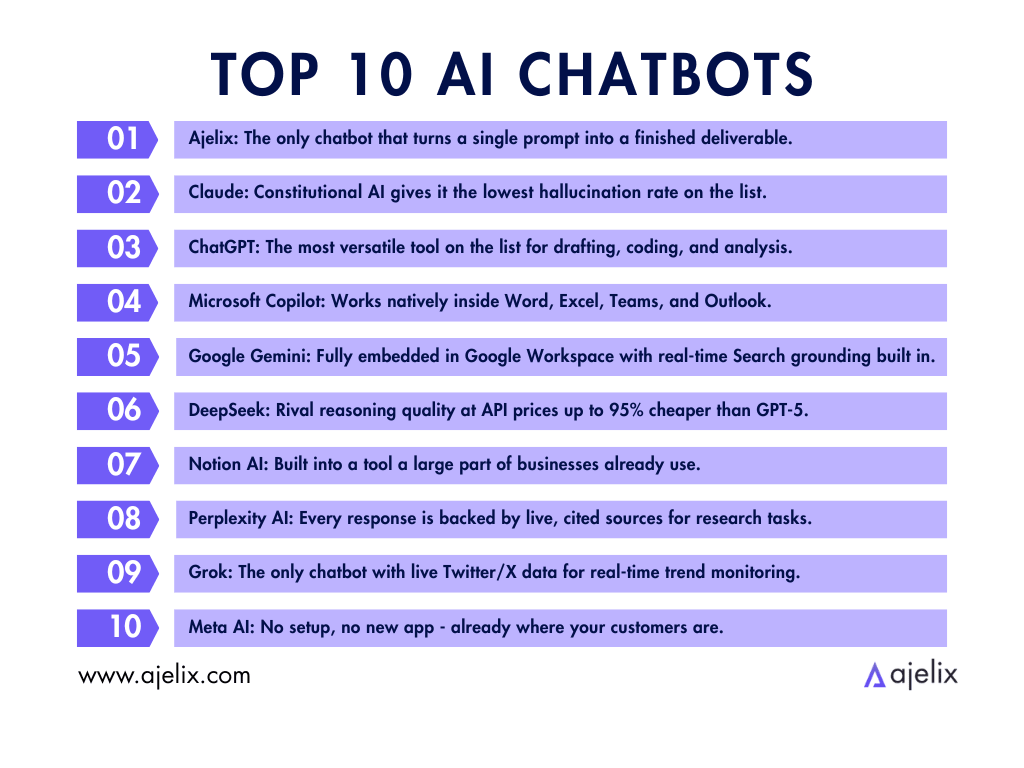
What else are these AI chatbots capable of? Here are their key features:
| Chatbot | Key Features |
|---|---|
| Ajelix | • Complete file management and storage solution• Message versioning/conversation branches• Multiple models from different providers• Secure code execution sandbox• Agent Skills• Assets: preview websites (landing pages), build interactive tools |
| ChatGPT | • GPT-5.4• Multimodal (text / image / voice) • Deep Research mode • Canvas editor • Custom GPTs • Sora 2 video (Pro) |
| Claude | • 1M token context (Max/Team/Enterprise) • Constitutional AI safety • Extended Thinking mode• Claude Code (Pro+) • M365 & Slack integration • Lowest hallucination rate |
| Microsoft Copilot | • Native M365 integration • Teams meeting summaries • Excel formula assistance • SharePoint & OneDrive access • Outlook email drafting |
| Google Gemini | • Gemini 3• Native Google Workspace AI • Deep Research • Multimodal (text / image / video) • NotebookLM integration • Real-time Google Search |
| DeepSeek | • DeepSeek V3.2 • Strong reasoning & coding • 128K context window • 90% prompt cache discount • Open-source available • Pay-as-you-go API |
| Notion AI | • Multi-model (GPT-5.2, Claude Opus 4.5, Gemini 3) • AI meeting notes • Enterprise search • Research Mode • AI task automation (Slack, Mail, Calendar) • Slack & Calendar integration |
| Perplexity AI | • Live cited sources on every answer • Lowest hallucination rate for research • Multi-turn research threads • File upload (Pro) • Basic deliverables (Pro/Max) • API access |
| Grok | • Live X (Twitter) data access • Grok 4.20 beta model • Multi-agent Heavy mode (SuperGrok Heavy) • Real-time trend analysis • Bold, direct responses |
| Meta AI | • Llama 4 Maverick model • WhatsApp, Instagram, Messenger, Facebook • Standalone app • No setup required • CSV / XLSX file reading |
Ajelix goes beyond standard chat by letting you manage, store, and act on files in one place. From uploading raw data to outputting a finished dashboard, deck, landing page and more without leaving the conversation.
ChatGPT covers more ground than any other tool on this list. Its Canvas editor, Deep Research mode, Custom GPTs, and Sora 2 video generation make it a full creative and analytical suite in one interface.
Claude is built for high-stakes work. Its 1M token context window means it can hold an entire contract or codebase in memory, while Constitutional AI keeps its outputs among the most trustworthy on the list.
Microsoft Copilot earns its place by eliminating the gap between AI and your actual work. Meeting summaries, email drafts, Excel formulas, and document edits all happen inside the tools your team already has open.
Google Gemini is the natural fit for Google-first teams. It works directly inside Docs, Sheets, and Gmail, and its real-time Search grounding makes it one of the most factually current tools on the list.
DeepSeek is the developer’s value pick. It’s open-source, pay-as-you-go, and priced up to 95% cheaper than GPT-5, while still delivering competitive reasoning and a 128K context window.
Notion AI removes the biggest friction point in AI adoption. Because it lives inside Notion itself, there’s no new tool to learn, no tab to switch to, and no workflow to rebuild around it.
Perplexity AI treats sourcing as a first-class feature, not an afterthought. Every answer links back to live, verified references, making it the most reliable research tool on this list for fact-sensitive work.
Grok has one capability no other chatbot here can match – live access to X (Twitter) data, making it the only tool built for real-time social listening, trend tracking, and breaking news analysis.
Meta AI requires nothing from the user to get started because it’s already built into WhatsApp, Instagram, Messenger, and Facebook, where over a billion people already spend their time.
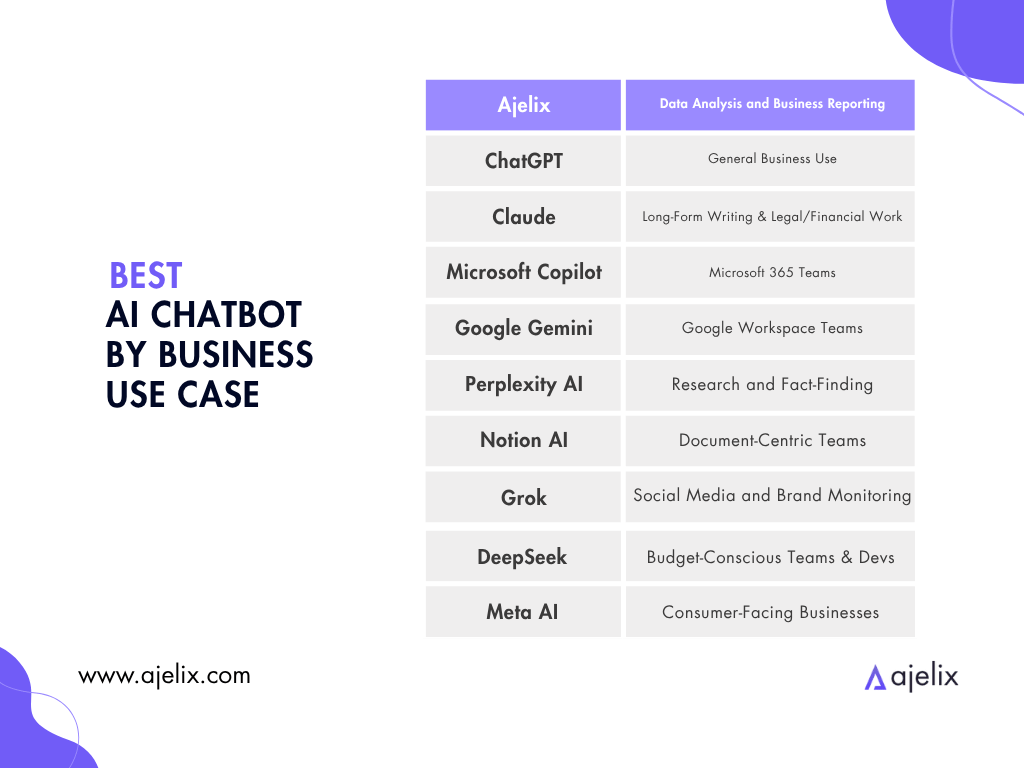
Best AI Chatbot by Business Use Case
Not every business needs the same thing from an AI chatbot. The right tool depends on what your team actually does every day.
Here’s how the top AI chatbots relate to the most common business use cases.
Best AI Chatbot for Data Analysis and Business Reporting
Winner: Ajelix
Most AI chatbots can talk about data. Ajelix works with it end to end.
Upload a raw Excel file or CSV export. Ajelix cleans, analyzes, and builds the output you need. That means a finished Excel file, PDF report, PowerPoint deck, landing page, or interactive dashboard. All from one conversation.
With ChatGPT or Claude, you get text and code back – well-written, useful text, but you still need to apply it yourself. With Ajelix, the file is the response. It runs the analysis in a secure cloud sandbox and returns a ready-to-use file.
For teams working across formats, Ajelix covers the full stack. Excel for financial models. PowerPoint for presentations. PDF for reports. Interactive dashboards in the browser. Files are saved across sessions, meaning there’s no need for regenerating work from scratch.
For data-driven SMBs without a data team, that combination is hard to match.
This video covers the difference between Chat and Agent mode on Ajelix, and relevant business use cases.
Best AI Chatbot for General Business Use
Winner: ChatGPT
For teams that need a capable tool across everything – drafting, summarizing, strategy, coding, research, and client communication – ChatGPT remains the broadest option on the list.
GPT-5.4 has meaningfully improved output reliability, and features like Deep Research mode, Canvas, and Custom GPTs give teams enough flexibility to cover almost any task. It is not the deepest tool for any single use case, but it is the most consistently useful across all of them.
Best AI Chatbot for Long-Form Writing and Legal or Financial Work
Winner: Claude
Claude is the tool to reach for when the stakes of getting it wrong are high. Its Constitutional AI framework gives it the lowest hallucination rate on this list, and its 1M token context window means it can hold an entire contract, policy document, or annual report in memory across a full working session.
For in-house legal teams drafting agreements, finance teams reviewing reports, or healthcare professionals working with sensitive documentation, Claude’s combination of reliability, depth, and careful reasoning is the strongest on this list.
Best AI Chatbot for Microsoft 365 Teams
Winner: Microsoft Copilot
For businesses running on Microsoft 365, Copilot offers the clearest ROI on this list, eliminating the friction of switching between tools entirely. Meeting summaries happen in Teams. Email drafts happen in Outlook. Formula suggestions happen in Excel. Document edits happen in Word.
If your team lives in M365, Copilot becomes the workflow. The cost ($21–30/user/month on top of existing licensing) is only justified if the team is genuinely embedded in Microsoft tools, but for those teams, it is.
Best AI Chatbot for Google Workspace Teams
Winner: Google Gemini
The same logic applies on the Google side. For teams running Docs, Sheets, Gmail, and Meet as their daily stack, Gemini is the natural fit. It works natively inside those tools without any integration setup, and its real-time Search grounding makes it one of the most factually current options on the list.
Best AI Chatbot for Research and Fact-Finding
Winner: Perplexity AI
No tool on this list handles research the way Perplexity does. For competitive research, market analysis, due diligence, or any task where you need to verify what you are reading, Perplexity removes the hallucination risk that makes other tools a liability in high-trust contexts.
It is not a workflow platform, and it will not produce your final deliverable. But as a research layer feeding into your broader process, it is the most reliable tool here.
Best AI Chatbot for Document-Centric Teams
Winner: Notion AI
For teams whose work lives in documents, Notion AI removes the biggest barrier in AI adoption: context-switching. Because the AI is built into Notion itself, there is no new tool to learn, no tab to open, and no copy-pasting between interfaces.
The multi-model routing across GPT-5.2, Claude Opus 4.5, and Gemini 3 makes output quality competitive. The catch is that Notion AI is only worth it if Notion is already your team’s primary workspace. If your critical workflows live in Salesforce, HubSpot, or a custom CRM, the value drops significantly.
Best AI Chatbot for Social Media and Brand Monitoring
Winner: Grok
For marketing teams, PR teams, or founders who need to track what is being said in real time on X, in news cycles, or across trending topics, Grok is the only tool on this list with live X (Twitter) data baked in. No other tool here can match it for social listening, sentiment tracking, or breaking news analysis.
It is a narrow use case, but for teams with that need, the advantage is valuable and it cannot be replicated by ChatGPT or Claude without third-party integrations.
Best AI Chatbot for Budget-Conscious Teams and Developers
Winner: DeepSeek
If your priority is cost and your team has the technical capability to work with an API, DeepSeek delivers reasoning and coding quality that genuinely rivals models costing multiples more. The open-source availability also means it can be self-hosted by teams with the infrastructure to do so.
The important warning stands: For teams handling sensitive, regulated, or confidential data, the privacy risk is documented and serious. For internal developer tooling, general research, or non-sensitive workflows, the price-to-performance ratio is hard to match.
Best AI Chatbot for Consumer-Facing Businesses
Winner: Meta AI
If your customers are on WhatsApp, Instagram, or Facebook, Meta AI is the only tool on this list that meets them there without any setup friction. No app to download, account to create, or onboarding to navigate.
It is not a workflow platform and it will not replace the tools above for internal business operations. But for businesses that want to engage customers conversationally in the channels they already use every day, nothing on this list matches Meta AI’s distribution reach.
AI Chatbot Pricing for Business Teams: What You Actually Get At Entry-Level
Pricing across these tools ranges from free to $300/month. The number on the label rarely tells you what you actually unlock. Some tools charge $20/month for full workflow capability. Others charge the same for text-only answers.
This table cuts through it. For each chatbot, here’s the entry-level price and what a business user realistically gets at that tier:
| Chatbot | Entry-Level Price* | What You Actually Get |
|---|---|---|
| Ajelix | Free → $39/mo (Lite) | File creation, data analysis, dashboards, presentations, Excel/PDF/PPT output. Full workflow at Lite. |
| ChatGPT | Free → $20/mo (Plus) | Broad general capability, some file output, voice, image input. |
| Claude | Free → $20/mo (Pro) | Strong reasoning and long-context analysis. No native file output or business deliverable generation. |
| Microsoft Copilot | Included in M365 → $20–30/user/mo | AI assistance inside Word, Excel, Teams, Outlook. Works within existing files. |
| Google Gemini | Free → $20/mo (AI Pro) | Up to 20 deep research reports/day, Google Workspace integration. Text and Docs output; no Excel or dashboards. |
| DeepSeek | Free → pay-as-you-go API | Strong reasoning via chat or API. No native business file output. |
| Notion AI | Free trial (~20 responses, lifetime) → $20/user/mo (Business) | Meeting summaries, docs, project briefs inside Notion. Free tier is a one-time trial, not a monthly allowance. |
| Perplexity AI | Free → $20/mo (Pro) | Cited web answers and sourced summaries. File creation (“Create files and apps” mode) is locked behind the Max plan at $200/mo. |
| Grok | Free → $30/mo (SuperGrok) | Real-time X/Twitter data access, general chat. Multi-agent Heavy mode requires SuperGrok Heavy at $300/mo. |
| Meta AI | Free (core) → premium tier in testing | Conversational AI on WhatsApp, Instagram, Messenger. No file output, no business deliverables. |
The key difference at $20/month
Most tools on this list cost around $20/month at their first paid tier. What you get for that $20 varies significantly.
ChatGPT and Claude start at $20/month. ChatGPT unlocks broad general capability with some file output. Claude unlocks strong reasoning, but no file delivery.
Notion AI charges $20/user/month at Business, and it’s effectively required, since the free tier gives you a one-time trial of ~20 responses. Copilot costs $20–30/user/month on top of an existing M365 subscription.
DeepSeek is the outlier on price: free to use via chat, with cheap API access. But it lacks business-grade file output, and its data privacy practices are a documented concern for teams handling sensitive information.
What to look for beyond the price
Before choosing based on price alone, ask three questions:
- Does it output files, or just text? ChatGPT, Claude, and DeepSeek produce text at entry level. Ajelix produces files.
- Is the free tier real, or a trial? Notion AI’s free tier is a one-time 20-response trial. Meta AI’s free tier is fully functional but limited in scope.
- What does the next tier unlock? Grok’s $30/mo plan adds some features, but the genuinely powerful mode costs $300/mo. Knowing the jump matters.
When ChatGPT isn’t the right default
For most teams, ChatGPT is the starting point. It’s well-documented, broadly capable, and easy to adopt. But a default choice stops making sense when it doesn’t match how your team actually works.
The question is whether a different tool fits your specific workflow better. Here’s when to look elsewhere.
Match by use case
- Need actual file output – Excel, PDFs, dashboards, landing pages, presentations? Ajelix is the strongest fit here. Where other chatbots return text you then paste into a spreadsheet or slide deck, Ajelix generates the file directly from the conversation. Analysis, dashboards, presentations, and data exports are available at the Lite tier.
- Need deep document reasoning or long contracts? Claude’s 1M-token context window handles large documents, dense legal text, and multi-document analysis better than any other tool at this price point. If your team regularly works with lengthy contracts, research papers, or policy documents, Claude Pro at $20/month is the most focused fit.
- Already deep in Google Workspace/Microsoft 365? Gemini integrates directly into Docs, Sheets, Slides, and Gmail. If your team lives in Google’s ecosystem and the priority is AI assistance inside existing files, Gemini AI Pro at $20/month removes the friction of switching context. The same logic applies to Copilot for teams already on Microsoft 365.
- Need cited, sourced research? Perplexity returns answers with traceable sources. For teams doing competitive research, market analysis, or any work where claim verification matters, Perplexity’s cited summaries reduce the risk of acting on hallucinated information. The free tier covers basic use; Pro at $20/month adds more detailed research reports.
- Need real-time web and social data? Grok’s direct access to X/Twitter data makes it useful for social listening, trend tracking, and monitoring public conversation in real time. This is something no other tool on this list offers at the same depth. It’s a narrow use case, but a strong one if it matches your team’s work.
On switching costs
Switching tools isn’t just a pricing decision. Teams build habits around how they prompt, what they expect as output, and where results land. A tool that’s technically better on paper may still slow a team down during a transition period.
Before committing, it’s worth running a parallel trial: keep the current tool for routine tasks while testing the new one on a specific project or workflow. Two to three weeks is usually enough to judge fit. Most of the tools on this list offer free or low-cost entry tiers that make this kind of trial practical without financial risk.
A shortlist for common team profiles
If your team primarily needs one thing, here’s where to start:
- File and data output: Ajelix
- Long document analysis and reasoning: Claude
- Sourced research and fact-checking: Perplexity
- General-purpose tasks with broad integrations: ChatGPT
- AI inside your existing Microsoft or Google tools: Copilot or Gemini
None of these are permanent choices. The most practical approach for most teams is to pick the tool that covers 80% of their current workflow, run it for a quarter, and reassess.
How to Choose the Right AI Chatbot for Your Team
The scoring, use-case breakdowns, and pricing comparison earlier in this guide are all inputs into one question: which tool fits your team right now?
This section turns that information into a practical process – four diagnostic questions, common mistakes to avoid, and a two-week pilot structure that lets you validate the choice before you commit.
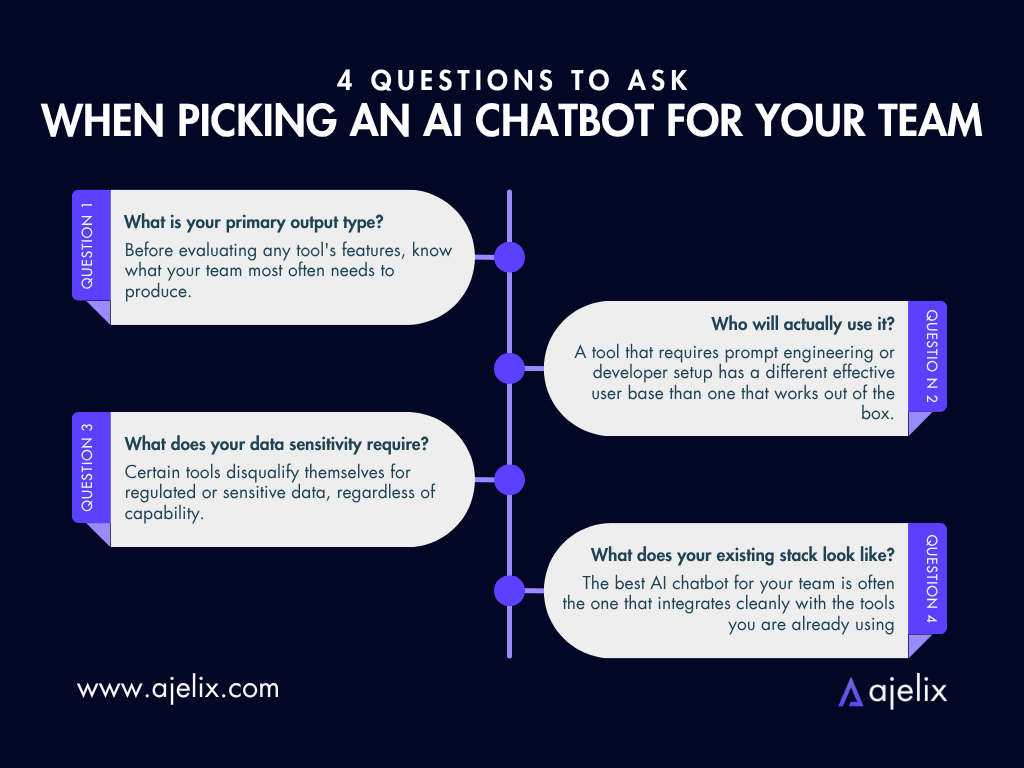
Question 1: What is your primary output type?
This is the single fastest filter on the list. Before evaluating any tool’s features, know what your team most often needs to produce.
- Files – Excel models, PDFs, PowerPoint decks, dashboards. Ajelix is the strongest fit. It generates business files directly from the conversation – no copy-pasting into a spreadsheet required.
- Documents and written content – contracts, reports, long-form analysis. Claude’s 1M token context window and low hallucination rate are the strongest combination for high-stakes written work.
- Research and cited intelligence – market analysis, competitive briefs, due diligence. Perplexity grounds every answer in live, cited sources and removes the hallucination risk that other tools carry in research contexts.
- General-purpose output across multiple formats. ChatGPT is the broadest option. It doesn’t lead in any single output type, but it covers more ground than any other tool on the list.
- Work that lives inside Microsoft 365 or Google Workspace. Copilot or Gemini, respectively. Both remove the friction of switching tools by meeting your team inside the software they already use every day.
If your team produces multiple output types equally, that itself signals a general-purpose tool like Ajelix or ChatGPT, which may serve better than a specialist.
Question 2: Who will actually use it, and what is their technical comfort level?
A tool that requires prompt engineering or developer setup has a different effective user base than one that works out of the box. This matters for adoption rate, not just capability.
- Non-technical users – managers, analysts, founders who need results without setup. Ajelix, ChatGPT, and Notion AI all score high here. The interface is conversational and the output requires no follow-up technical work from the user.
- Technical teams or developers who want API access and customization. DeepSeek offers the most cost-efficient API with strong reasoning performance, at a fraction of the cost of GPT-5 or Claude. ChatGPT and Claude both offer capable APIs as well.
- Mixed teams. Start with a tool that non-technical staff can adopt immediately, and run API or custom integrations separately for the technical layer.
Question 3: What does your data sensitivity require?
This question has a hard filter quality that the others do not. Certain tools disqualify themselves for regulated or sensitive data, regardless of capability.
- Regulated industries – legal, finance, healthcare, government. DeepSeek carries documented data privacy risks and should not be used for sensitive internal, financial, or client data. For other tools, review the enterprise data handling terms and confirm whether inputs are used for model training.
- Consumer-facing data (social, WhatsApp, Instagram interactions). Meta AI confirmed it uses chat interactions to personalize ads. This is a documented consideration for businesses operating in privacy-sensitive markets.
- General business data with standard sensitivity. Most tools on this list offer enterprise-grade data handling at their Team or Enterprise tiers. Confirm the tier before handling anything confidential.
Question 4: What does your existing stack look like?
The best AI chatbot for your team is often the one that integrates cleanly with the tools you are already using, not the one with the longest feature list in isolation.
- A custom or fragmented stack – multiple tools without a dominant platform. Ajelix and ChatGPT are the stronger standalone choices. Both work independently without requiring integration into an existing ecosystem to deliver value.
- Microsoft 365 as your primary stack. Copilot is the path of least resistance. It operates natively inside Word, Excel, Teams, and Outlook without any new workflow to build.
- Google Workspace as your primary stack. Gemini integrates directly into Docs, Sheets, Slides, and Gmail, and its real-time Google Search grounding keeps outputs factually current.
- Notion as your team’s documentation and project hub. Notion AI is the obvious fit. The AI is built in, the learning curve is zero, and the multi-model routing (GPT-5.2, Claude Opus 4.5, Gemini 3) keeps output quality competitive.
Three mistakes teams make when evaluating AI tools
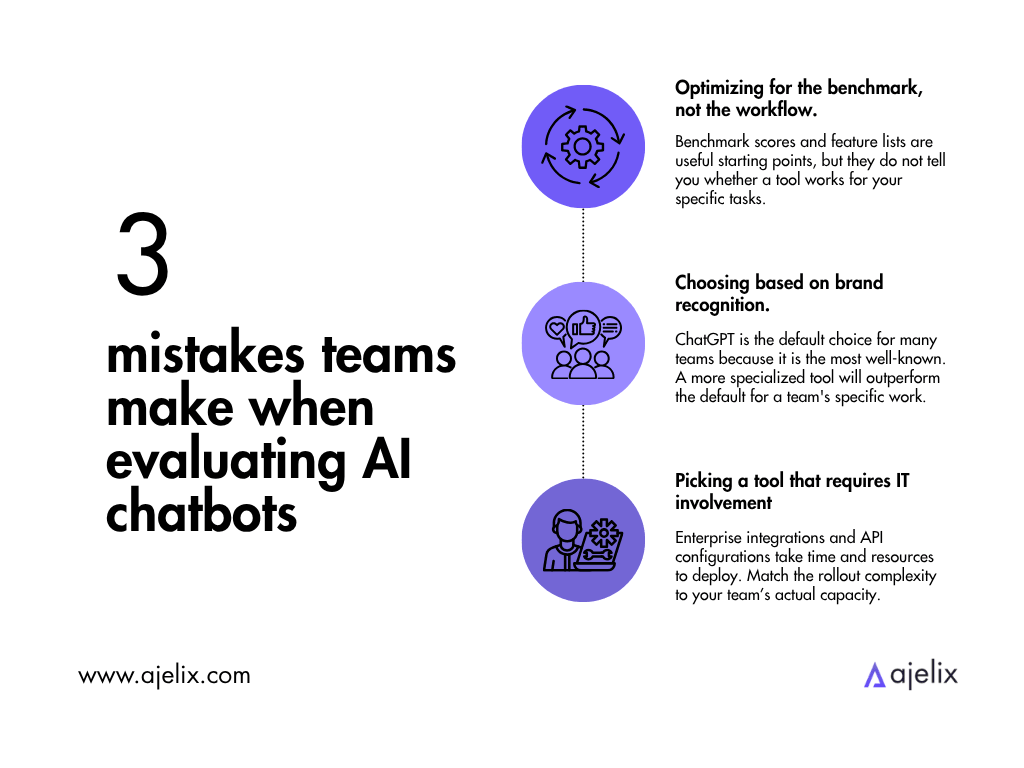
Most AI tool evaluations get derailed by one of three patterns. Recognizing them early saves significant time.
Optimizing for the benchmark, not the workflow. Benchmark scores and feature lists are useful starting points, but they do not tell you whether a tool works for your specific tasks. A tool that ranks second on general reasoning benchmarks may be the best fit if it integrates cleanly with your stack and outputs the format your team actually uses.
Choosing based on brand recognition. ChatGPT is the default choice for many teams because it is the most well-known. That is a reasonable starting point, but it is not a substitute for evaluation. For teams whose primary need is data output, document reasoning, or cited research, a more specialized tool will outperform the default for their specific work.
Picking a tool that requires IT involvement for a self-serve team. Enterprise integrations and API configurations take time and resources to deploy. If your team needs results this week, a tool that requires a two-month IT implementation does not solve the problem, no matter how capable it is at full deployment. Match the rollout complexity to your team’s actual capacity.
A two-week pilot structure
Rather than committing based on a demo or a feature comparison, run a short parallel trial. Most tools on this list offer free or low-cost entry tiers that make this practical without financial risk.
Author’s Note. Ajelix’s CEO Artūrs suggests that the best way to implement AI in a company is by optimizing small processes, e.g. start one process at the time, optimize it and then move forward.
- Week 1: Use the new tool for one specific, recurring task only. Pick a task your team does at least three times per week: a weekly report, a client summary, a data export, a meeting brief. Keep your current tool for everything else.
- Week 2: Expand to two or three task types and involve a second team member. Note where the new tool saves time, where it creates friction, and whether the output format lands without extra editing.
At the end of two weeks, you will have enough real-work evidence to make the decision. Three questions are worth answering at that point:
- Did the tool reduce the time to a finished, usable output or just shift the work to a different step?
- Did your team use it without prompting, or did adoption require active encouragement?
- Did the output land well with whoever received it – a manager, a client, a colleague – or did it require significant editing first?
If the answers are positive across all three, the tool is likely the right fit.
If the output quality is strong but adoption is low, the barrier is often ease of use rather than capability, which is solvable with a short team session.
If the output still requires significant editing, either the tool is not the right fit, or the prompting approach needs adjustment.
The AI tooling landscape will keep shifting. But a tool that demonstrably saves your team time on real tasks this quarter is worth more than the perfect solution you are still evaluating next month.
FAQ
Ajelix ranks highest overall (9.1/10) for business use, followed by Claude (8.5/10) and ChatGPT (8.3/10). The best choice depends on your needs: Ajelix for end-to-end file and data workflows, ChatGPT for general-purpose tasks across the broadest range of use cases, and Claude for high-stakes writing and long-document analysis.
A chatbot responds; an agent acts. When you ask a chatbot a question, it generates an answer and stops. An AI agent sets a goal, plans the steps, uses tools, and completes the entire workflow on its own.
Ajelix is the strongest pick for business teams that need finished file outputs directly from a conversation. ChatGPT suits teams with varied output needs across writing, strategy, coding, and research. For Microsoft 365 teams, Copilot; for Google Workspace teams, Gemini.
ChatGPT remains one of the best all-round tools but is no longer the top pick for every use case. It scores 8.5/10 and leads for general-purpose versatility, but Ajelix outperforms it for business file output, Claude outperforms it for long-document reasoning, and Perplexity outperforms it for cited research. The right tool depends on what your team actually produces.
Meta AI, DeepSeek, and Perplexity all offer functional free tiers. Meta AI is free and works directly inside WhatsApp, Instagram, and Messenger with no setup required. Ajelix also offers a free trial covering its full workflow – file creation, data analysis, and dashboards – which is broad for a no-cost plan. DeepSeek is free to use via chat, though it carries documented data privacy concerns.
Claude (Anthropic) and ChatGPT (OpenAI) both offer enterprise-grade data handling at their Team and Enterprise tiers, with no training on inputs. DeepSeek should be avoided for sensitive data: multiple security researchers have flagged data disclosure risks. Meta AI uses chat interactions to personalize ads, which is a consideration for privacy-sensitive business contexts.
Other chatbots like ChatGPT and Claude can analyze data and return useful summaries, but the output is text – you still apply it yourself. Ajelix returns the finished file.
Claude is the strongest choice for high-stakes written work. Its 1 million-token context window lets it hold an entire contract or annual report in memory across a full session, while its Constitutional AI framework gives it the lowest hallucination rate on this list. It’s a meaningful advantage in legal, finance, and healthcare environments where accuracy is non-negotiable.
Microsoft Copilot. For teams running M365, it is the clearest fit: meeting summaries happen in Teams, email drafts in Outlook, formula suggestions in Excel, and document edits in Word, all without switching apps. The cost is $20–30/user/month on top of existing M365 licensing, which is only worth it if your team is genuinely embedded in Microsoft tools.
Google Gemini. It works natively inside Docs, Sheets, Gmail, and Meet, and its real-time Google Search grounding keeps outputs factually current. For teams whose primary stack is Google, Gemini removes the friction of switching tools entirely. Its value drops significantly for users not running Google Workspace as their primary platform.
Perplexity AI is the most reliable research tool on this list. Every response is grounded in live, cited sources, making it the most hallucination-resistant option. It is not a workflow platform, but as a research layer feeding into your process, it is unmatched.
Not for sensitive data. DeepSeek is a Chinese company subject to Chinese data regulations, which may compel disclosure of user data to the government. Multiple security researchers have flagged documented privacy risks for businesses handling internal, financial, or client data. It is competitive on price and reasoning quality, but should only be used for non-sensitive workflows by teams who have assessed that risk.
Most tools start at $20/month at their first paid tier, but what that buys varies significantly. ChatGPT and Claude charge $20/month – ChatGPT unlocks broad general capability, Claude unlocks strong reasoning with no file output. Microsoft Copilot costs $20–30/user/month on top of an M365 subscription. DeepSeek is free to use via chat, with inexpensive pay-as-you-go API access.
The best alternative depends on what ChatGPT is not delivering for you. For finished file output (Excel, PDFs, dashboards), Ajelix is the stronger fit. For long-document reasoning and low hallucination, Claude is the closest alternative and often preferred for professional writing. For cited research, Perplexity. For Microsoft 365 or Google Workspace users, Copilot or Gemini respectively.
No – current AI chatbots augment human work rather than replace it. They handle specific, repeatable tasks faster than a person can: drafting, summarizing, analyzing data, building reports, researching topics. The tasks that require judgment, relationship management, creative strategy, and contextual decision-making still require a human in the loop. The practical value is time saved per task, not headcount reduction.
Agentic AI chat that helps you complete projects
AI for work that ingests, transforms, and delivers the exact deliverables your team needs, while you stay focused on strategy. No more chatting, agents can get the job done.