Best AI Agent For Excel: Use Cases & Top Tools

Finance and ops teams still spend large chunks of time rebuilding and polishing the same spreadsheets, even though an AI agent for Excel can do it for them. The AI capabilities are even more powerful now than they were only a year ago.
Our team of AI experts tested and compared the leading agents, and will guide you through use cases you can copy and apply to your own Excel processes.
Let’s dive in.
What Is An AI Agent For Excel
An AI agent for Excel is software that uses a large language model to work inside spreadsheets autonomously. An Excel LLM agent completes tasks from beginning to end, reading your data, planning a sequence of steps, and explaining what it did.
Three categories of Excel agents are available:
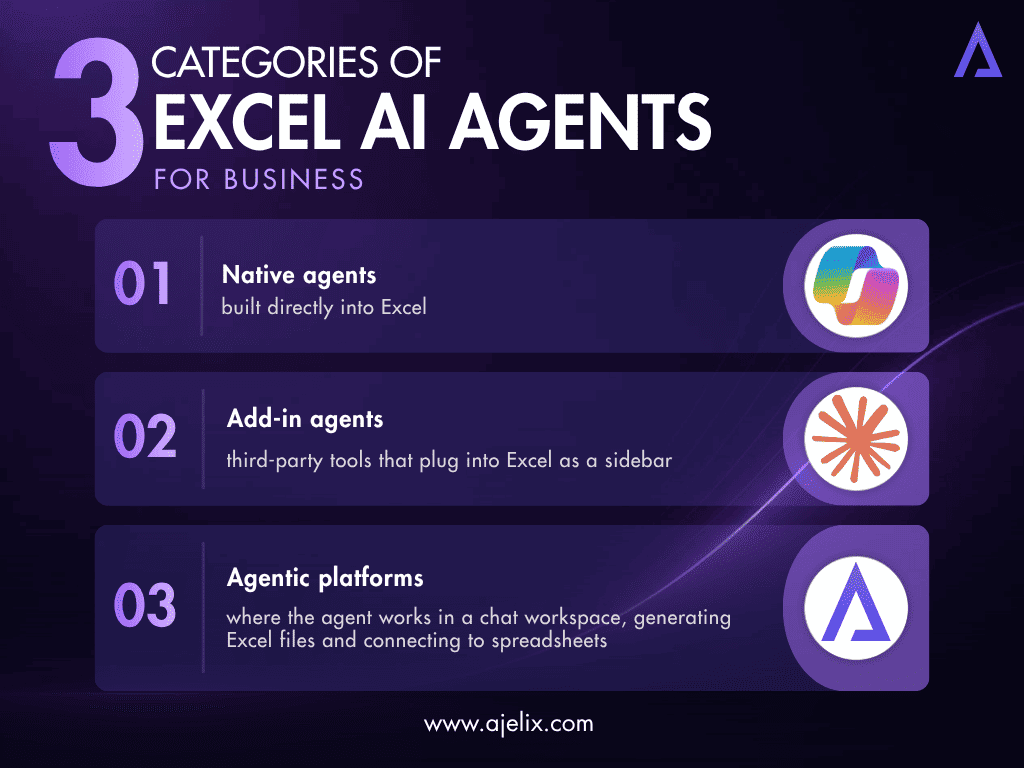
- Native agents built directly into Excel (example: Microsoft Copilot);
- Add-in agents: third-party tools that plug into Excel as a sidebar (examples: Claude for Excel, GPT for work Excel AI agent);
- Agentic platforms where the agent works in a chat workspace, generating Excel files and connecting to spreadsheets (example: Ajelix).
If you’ve ever searched for an AI agent for Excel automation or an AI agent for Excel analysis, the second one is what you were looking for. The first is meant for formula generation.
AI Agent Comparison
Our comparison of the best Excel AI agents:
| Tool | Type | Best For | Standout Capability |
|---|---|---|---|
| Ajelix | Agentic platform | Spreadsheet work: templates, dashboards, financial models, scripts | Agentic chat that delivers finished, formatted Excel files |
| Microsoft Copilot | Native in Excel | Teams already using Microsoft 365 | Plan mode, change tracking, and Python-powered analysis |
| Claude for Excel | Add-in (sidebar) | Complex, multi-tab financial models and formula auditing | Cell-level citations and MCP connectors |
| GPT for Work | Add-in (agent) | Bulk row-by-row processing at scale | Up to 1,000 rows per minute, 1 million rows per run in Excel |
| Shortcut | Excel add-in/web app | Financial modeling for finance teams | Ranked top for financial model quality in analyst evaluations |
| ChatGPT for Excel | Add-in | Flexible general-purpose spreadsheet help | Works in Excel and Google Sheets on every ChatGPT plan |
| Numerous.ai / Rows / Formula Bot | Add-ins & alternatives | Lightweight tasks, AI-native spreadsheets, formula help | Budget-friendly options for simpler, recurring jobs |
Below, we use the Ajelix AI agents to execute some of the most popular Excel use cases.
Excel Use Cases With Ajelix
Ajelix is an agentic AI workspace used by 350,000+ professionals. You describe what you need, and the agent plans and executes the task, returning a downloadable Excel file. It is the best AI agent for Excel, as Ajelix was founded with a primary focus on Excel automation.
Who is it for: Business users, finance teams, and analysts who want to hand a task to an agent and receive a finished and polished spreadsheet in return.
- Pros: Agentic chat executes complete Excel workflows, such as templates with formulas, validation and conditional formatting; professional charts and dashboards; full financial models with scenarios; data analysis with written insights; formula generation and script/VBA automation; also works with Google Sheets through the Ajelix add-on; built on Ajelix’s own AI infrastructure, including EU-hosted and on-premises deployment.
- Cons: Works in the Ajelix workspace instead of inside Excel, so it’s best when you’re generating or transforming files, not for micro-edits inside a sheet.

Here are five use cases our team tested, with the exact prompts.
Financial Model
Prompt to try:
"Build a 3-statement financial model for an imaginary SaaS company: monthly revenue projections for 24 months with churn and expansion assumptions, operating expense forecast, a summary P&L, and base/best/worst case scenarios driven by an assumptions tab."
Ajelix result:
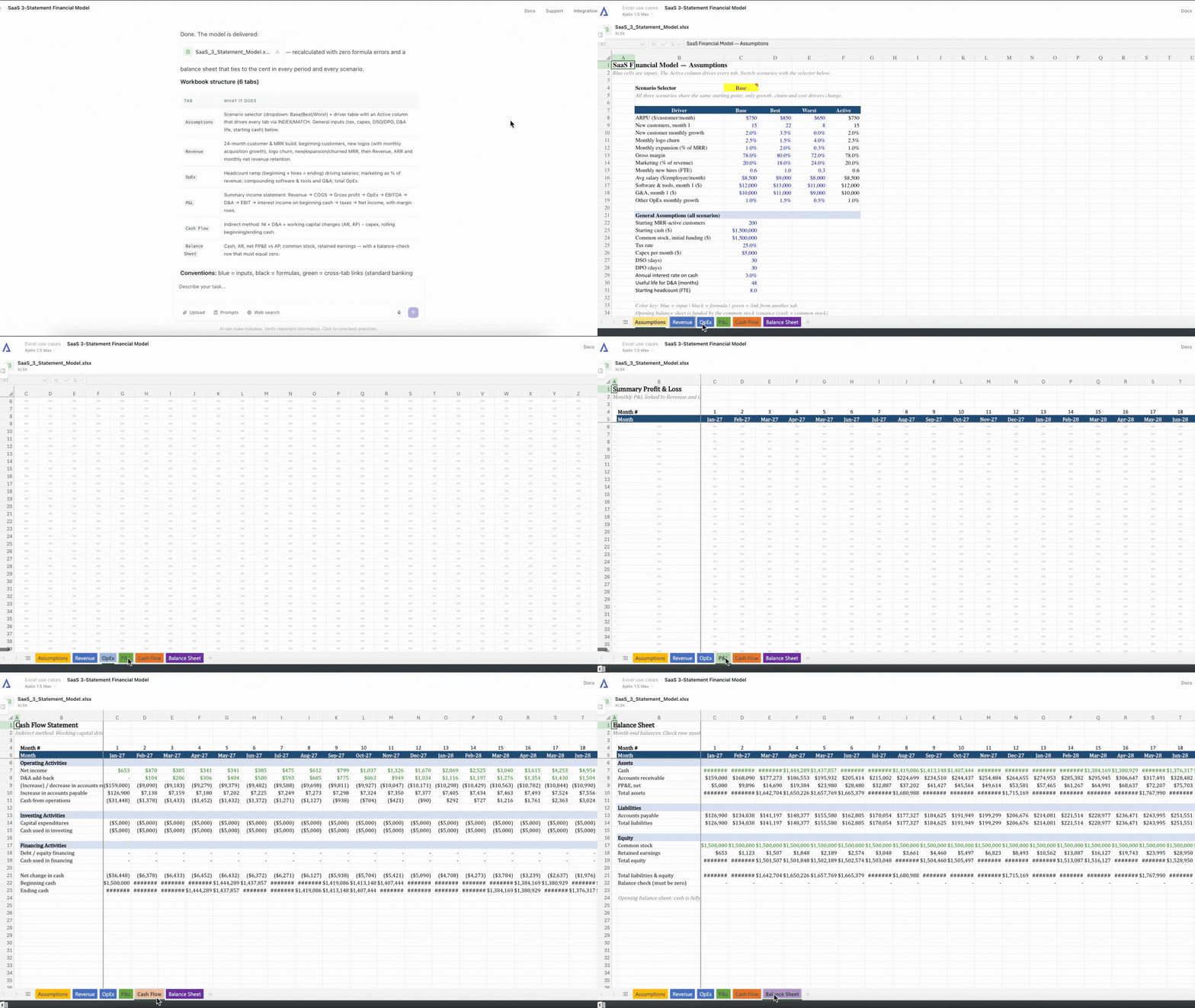
The agent built a three-statement financial model that projected revenue month by month for two years based on new customers, churn and upgrades, forecasted operating costs, and included a P&L, cash flow statement and balance sheet.
All of it ran off one assumptions tab where you can switch between base, best and worst case scenarios, and watch the model update.
Budget vs Actual
Prompt to try:
"Create a budget vs actuals Excel template with monthly columns, data validation on category inputs, conditional formatting that flags any line where actuals exceed budget by more than 10%, and a summary tab with the top 5 variances."
Ajelix result:
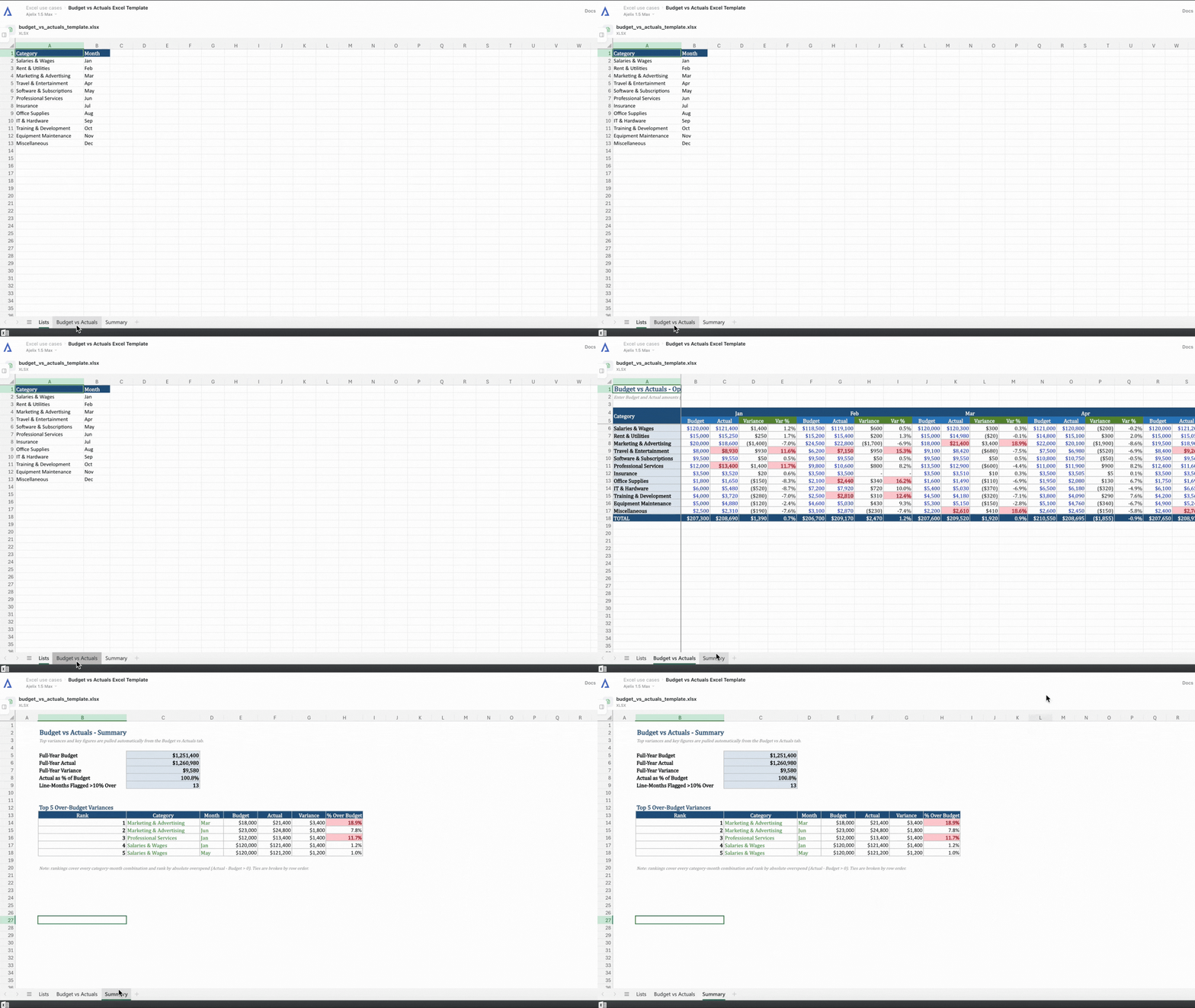
The agent built an Excel Budget vs Actuals template that tracks spending across 12 months, with columns for the budget, actual spend, and the difference. Categories were picked from a dropdown list, and any line more than 10% over budget was highlighted in red. A summary tab showed the five biggest items that were over the budget.
Sales Performance Dashboard And Charts
Prompt to try:
(Upload your sales data.)
“From this sales export, create a dashboard with revenue by region, month-over-month trend, top 10 customers by revenue, and a funnel conversion chart. Use consistent branding colors and make it board-ready.”
Ajelix result:
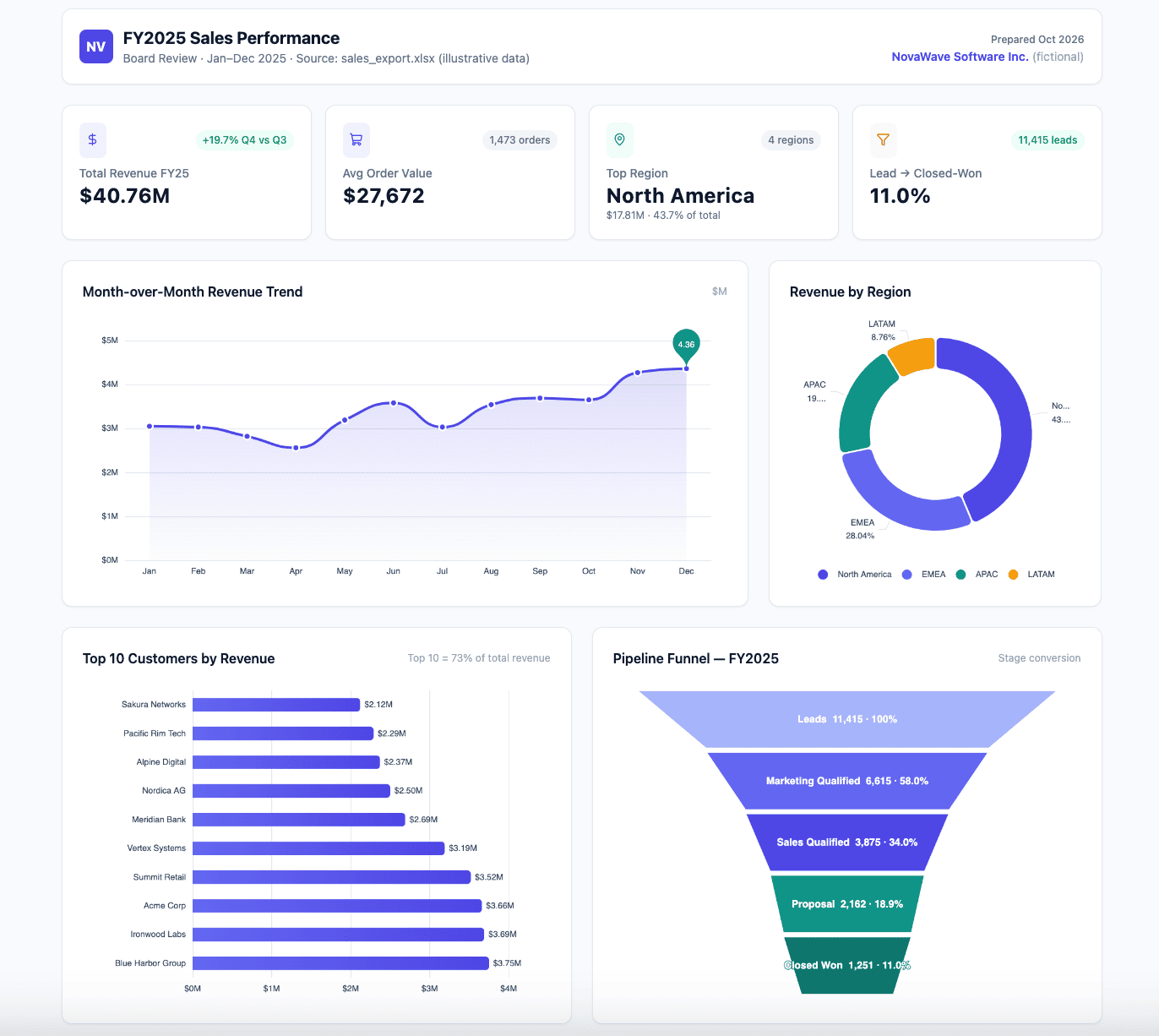
The agent built an interactive sales dashboard that starts with four KPI cards showing total revenue, average order value, the strongest region, and overall conversion rate.
It is followed by four charts:
- A line chart tracking how revenue moved month by month;
- A donut chart breaking revenue down by region,
- A ranked bar chart of the ten highest-spending customers,
- A funnel chart showing how leads progress from first contact to a closed deal.
All charts share the same color scheme.
Variance And Trend Analysis
Prompt to try:
(Upload your expense data.)
“Here are 24 months of expense data by department. Identify the biggest cost drivers, flag anomalies or unusual spikes, quantify month-over-month growth rates, and write a short executive summary as a .doc file.”
Ajelix result:
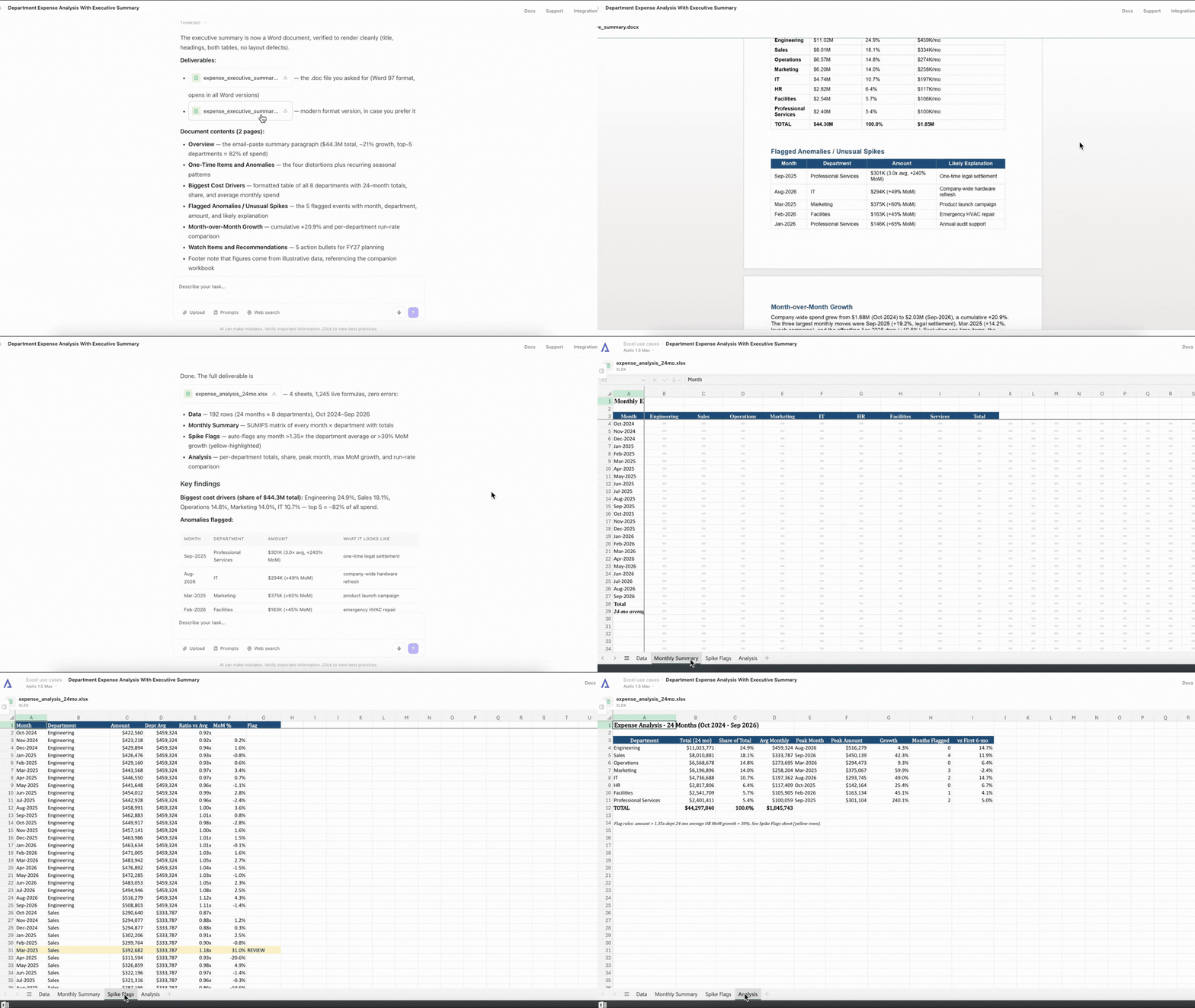
The agent put the full analysis into a polished Word document. The executive summary covered the biggest cost drivers, the unusual spikes that stood out from normal monthly patterns, and how fast expenses grew month over month.
It also included clean tables showing department totals and flagged anomalies, with everything fully formatted.
Cleaning A Sheet
Prompt to try:
(Upload your contact data.)
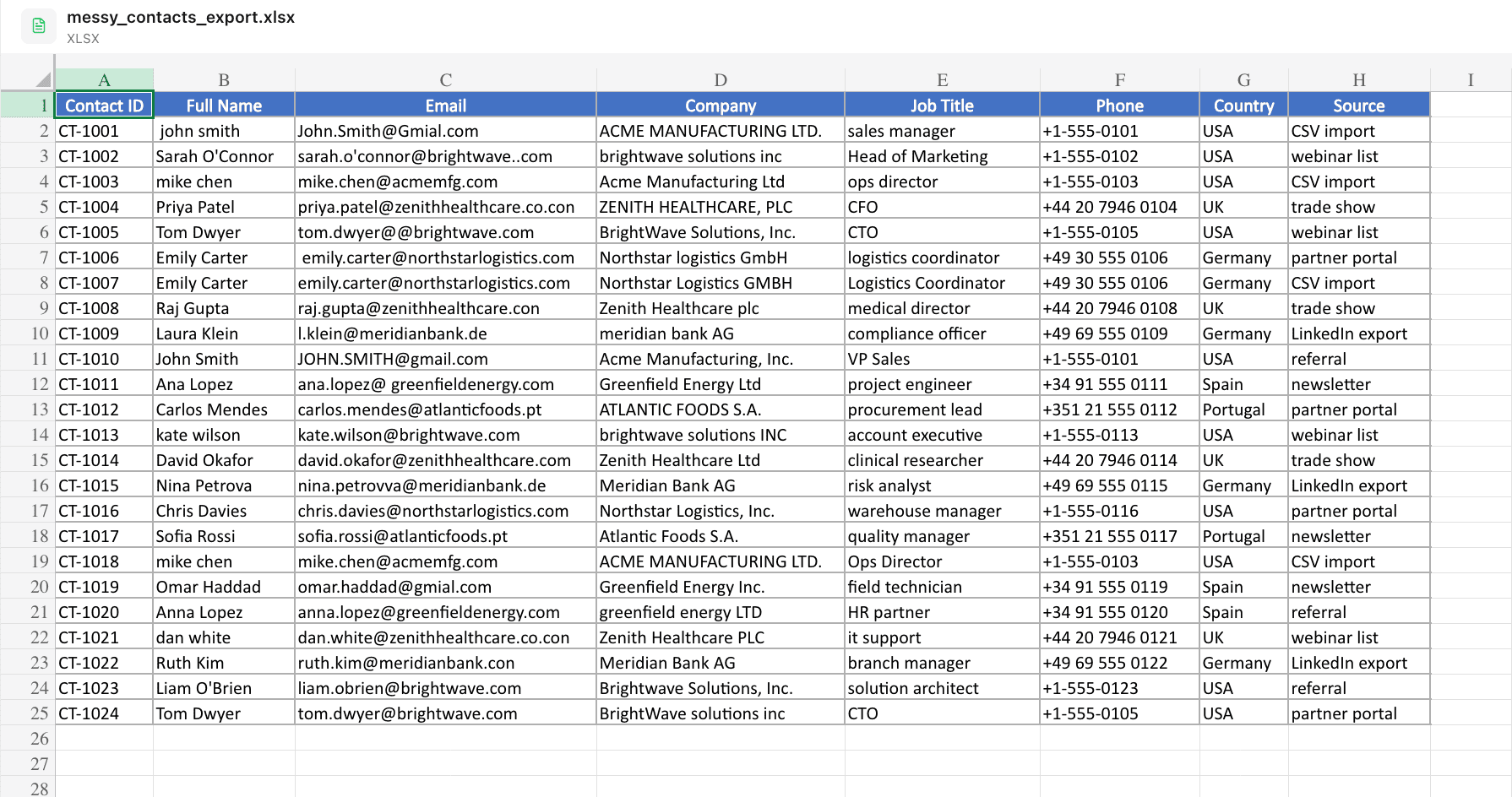
“Clean this contact export: standardize company name casing, remove legal suffixes like Ltd and Inc, fix typos in the email column, deduplicate rows by email, and highlight every change you made.”
The messy data we attached:
Ajelix result:
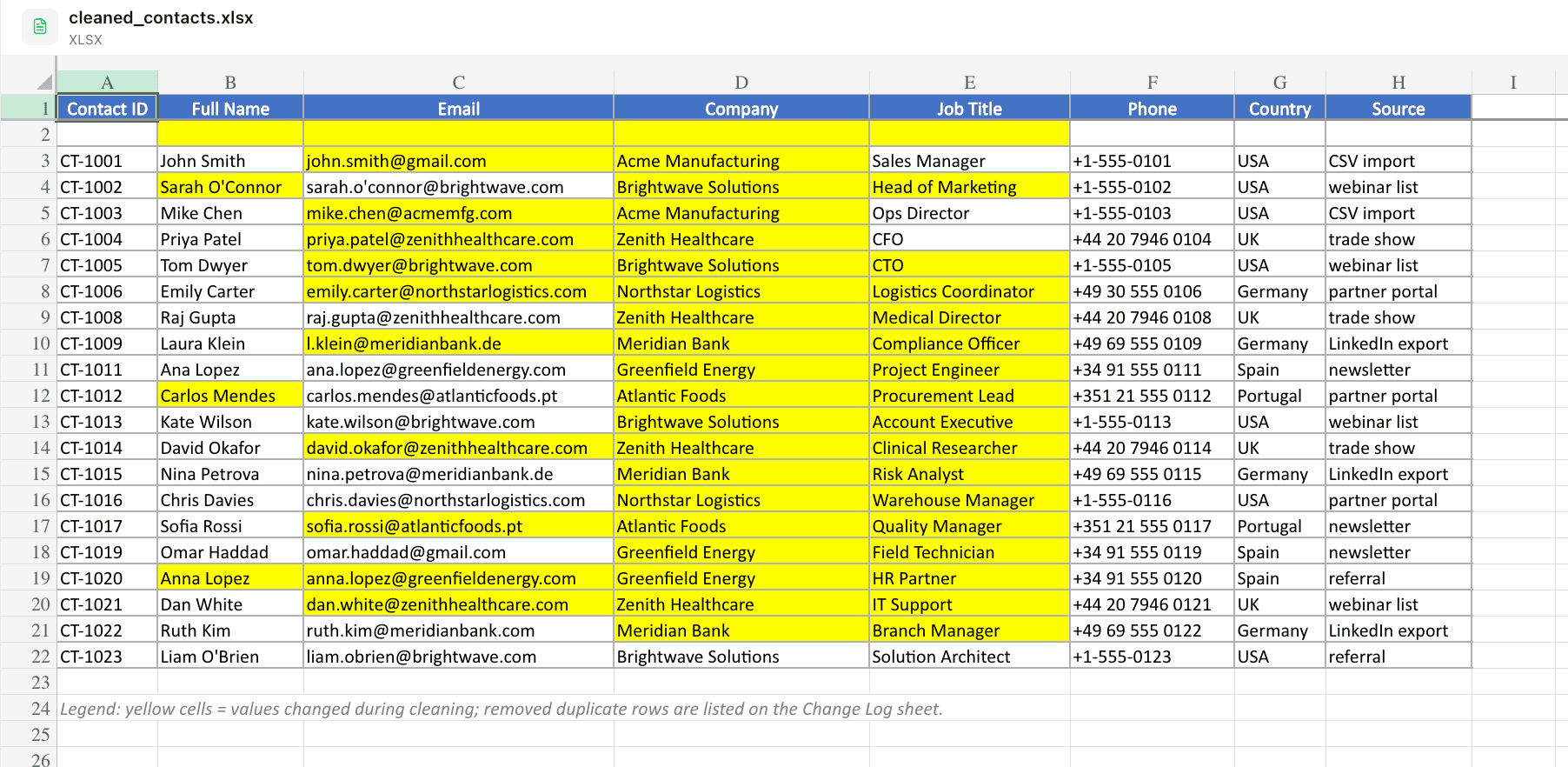
The agent cleaned up a messy contact export in Excel, which had inconsistent company names, legal suffixes like Ltd, Inc and PLC, email typos, and duplicate entries. It standardized the company name casing, corrected the typos, and removed the legal suffixes and duplicates by matching emails.
Every change was highlighted in yellow, and a separate Change Log sheet recorded each original value next to the cleaned one.

Copilot In Excel And Claude For Excel
Copilot and Claude are among the best-known AI agents for Excel sheet work. Below, we cover their differences.
Copilot In Excel
Who is it for: Microsoft 365 teams that want AI directly inside Excel, with IT governance already in place.
- Pros: Edit with Copilot with a chat/edit switcher, plan mode to preview each step before changes, and change indicators on the grid; can invoke Python for advanced analysis; supports model choice between OpenAI GPT-5.5 and Claude models; can query locally stored workbooks through Copilot Chat.
- Cons: Requires a qualifying Microsoft 365 Copilot license; Microsoft retired the native =COPILOT() cell function in September 2026, pushing users to the side pane.
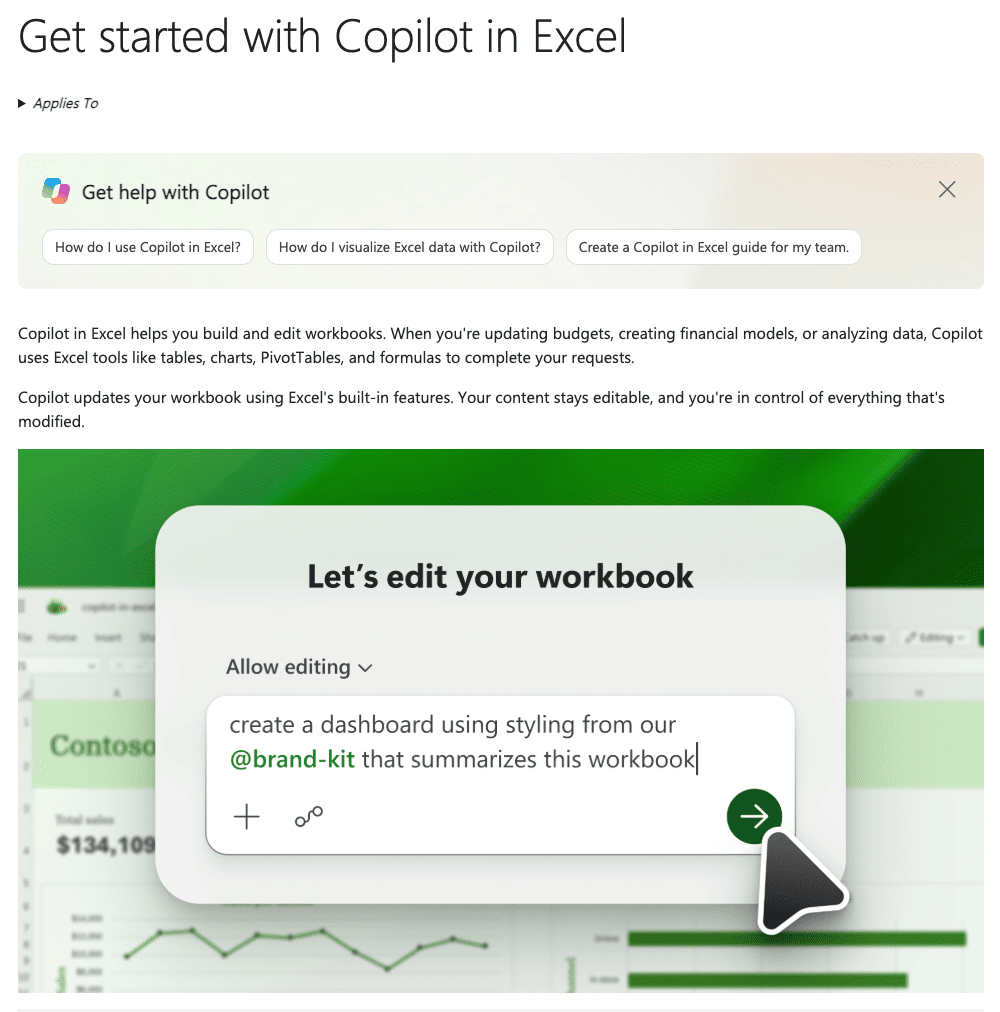
Copilot is the default answer for organizations already using Microsoft 365, and its recent updates have made it a capable AI agent. Plan mode is the standout feature, meant for high-stakes workbooks – you review the agent’s intended steps and which data it will touch before anything changes.
Claude For Excel
Who is it for: Finance professionals, analysts, and auditors working with complex, multi-tab models.
- Pros: Sidebar agent that reads entire workbooks with nested formulas and cross-sheet dependencies; explains formulas with cell-level citations; edits pivot tables and charts; updates assumptions without breaking formula chains; MCP connectors; shares conversation context with Claude for PowerPoint.
- Cons: Chat history is stored locally in your browser (not on Anthropic’s servers) and doesn’t sync across devices or between the Excel and PowerPoint add-ins; can’t execute VBA or macros or work with data tables; Anthropic’s own documentation warns about prompt injection in spreadsheets from untrusted sources.

Claude for Excel has become among the strongest products for accuracy-critical model work. It is stronger than Copilot when it comes to auditing and understanding a model someone else built, but struggles with bulk processing and volume work.
Other Excel AI Tools Worth Knowing
Outside the top three AI agents for Excel we recommend, we have compiled a further list:
- GPT for Work (Talarian): Bulk-processing specialist: an add-in that plans and executes multi-step tasks and processes up to 1,000 rows per minute, with a single run covering up to 1 million rows in Excel.
- Shortcut: A lesser-known agent, but it outranked the better-known tools on financial model quality in a 2026 evaluation.
- ChatGPT for Excel: The most flexible general-purpose option, working in Excel and Google Sheets on every ChatGPT plan, though without bulk processing.
- Numerous.ai: A budget-friendly add-in for light, recurring bulk tasks.
- Rows: An AI-native spreadsheet alternative for teams open to leaving Excel for analysis work.
- Formula Bot (now Better Analyst): Formula generation and conversational assistant for quick, simple needs.
- Julius AI: Conversational analysis for datasets that have outgrown Excel.
- Gemini in Google Sheets: The Sheets-native counterpart to Copilot for Google Workspace teams. (Ajelix also offers an add-on for its chat interface inside the Google Workspace.)
- DataSnipper: Built with auditors in mind; every number its Excel agent produces comes with a link back to the source document, so anything that ends up in your workpapers can be traced when a regulator or audit partner asks.
Choose The Right Tools For Your Needs
To decide what is the best Excel AI agent for your needs, here is an overview comparison by use case:
| You need… | Best tool |
|---|---|
| A finished deliverable, such as a model, dashboard, template or report, from a prompt | Ajelix |
| AI natively inside Excel in a governed Microsoft 365 environment | Microsoft Copilot |
| Auditing and understanding complex, multi-tab financial models with cited cell references | Claude for Excel |
| Bulk processing across thousands or millions of rows | GPT for Work |
| Highest-rated financial modeling quality from a specialist agent | Shortcut |
| Flexible, general-purpose spreadsheet help across Excel and Google Sheets | ChatGPT for Excel |
| Budget-friendly, light recurring bulk tasks | Numerous.ai |
| Analysis-heavy work in an AI-native spreadsheet (you have to be open to leaving Excel) | Rows |
| Quick formula help or conversational analysis of an uploaded file | Formula Bot (now Better Analyst) |
| Analysis for datasets that have outgrown Excel entirely | Julius AI |
| Sheets-native AI for Google Workspace teams | Gemini in Google Sheets |
| Audit-grade traceability, with every output linked back to its source document | DataSnipper |
Unsure where to start? Consider Ajelix.
FAQ
Yes. Microsoft’s Copilot is built into Excel, Claude for Excel runs as a sidebar add-in, GPT for Work offers an agent add-in, and platforms like Ajelix execute complete spreadsheet tasks in an agentic chat and deliver finished Excel files.
Copilot is the default for Microsoft 365 environments, Claude for Excel leads on complex model auditing, GPT for Work leads on bulk row processing, and Ajelix is the strongest choice when you want an agent to deliver finished workbooks, such as templates, dashboards, financial models and reports.
Yes. Describe the report once (structure, formatting, thresholds) and the agent reproduces it each cycle from your new data. For Microsoft-native automation, combine Copilot or Power Automate with your reporting flow.
An agent plans and executes multi-step work: reading your data, choosing analysis methods, building charts, and writing summaries. A formula generator produces one formula per prompt and leaves the rest to you.
No. All the tools in this guide accept instructions that are prompted in simple terms. You should, however, be able to review the output – agents still make mistakes, especially on complex logic.
Check each vendor’s data processing and retention terms before uploading sensitive files, never paste regulated data into tools without approved agreements, and be cautious with spreadsheets from untrusted sources.
Agentic AI chat that helps you complete projects
AI for work that ingests, transforms, and delivers the exact deliverables your team needs, while you stay focused on strategy. No more chatting, agents can get the job done.