What are AI Agent Skills?
AI agents are everywhere now. They schedule meetings, write code, analyze data, and even manage entire workflows. But here’s the thing most people miss: an AI agent is only as good as its AI agent skills.
Skills are the difference between a chatbot that simply responds and an agent that actually does things. In this guide, I’ll break down everything you need to know about AI agent skills – what they are, why they matter, and how to build them.
Table of contents:
- What Are AI Agent Skills?
- AI Agent Skills vs Tools: What’s the Difference?
- AI Agent Skills Examples You Should Know
- OpenAI
- Cursor
- OpenClaw
- Ajelix
7.1 Three Ways to Add Skills in Ajelix
7.2 Why Ajelix Skills Stand Out
7.3 Using External AI Skills in Ajelix - How to Create Your Own AI Agent Skill
8.1 Start With a Clear Description
8.2 Define Your Inputs Carefully
8.3 Define Your Outputs Just as Carefully
8.4 Keep It Focused on One Thing - FAQ
What Are AI Agent Skills?
Let’s start with the basics. An AI agent skill is basically a capability – something the agent knows how to do that involves interacting with the outside world.
Think of it this way – skills are the bridge between “understanding” and “doing.”
The core skills most AI systems need include:
- Tool use – Calling APIs, running code, querying databases
- Memory management – Remembering what happened in previous conversations and using that context next time
- Planning – Taking a complex request and breaking it into steps
- Reasoning – Making decisions based on available information
You can have the most sophisticated language model on the planet, but without these skills configured, it’s like owning a Ferrari with no wheels.
AI Agent Skills vs Tools: What’s the Difference?
This trips up almost everyone at first. People use “skills” and “tools” interchangeably, but they’re not the same thing.
| AI Agent Skills | Tools |
| The capability to perform an action | The mechanism used to perform it |
| “I can search the web” | The actual search API being called |
| Learned or configured abilities | External services and interfaces |
| Defines what the agent can do | Defines how it gets done |
Your skill might be “research competitor websites.” The tools are the specific APIs, scrapers, and parsers that make that research happen.
The skill is the intention. The tools are the implementation.
A single skill often pulls together multiple tools. A “deep research” skill might combine web search, PDF reading, and summarization into one seamless capability. The agent doesn’t need to think about which tool to use when – the skill handles that orchestration.
Agent skills examples make this clearer:
- A “file analysis” skill uses document parsing tools
- A “code review” skill combines static analysis and git integration
- A “customer support” skill connects to your CRM and ticketing system
The distinction matters because when you’re building or configuring agents, you need to think at the skill level. Get caught up in the tools too early and you’ll build something brittle that breaks every time an API changes.
AI Agent Skills Examples You Should Know
Let me walk you through the practical skills that actually get used in production environments today.
1. Web Search and Research
This sounds basic, but doing it well is actually hard. A proper research skill combines:
- Calling search APIs effectively
- Extracting the actual content from pages (not just the metadata)
- Summarizing findings without losing key details
- Validating sources so you’re not citing spam
2. Code Execution
Running code safely in a sandboxed environment. Essential for:
- Data analysis and visualization
- Automating repetitive scripts
- Testing and debugging
- Quick prototyping
The “safely” part is crucial. You don’t want an AI agent running arbitrary code on your production servers.
3. File Operations
Reading, writing, and manipulating files across every format your business actually uses:
- Documents (PDFs, Word files, text)
- Spreadsheets (Excel, CSV)
- Media files (images, audio, video)
- Structured data (JSON, XML, databases)
A file operations skill that only handles text files is useless for most real work.
4. API Integration
Connecting to the services and systems you already use:
- CRMs like Salesforce and HubSpot
- Communication tools like Slack and email
- Databases and data warehouses
- Payment processors and billing systems
This is where the “agent” part really matters. Anyone can call an API. An agent knows when to call it, what data to send, and what to do with the response.
OpenAI
OpenAI has largely defined what people expect from capable AI. Their approach centers on:
- Function Calling – You define what your agent can do using structured schemas, and the model figures out when to invoke each capability. It’s elegant when it works.
- Built-in Tools – Code interpreter for Python, web browsing for real-time data, file handling for documents. These work out of the box.
- Custom GPTs – Let non-developers create agents by combining built-in capabilities with custom instructions and knowledge. No coding required.
Building on OpenAI typically means defining clear function schemas and writing system prompts that guide the model toward appropriate skill usage.
Cursor
Cursor took a different angle. They’re not trying to be a general-purpose AI platform, they’re an AI-native code editor that deeply understands development workflows.
Cursor’s key skills include:
- Generating code across languages and frameworks
- Reading and understanding entire codebases for context
- Refactoring – restructuring code while keeping everything functional
- Debugging with actual explanations of what went wrong
- Executing terminal commands safely
Cursor’s agent can write code, run tests, fix bugs, and commit changes. For developers, this closes the entire development loop.
OpenClaw
OpenClaw represents the newer generation of open-source agent frameworks. They’re betting on flexibility:
- Modular skill architecture – add and remove capabilities easily
- Multi-agent orchestration – different agents with different skills working together
- Local execution – run skills on-device for privacy-sensitive work
- Community extensibility – shared skill libraries
For teams wanting full control over their agent capabilities, OpenClaw provides a blueprint for custom skills AI development.
Ajelix
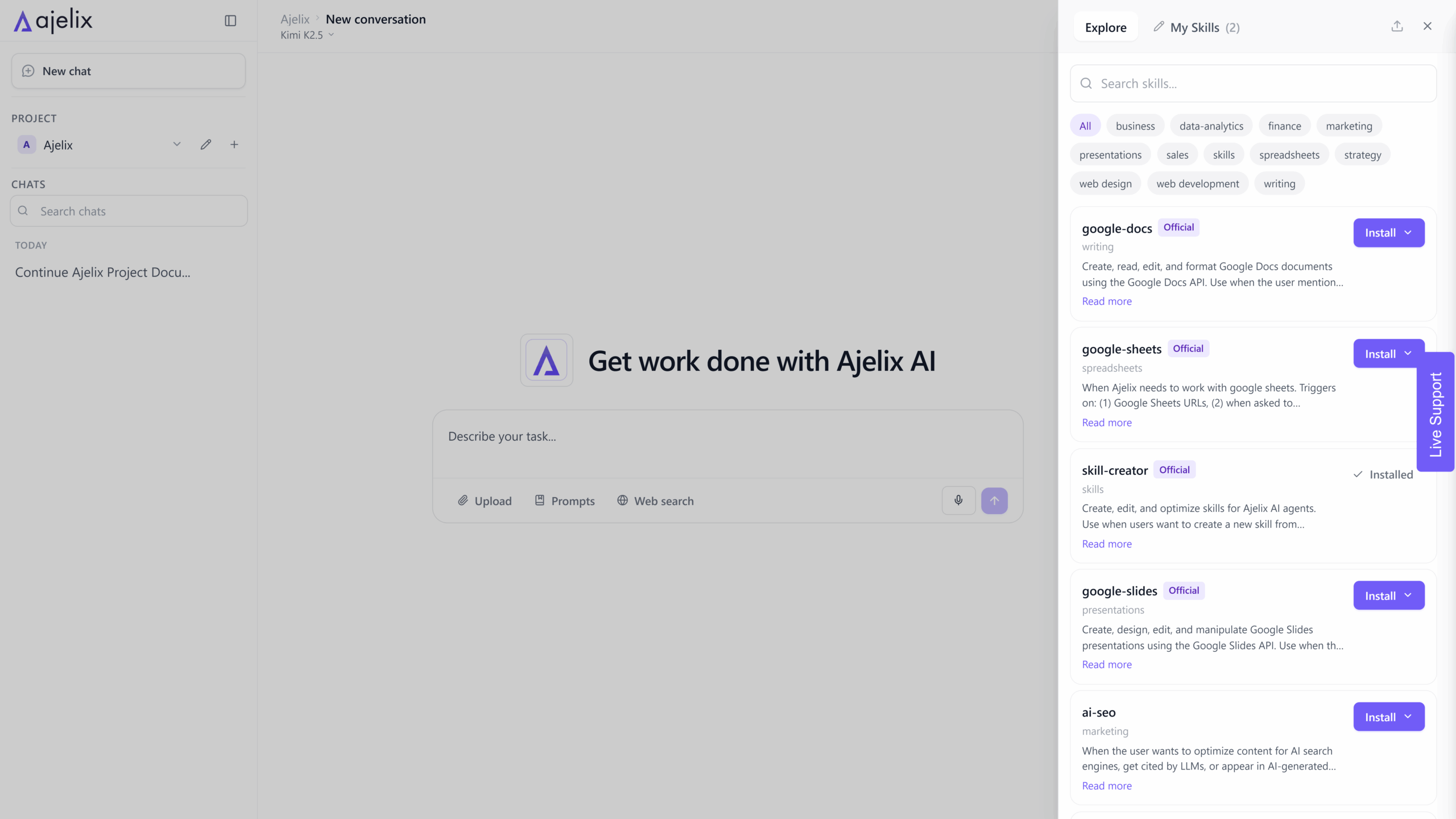
While platforms like OpenAI, Claude, and Cursor offer powerful built-in capabilities, Ajelix AI Agent skills take a different approach – they give you complete control over your agent’s skill set.
Three Ways to Add Skills in Ajelix
1. Create Your Own Skills
Ajelix lets you build custom skills from scratch. Whether you need a proprietary data connector, a specialized analysis tool, or a unique workflow automation, you can develop skills tailored to your exact requirements.
2. Import Existing Skills (.zip Format)
Have skills built elsewhere? Ajelix supports importing skills in .zip format. This means you can:
- Share skills across teams
- Import community-built capabilities
- Migrate skills from other projects
- Backup and version-control your skill library
3. Use the Skill-Creator Skill
Here’s where it gets meta – Ajelix includes a skill-creator skill that helps you build new skills. Instead of writing boilerplate code, describe what you want your skill to do, and the skill-creator generates the structure, handles the integration, and sets up the configuration.
Why Ajelix Skills Stand Out
| Feature | Ajelix Approach |
| Creation | Build from scratch, import, or use skill-creator |
| Format | Standardized .zip packaging for easy sharing |
| Flexibility | No lock-in – your skills, your control |
| Integration | Use Ajelix skills alongside external ones |
Using External Skills in Ajelix
You’re not limited to Ajelix-native skills. The platform is designed to work with skills from Claude, OpenAI, Cursor, and other providers. Ajelix acts as the orchestration layer, bringing capabilities from wherever they originate and making them work together.
This means:
- Import OpenAI function-calling capabilities
- Leverage Claude’s computer use features
- Adapt Cursor’s code-generation skills
- Mix and match the best capabilities from across the ecosystem
Ajelix acts as the orchestration layer – bringing together skills from wherever they originate and making them work together seamlessly.
How to Create Your Own AI Agent Skill
Creating a skill sounds intimidating. It’s not. Once you understand what a skill actually needs to contain, the rest is just filling in the blanks.
Start With a Clear Description
Before you write any code, write one or two sentences explaining what your skill does.
Good: “This skill searches the web and returns a summary of the top 3 results.”
Bad: “This skill uses HTTP requests to query a search API and processes the JSON response.”
The first explains the outcome. The second explains the implementation. You want the first.
A clear description helps the AI agent know when to use the skill and helps your team understand what they’re working with.
Define Your Inputs Carefully
Every skill needs to declare what information it requires. For each input, specify:
- The name
- The data type (string, number, boolean, list)
- Whether it’s required or optional
- A plain-English description of what it represents
That description matters more than you think. It’s not just documentation – it’s what helps the AI agent decide how to fill in the input correctly.
Be specific. Don’t write “the query.” Write “the search term the user wants to look up.”
Define Your Outputs Just as Carefully
Same logic applies on the output side. What does your skill return? Define every field with:
- Description
- Name
- Type
If your skill returns a summary and a source URL, say so explicitly. This allows the agent to pass your results to other skills or display them correctly.
Keep It Focused on One Thing
Here’s where most people go wrong: scope creep.
A skill that fetches weather data should fetch weather data. It shouldn’t also convert currencies, translate text, and send emails. The moment you find yourself adding a second unrelated feature, stop. Make a second skill.
Focused skills are easier to test, easier to debug, and far more reusable across different agents. Think of it like writing a good function: do one thing, do it well, and make it obvious exactly what that one thing is.
If you want to learn how to create skills in Ajelix, read this documentation.
FAQ
AI agent skills are the capabilities that allow an AI agent to take action in the real world – not just respond to questions. They define what an agent can do, whether that’s searching the web, reading files, calling APIs, or running code. Without skills, an agent is just a chatbot. With the right skills, it becomes a fully autonomous system that can complete complex tasks from start to finish.
Skills are the what – the capability itself. Tools are the how – the underlying mechanism that makes the capability work. A “research” skill is something the agent knows how to do. A search API is the tool it uses to do it. One skill can rely on multiple tools under the hood, which is why the distinction matters when you’re designing or debugging agents.
The most universally useful skills are web search, file reading and writing, code execution, and API integration. These four cover the majority of real-world use cases. Once you have those working reliably, you can start building more specialized skills on top – things like CRM lookups, data summarization, or custom workflow automation.
Yes. Ajelix is designed to work with skills from external providers including OpenAI, Claude, Cursor, and others. You’re not locked into a single ecosystem. You can mix and match skills from different platforms and let Ajelix orchestrate them together in a single agent workflow.
Start with a clear description of what your skill does, define your inputs and outputs carefully, write focused logic that does one thing well, and always handle errors explicitly. You can build from scratch, import a .zip file, or use the built-in skill-creator skill to generate the structure automatically. Full instructions are available in the Ajelix documentation.
It’s a skill that builds other skills. You describe what you want your new skill to do in plain language, and the skill-creator generates the configuration, structure, and integration setup for you. It’s Ajelix’s way of making skill creation accessible to anyone – not just developers.
Not necessarily. Platforms like OpenAI’s Custom GPTs and Ajelix’s skill-creator let you define and configure skills without writing code directly. That said, if you want full control over the logic, error handling, and integrations, some coding knowledge goes a long way. Python is the most common language used for skill development.
Agentic AI chat that helps you complete projects
AI for work that ingests, transforms, and delivers the exact deliverables your team needs, while you stay focused on strategy. No more chatting, agents can get the job done.