YouTube Analytics AI Dashboard & Template: Analyze Performance
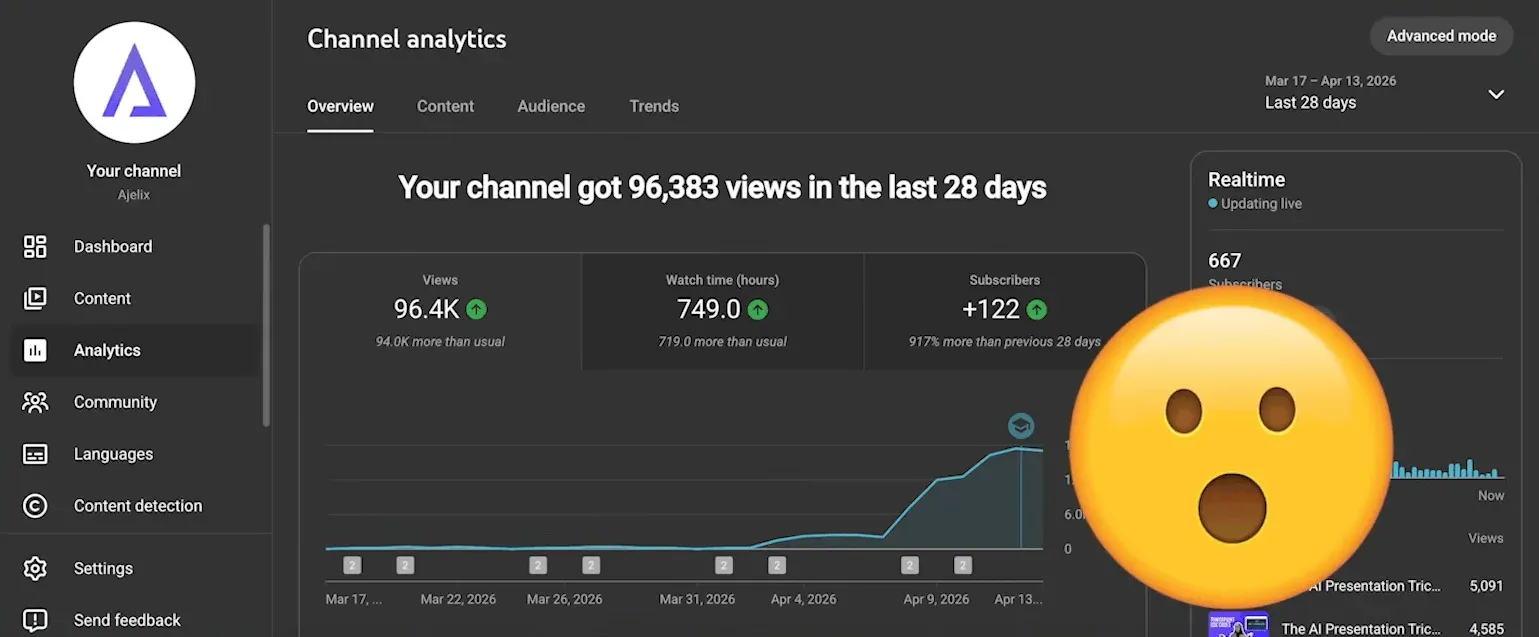
In one week, a single AI-powered YouTube analytics session led to a hockey-stick views spike and a record high in new subscribers. The workflow takes about 10 minutes, costs nothing to start, and turns your raw YouTube data into a visual analytics dashboard that tells you exactly which titles, formats, and topics drive real growth, and which ones don’t.
Don’t believe me? Check the hockey stick growth screenshot from the official Ajelix YouTube account after we did the analysis and implemented learnings in our next videos:
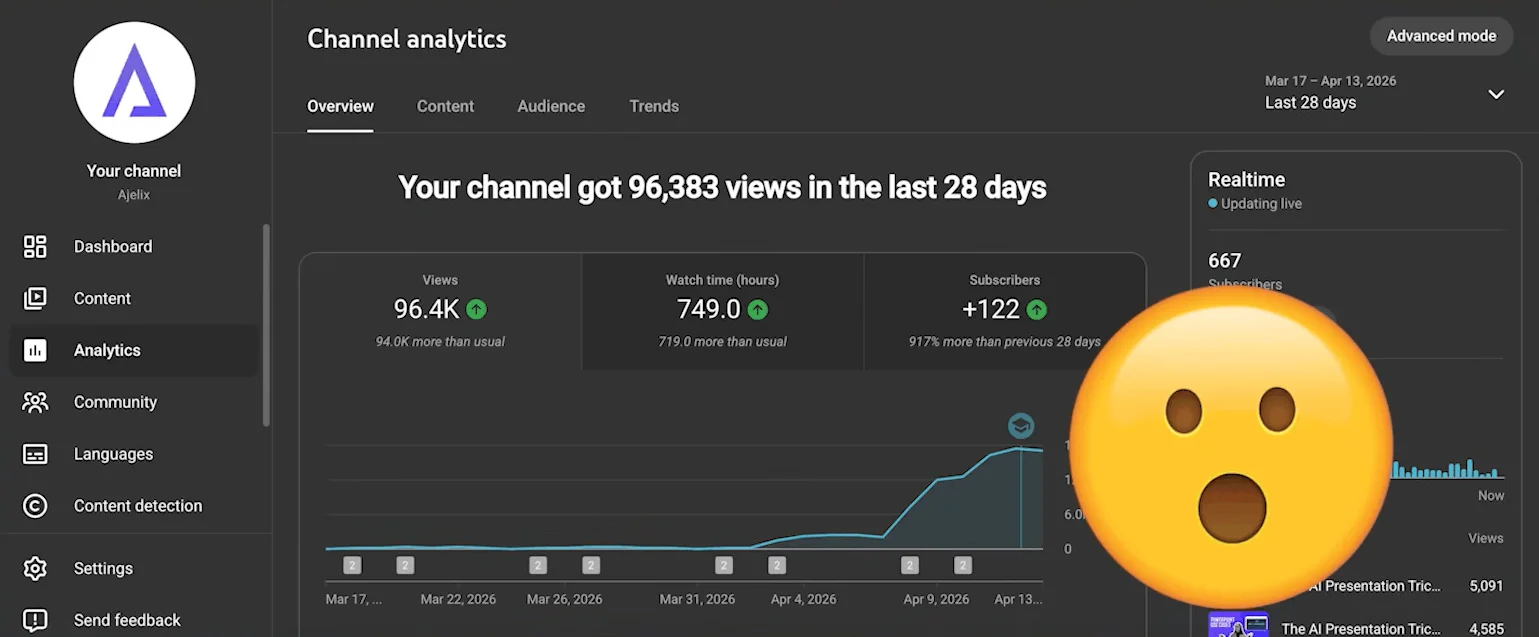
We’re going to share the exact process we did in this article.
Video Walkthrough
Watch the full step-by-step tutorial below (or skip to the guide below):
What YouTube Studio Analytics Won’t Tell You
YouTube Studio gives you standard YouTube channel analytics: views, watch time, and subscriber counts. It looks clean. It feels useful. But it has a critical blind spot: it doesn’t connect the dots.
It won’t tell you why a specific video outperformed another. It won’t show you the relationship between your title formula, video format, length, and engagement. That gap is where most creators stay stuck, optimizing based on gut feeling instead of pattern recognition.
That’s precisely where a YouTube Analytics AI workflow changes everything.
Build Your YouTube Analytics AI Dashboard
1. Export Your Data from YouTube Studio Advanced Mode
The first step to proper YouTube video analytics is getting the right data out of YouTube Studio.
- Open YouTube Studio and navigate to Analytics
- Switch to Advanced Mode. This is where the real data lives
- Set your time period (last 30 days is a solid starting point)
- Select the metrics that matter for deep analysis:
- Unique viewers
- New viewers vs. returning viewers
- Subscribers gained
- Likes and dislikes
- End screen and card performance
- Add any other metric you want to connect or analyze
- Click Apply, then hit Export Current View
- Export as Google Sheets or CSV
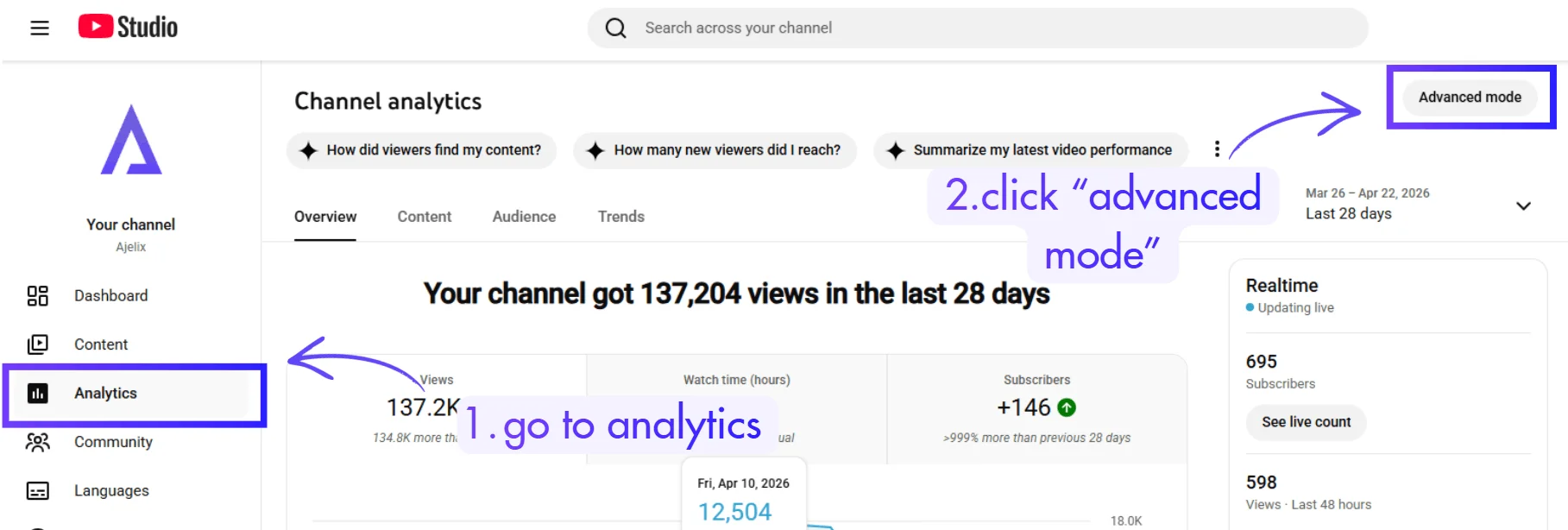
You now have a raw data table: full of numbers, but not yet telling you anything. That’s about to change.
2. Connect Your Data to an AI Agent
Head over to chat.ajelix.com. This is an agentic AI chat tool that can read your spreadsheet data, run a deep analysis, and generate a fully visual YouTube analytics dashboard, right inside the chat window.
Here’s how to set it up:
- Paste your prompt: give the AI context. For example: “I’ve been publishing videos on YouTube for 2 months, and I need to understand what’s working and what isn’t. Analyze the formats, title names, and engagement data to understand what performs best, and create a dashboard showing the most useful learnings and what I should target next.”
- Upload your data: drag and drop your CSV, or share your Google Sheets link directly (set sharing to “anyone with the link”)
- Enable Web Search in the tool settings
- Enable the Google Sheets skill <- this is critical. Without it, the AI won’t know how to interpret your spreadsheet structure
- Hit Start Task
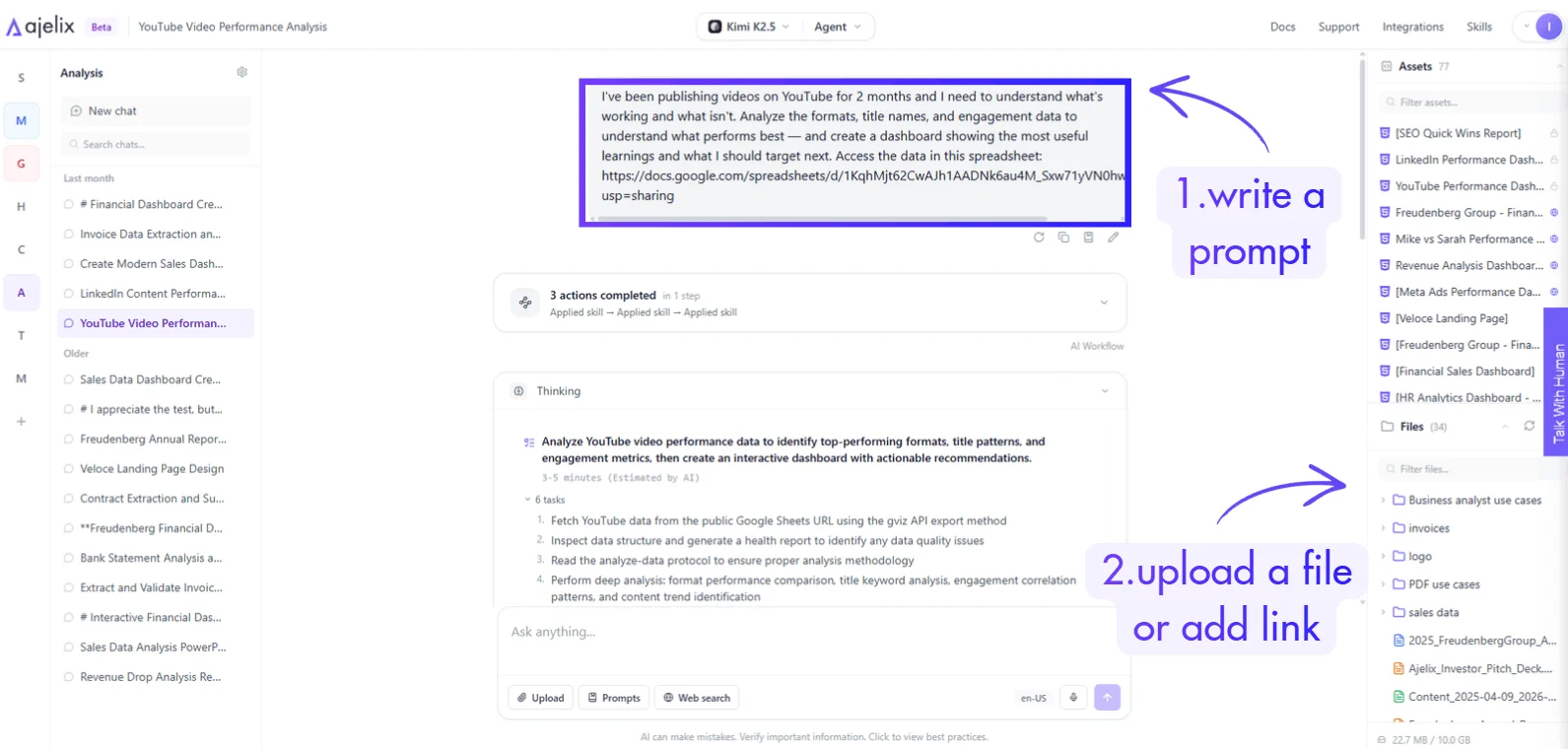
The AI agent will reason through a work plan, outline its approach, then execute: it analyzes every video, identifies patterns, and builds a youtube video analytics dashboard as an interactive HTML output directly in the chat.
3. Read the Dashboard and Extract Actionable Insights
This is where the YouTube Analytics dashboard template pays off. The AI-generated analytics dashboard breaks down your content by:
- Title pattern performance hook titles, role-targeted titles, disruption titles, how-to formats, number lists, etc.
- View count by format and topic
- Engagement rates by video length (for this channel, two-to-five-minute videos consistently outperformed)
- Subscriber conversion by content type
Here’s the dashboard we got from AI analytics:
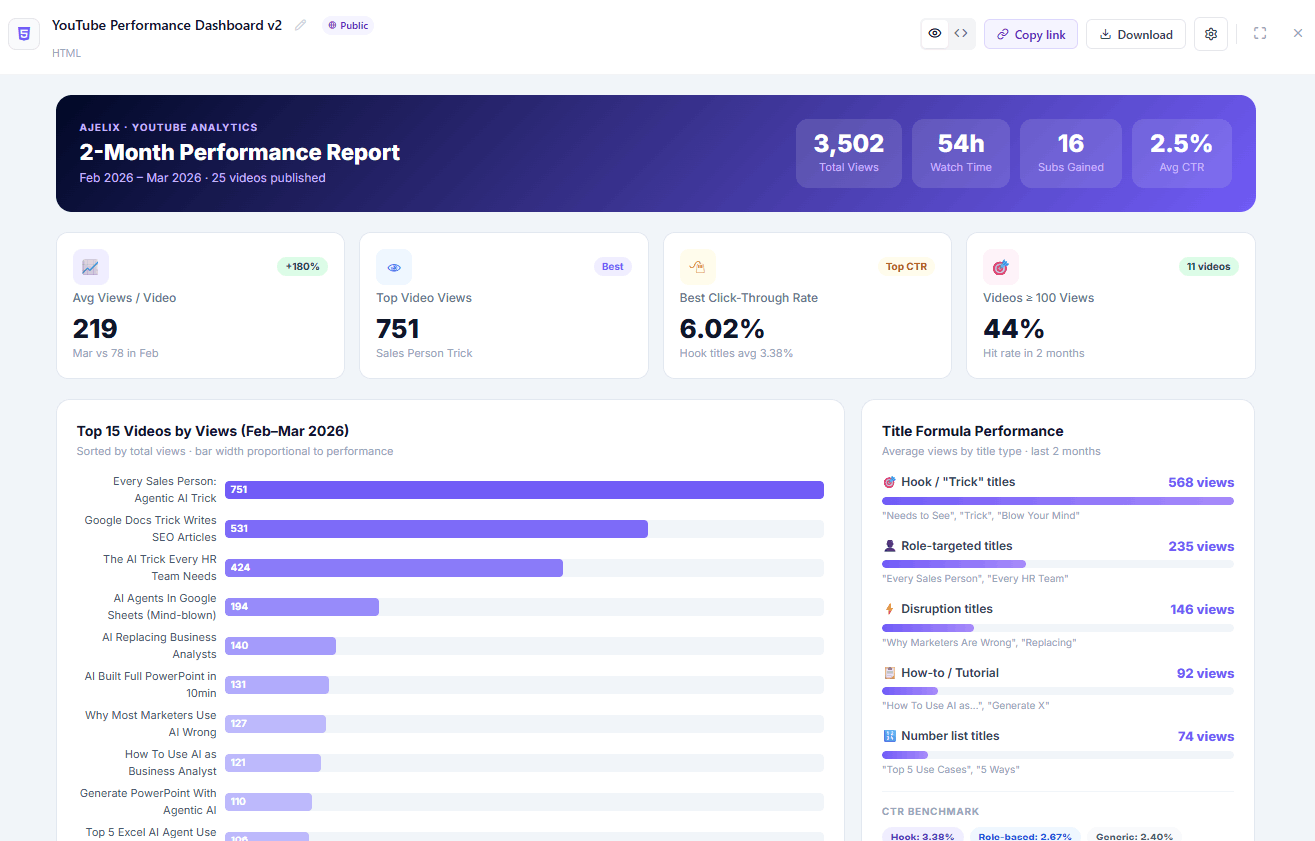
This is a practical, real-world analytics dashboard example, not a static template you fill in manually, but an AI-built view tailored to your channel’s specific data.
In the example from this video, the analysis revealed:
- Best performing title types: Hook titles, role-targeted titles, and disruption-framing titles
- Worst performing title types: Generic how-to and numbered list titles
- Optimal video length: 2–5 minutes for maximum engagement
Those insights were shared with the team, applied to upcoming video titles and formats, and within a week, one video drove a hockey-stick views spike and a record subscriber count. That’s not luck. That’s pattern recognition applied at speed.

Why This Beats Manual YouTube Analytics
Standard youtube analytic tools show you what happened. AI-powered analysis shows you why it happened, and what to do next.
| Standard YouTube Studio | YouTube Analytics AI |
|---|---|
| Views, watch time, impressions | Pattern analysis across all videos |
| Basic charts | Interactive youtube analytics dashboard |
| Manual interpretation | AI-generated insights and recommendations |
| No title/format correlation | Clear title formula performance breakdown |
| No engagement depth | Engagement by length, format, and topic |
This approach works equally well for youtube shorts analytics. If you export your Shorts data separately, the same workflow applies and gives you a dedicated YouTube Shorts analytics dashboard view for short-form performance.
How to Check YouTube Analytics the Right Way (Quick Reference)
If you’re new to this, here’s the condensed version of how to check youtube analytics properly:
- Go to YouTube Studio → Analytics → Advanced Mode
- Choose a meaningful time range (minimum 30 days for reliable patterns)
- Add engagement-depth metrics beyond just views
- Export to Google Sheets or CSV
- Feed into an AI agent with a focused prompt
- Let the AI build the youtube analytics dashboard template
- Extract title, format, and length insights
- Apply changes to your next 3–5 videos and track the delta
What Else Can You Do With an AI Agent? (More Use Cases)
The YouTube analytics workflow above is one example of a much broader shift in how teams and creators are using agentic AI. The same principle, connect your data, write a focused prompt, and get a built output, applies across almost every area of a business.
1. For data and analytics work
AI agents are replacing hours of manual reporting. You can feed a raw HR spreadsheet and get a fully formatted AI-powered HR analytics report automatically.
Point it at your Google Analytics data, and it surfaces patterns you’d never spot manually. The same applies to financial work: P&L analysis in Google Sheets, financial models in Excel, and financial analysis workflows can all be handled by an agent that reads your data and builds the output for you.
2. For spreadsheets and dashboards
Agentic AI is particularly powerful. Whether you need to create an Excel dashboard in one click, build charts in Excel, turn a Google Sheet into a visual dashboard, or create reusable Excel templates, an AI agent handles the heavy lifting. There’s even a dedicated AI Agent add-on for Google Sheets that builds charts and KPIs directly inside your spreadsheet, no export needed.
3. For content, presentations, and documents
The use cases are just as strong. Instead of building slides from scratch, you can transform raw sales data into a professional PowerPoint deck automatically, or use a Google Slides AI add-on that generates the whole presentation for you. On the writing side, an AI agent inside Google Docs can research and write an entire blog post — including SEO-focused content. Need a landing page? There are no-code AI workflows for that too. And if your data is locked inside PDFs, AI agents can extract and transform it in four different ways without any manual copying.
4. For marketing and strategy
Agentic AI is becoming a serious analytical layer. From diagnosing why your LinkedIn posts aren’t getting traction to running agentic web research for competitive intelligence, or using AI as a proper business analyst, the top marketing use cases for agentic AI all follow the same pattern: give the agent context, give it data, let it reason and build.
If you’re only using AI as a writing assistant right now, you’re using about 10% of what it can actually do.
The Bottom Line
A YouTube Analytics AI workflow isn’t a complex data science project. It’s a 10-minute process that converts a confusing spreadsheet into a clear, visual youtube analytics dashboard with real recommendations. The creators who grow consistently aren’t the ones who post more, they’re the ones who know what their data is telling them and act on it.
If you’re doing YouTube and skipping this step, you’re leaving your best insights on the table.
Try it free at chat.ajelix.com, no setup required, free tier available.
Frequently Asked Questions
YouTube Analytics AI refers to using an AI agent or AI-powered tool to analyze your YouTube channel data, including views, engagement, watch time, title performance, and subscriber behavior, and surface actionable insights automatically. Instead of reading raw numbers, the AI interprets patterns across your entire video library and tells you what’s working and why.
They serve different purposes. YouTube Studio shows you what happened — views, watch time, impressions. A YouTube Analytics AI workflow shows you why it happened and what to do next. It connects title patterns, video formats, length, and engagement data in ways YouTube Studio’s native reporting doesn’t support.
Go to YouTube Studio → Analytics → Advanced Mode. Select your date range and the metrics you want (unique viewers, new viewers, subscribers gained, likes, end screens, cards), then click “Export Current View.” You can export as a Google Sheets file or CSV — both work for AI analysis.
Yes. Export your Shorts data separately using the same Advanced Mode export process. When you upload it to the AI agent, specify in your prompt that the data is Shorts-only. The AI will analyze performance patterns specific to short-form content and build a YouTube Shorts analytics dashboard tailored to that format.
The full workflow: exporting data from YouTube Studio, uploading it to the AI agent, running the analysis, and getting a visual dashboard, takes approximately 10 minutes. The AI does the analysis and dashboard generation automatically; your job is just to write a clear prompt and apply the insights.
The AI analysis is only as good as the data you export. Use at least 30 days of data for statistically meaningful patterns, and include engagement-depth metrics (not just views). The more context you give the AI in your prompt, channel niche, goals, what you’re trying to improve, the more targeted and accurate the output will be.
No. The agentic AI handles all the analysis and dashboard creation. You write a plain-language prompt describing what you want to understand, upload your spreadsheet, and the agent builds the output. No formulas, no coding, no pivot tables required.
Yes. chat.ajelix.com has a free tier available with no setup required. You can run the full workflow: upload your YouTube export, analyze your data, and generate a dashboard without a paid subscription to get started.
Agentic AI chat that helps you complete projects
AI for work that ingests, transforms, and delivers the exact deliverables your team needs, while you stay focused on strategy. No more chatting, agents can get the job done.


