Convert PDF To Excel Using AI: 4 Ways AI Agents Work With PDFs
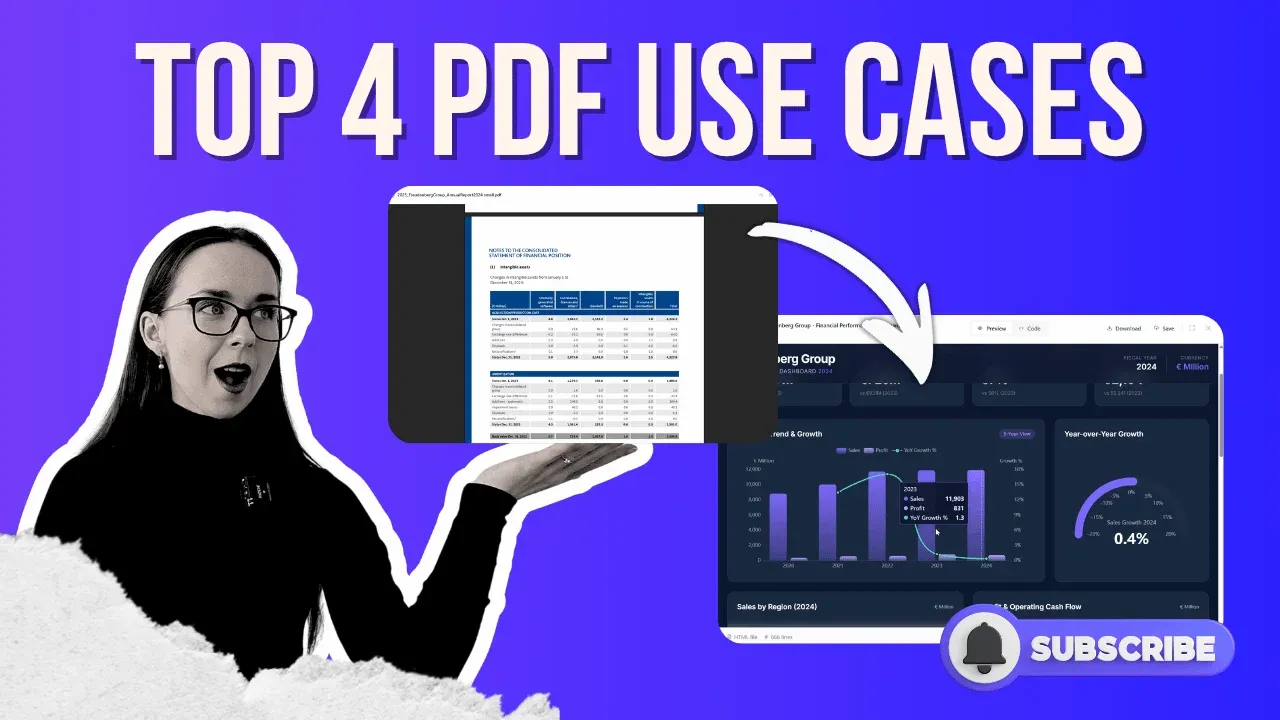
You can convert PDF to Excel using AI in under 5 minutes, no manual copy-pasting, no formatting errors, no missed rows. But extraction is just the starting point. Today’s AI agents go much further than that.
In this guide, you’ll see exactly how to:
- Convert PDF invoices to Excel: pull line items, quantities, prices, and totals from multiple invoices with different layouts into one clean, validated spreadsheet
- Turn bank statements into Excel: extract every transaction, auto-categorize spending by type, and generate a monthly summary table ready for reporting
- Transform a 60-page PDF report into an interactive dashboard: charts, trends, regional breakdowns, and a board-ready visual, built in minutes
- Summarize legal contracts into a Word document: extract payment terms, termination clauses, and penalty clauses without reading 40 pages
Whether you’re dealing with invoices, bank statements, annual reports, or contracts, an AI agent handles all of it end-to-end. This is your practical answer to the question everyone in finance and operations is asking: how do I stop wasting hours on PDFs every week?
Why Manual PDF Processing Is Costing You More Than You Think
How much time did your team spend last week pulling data out of PDFs? For most finance and operations professionals, the honest answer is hours, every single week. The frustrating part isn’t the time itself. It’s that the work is entirely unnecessary.
Whether you’re dealing with invoices, bank statements, annual reports, or legal contracts, an AI agent handles all of it end-to-end. No copy-pasting, no formatting errors, no missed rows. If you’ve been searching for a reliable ai tool to convert PDF to excel, or wondering how to convert PDF to Excel without doing it manually, this guide is your answer.
You may also like use case on how to perform financial modelling in Excel.
The Tool To Work With PDFs
All four use cases in this guide are demonstrated using chat.ajelix.com, an AI agent platform built for exactly this kind of document-heavy workflow. Unlike a basic chat tool or a standard excel to pdf converter, Ajelix operates as a true agent: it reads your files, builds a step-by-step work plan, executes tasks autonomously, and gives you a downloadable result.
There’s a free trial available, no credit card required to start.

Use Case 1: Convert Multiple PDF Invoices Into One Excel Spreadsheet
What it does: Extracts line items, quantities, unit prices, and totals from multiple invoices, even when each PDF has a completely different layout, and consolidates everything into a single, structured Excel file.
This is the core PDF to Excel use case. If you’re manually keying invoice data or copy-pasting between files, this workflow replaces that entirely. You can view the full breakthrough in the video.
How it works:
- Upload your invoice folder to chat.ajelix.com (you can drop an entire folder with several PDFs at once)
- Use a prompt like: “Extract all line items, quantities, unit prices, and totals from this invoice PDF and organize them into an Excel spreadsheet. Validate that the line item totals match the invoice grand total.”
- Review the AI’s work plan before it begins, this is what separates an agent from a simple chatbot
- Click Start Task and wait approximately 3–5 minutes
- Download the Excel file with vendor names, invoice numbers, dates, descriptions, quantities, and unit prices, all validated
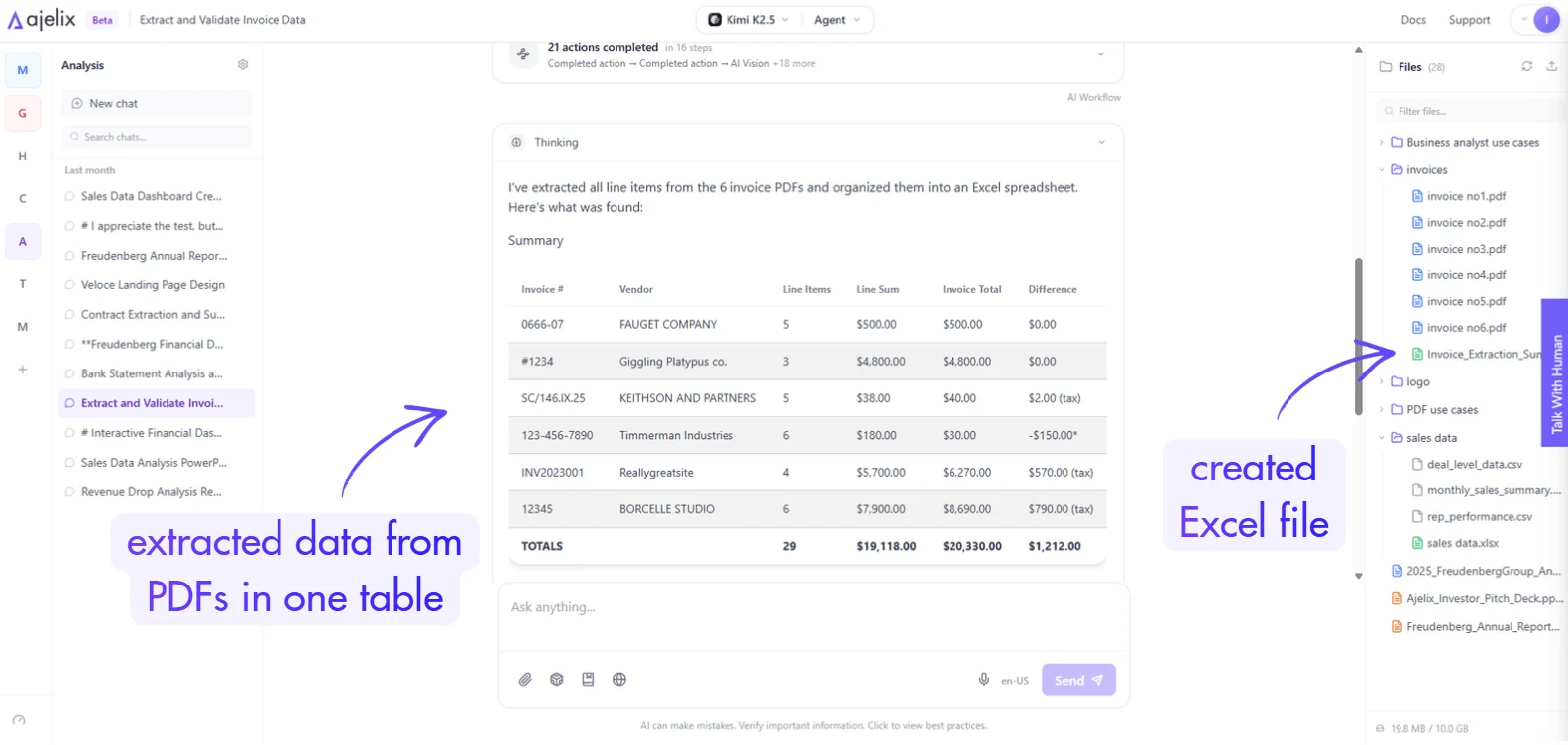
Result: A clean convert PDF to Excel spreadsheet output, ready for analysis, pivot tables, or accounting workflows. Tested against real invoices, the totals matched perfectly.
This scales. You can upload hundreds of invoices at once and get the same structured output, something no adobe pdf to excel converter doing basic OCR can reliably produce.
Use Case 2: Bank Statement to Excel – Categorized and Summarized
What it does: Pulls every transaction from a bank statement PDF, categorizes spending by type (groceries, dining, retail, income, etc.), and builds a monthly summary table in Excel.
If you’ve ever searched for a bank statement converter AI or tried to manually format a bank statement to Excel, this use case will save you significant time, especially when working with multi-month statements.
How it works:
- Upload your bank statement PDF
- Prompt: “Extract all transactions from bank statement PDF file in the workspace, categorize them by type and build a monthly summary table in Excel with a category breakdown.”
- Review the work plan, then click Start Task
- Download the Excel file
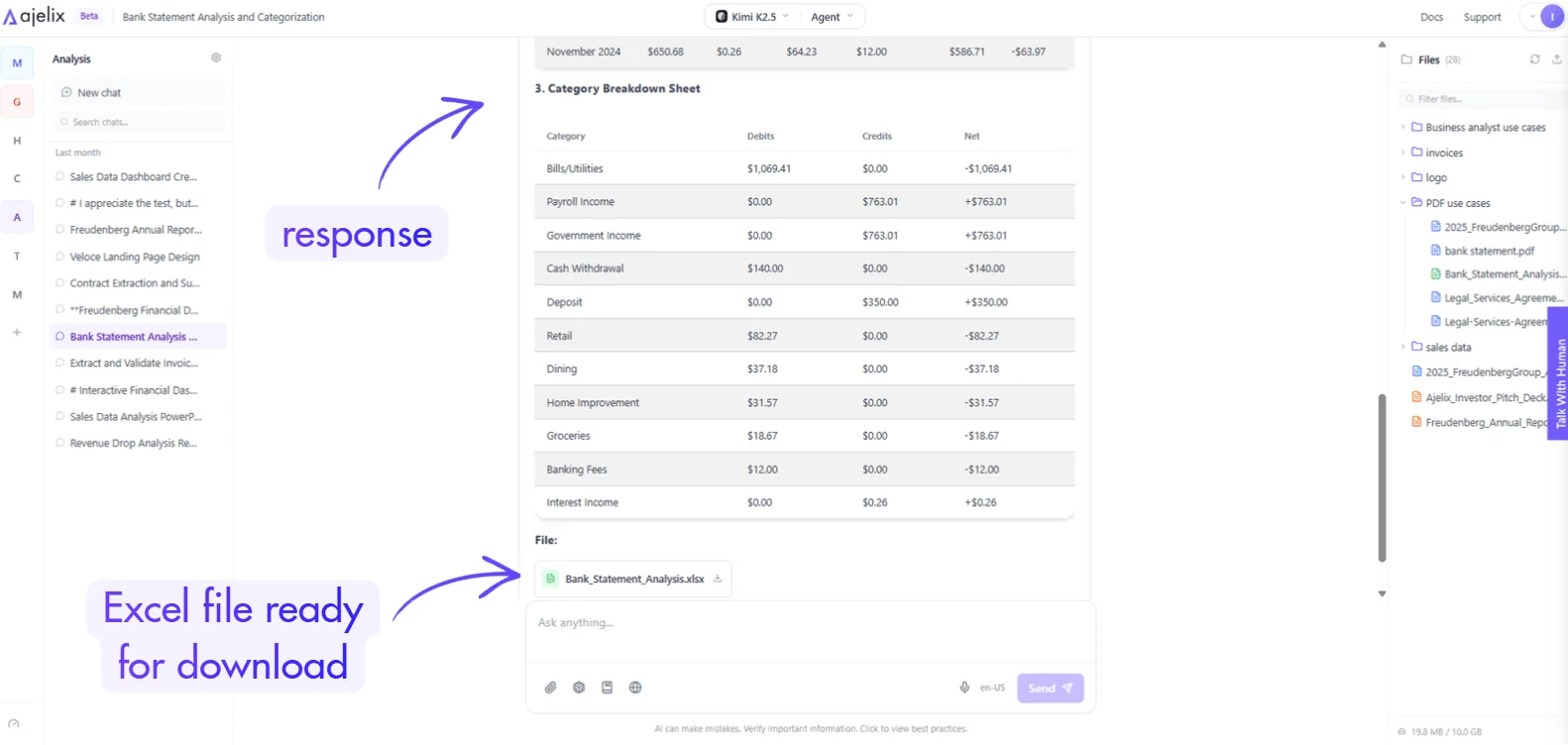
Result: Three structured sheets: transaction details, monthly summary, and a category breakdown (interest, income, groceries, dining, retail, and more). Every transaction is timestamped and categorized.
The real value here isn’t just the extraction, it’s the categorization. Manual categorization of 200+ transactions introduces errors. PDF to Excel AI handles it in under 5 minutes. You may also like the article on the Excel template generator.
Use Case 3: Turn a 60-Page PDF Report Into an Interactive Dashboard
What it does: Reads a lengthy PDF annual report, extracts the key data tables, and generates a sleek, branded interactive dashboard, ready to present to your board or management team.
This is where PDF summarizer capabilities meet data visualization. Instead of building charts manually from a report, the AI reads the document and creates the visual output for you.
How it works:
- Upload your PDF annual report (tested with a ~60-page document)
- Prompt: “Extract most important data tables from [report name], then create a visual dashboard with charts showing revenue trends, year-over-year growth, and key performance metrics. Make sure to use my brand colors #715cf7, the design should be sleek, modern, and ready to present to the board. Provide the output here in the chat as an asset.”
- Review the five-step work plan, then start
- View the dashboard directly in chat, then publish it with a shareable link
Result: A fully interactive dashboard with revenue trends, profit, operating cash flow, regional sales, sector breakdowns, and a balance sheet summary, built in about 5 minutes. Check the report below, we generated in the video
The same approach works if you want to make notes from PDF AI or repurpose report content into presentations. It’s the same fundamentals as ppt to pdf ai workflows, let the agent handle the formatting while you focus on the message.
Use Case 4: Legal Document Summary, Extract What Matters
What it does: Reads a multi-page legal agreement and extracts payment terms, termination clauses, and penalty clauses into a clean, formatted Word document summary.
Nobody has time to read 40 pages of legal language before a meeting. This is notes from PDF AI applied to a real business scenario, and it’s one of the highest-value use cases in the guide.
How it works:
- Upload your legal services agreement (or any contract PDF)
- Prompt: “Read this contract about legal services. Extract the main payment terms, termination clauses, and any penalty clauses. Format this into a clean Word document summary.”
- Accept the work plan and start
- Download the Word document
Result: A structured Word summary covering hourly rate structures, payment schedules, termination by withdrawal, penalty clauses, and billing dispute processes. completed in 2–3 minutes.
Walking into a contract review meeting with an AI-generated brief means you spend time on negotiation, not comprehension. This is how smart teams use AI to work faster without cutting corners.
What AI Can Do With Your PDFs Right Now
| Use Case | What You Get | Time Saved |
|---|---|---|
| PDF invoices → Excel | Structured, validated invoice data table | Hours per week |
| Bank statement → Excel | Categorized transactions + monthly summary | 1–2 hours per statement |
| Annual report → Dashboard | Interactive, shareable visual dashboard | Half a day of manual work |
| Legal contract → Summary | Word document with key clauses extracted | 30–60 min of reading |
How To Get Started
Every workflow shown here is available at chat.ajelix.com, free trial included.
If your business runs on PDFs: invoices, statements, contracts, reports, and you’re still processing any of this manually, you’re leaving hours on the table every single week. The question isn’t whether you can convert PDF to AI-powered workflows. You already can. The question is how long you’ll wait before you start.
Found this useful? Subscribe to the Ajelix YouTube channel for more walkthroughs on AI-powered document and data workflows.
Agentic AI chat that helps you complete projects
AI for work that ingests, transforms, and delivers the exact deliverables your team needs, while you stay focused on strategy. No more chatting, agents can get the job done.