AI Assistant vs AI Agent: Differences & Top Business Use Cases

Everyone’s using AI, but few people know what they’re actually using. The difference between an AI agent vs AI assistant isn’t just terminology. It determines what AI can and can’t do for you.
If you’ve ever wondered why ChatGPT stops at an answer while other tools complete the task, that gap has a name. One waits for your next instruction. The other gets to work.
What Is an AI Assistant?
An AI assistant is an intelligent application that understands natural language commands and uses a conversational AI interface to complete tasks for a user.
The core characteristic is that it is reactive. You bring the question, it brings the answer. It won’t do the research unprompted, send the email it just drafted, or follow up on anything. Every step of the workflow still requires your instruction.
This is where the term conversational AI becomes important. AI assistants are built around dialogue. They process your input using LLMs (Large Language Models), generate a response, and wait. There is no memory of what came before (unless the tool explicitly supports it), background processes running, or initiative taken without your instruction.
Common examples include ChatGPT, Amazon Alexa, and Microsoft Copilot. Each operates as a virtual assistant within its own interface – answering questions, helping with writing, summarizing content, and supporting decision-making through conversation.
The limitation is by design. AI assistants are optimized for response quality, not task completion. They’re built to inform and assist, not to act independently across systems or see a multi-step workflow through to the end.
That distinction matters and it’s exactly what separates them from AI agents.
What Is an AI Agent?
An AI agent is a system that plans, executes, and delivers a finished output toward a goal – without needing step-by-step guidance. Unlike an AI assistant that stops at a response, an AI agent completes the work.
Example. Ask an AI assistant to research your top three competitors and summarize their pricing. It’ll likely hit a wall. Give the same task to an AI agent, and it searches the web, pulls the data from each page, and hands you a structured summary.
What makes an AI agent distinct comes down to four core properties:
- Autonomy. It operates independently, without step-by-step human direction.
- Goal-Orientation. It works toward an outcome, not just a single response.
- Tool Use. It connects to external systems to gather information and take action.
- Adaptability. It adjusts its approach based on what it finds along the way.
Those four properties, working together, are what make an AI agent something fundamentally different from any automation tool that came before it.
Common examples include Ajelix, Claude (when operating in agentic mode), and AutoGPT. Each is built to handle multi-step workflows. Ajelix, for instance, connects directly to your spreadsheet data, generates analysis, and builds output without you managing every step.

That’s the difference in practice: the agent decides what to do next. You just define where you want to end up.
AI Agent vs AI Assistant: Key Differences
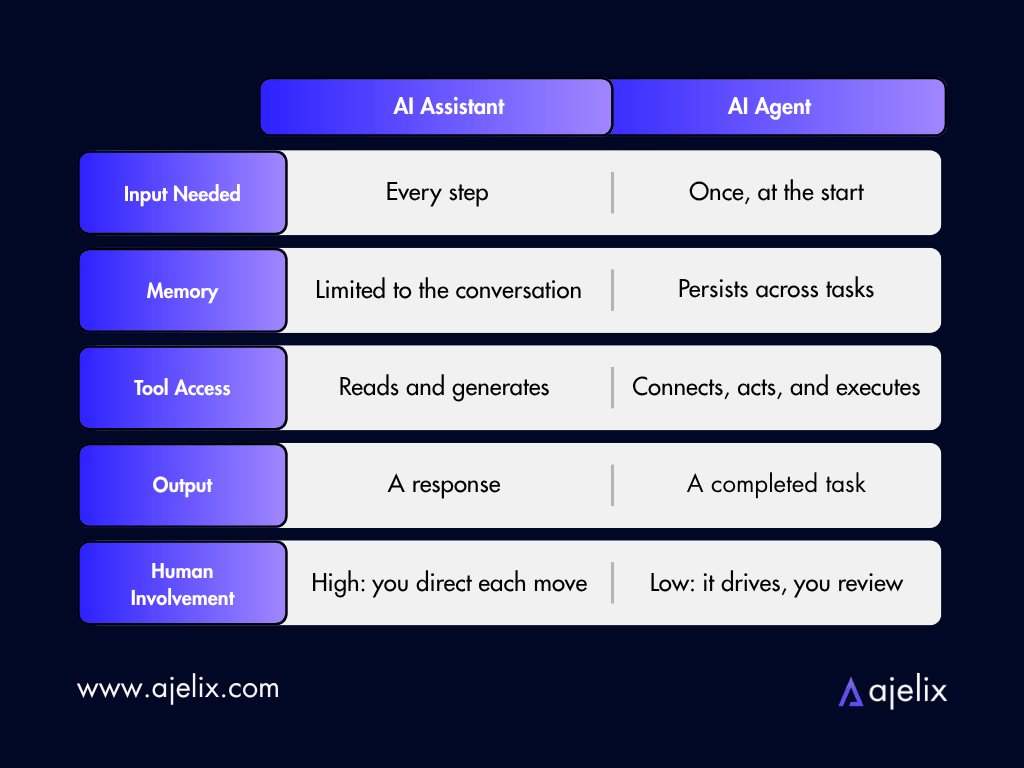
An AI assistant responds to your input. An AI agent acts on a goal. The three distinctions that define this gap are initiative, tool use, and scope, and together they determine which type of AI belongs in which situation.
But that one-line gap plays out across every dimension of how these tools work. Understanding it changes how you evaluate any AI product you come across.
1. Initiative: Waiting vs Acting
AI assistants wait. They have no concept of “what comes next” unless you provide it.
An AI agent starts with a goal and figures out what comes next on its own – searching, deciding, adjusting, and delivering.
2. Tool Use: Generating vs. Connecting
AI assistants generate text based on what they know. AI agents connect to external systems, such as browsing the web, reading files, running code, and calling APIs, to gather what they need and act on it. That’s a structural difference.
3. Scope: Conversations vs. Workflows
AI assistants excel inside a single conversation. AI agents operate across workflows – tasks that span multiple steps, tools, and decisions. Where an assistant hands you the plan, an agent runs it.
This doesn’t make one better than the other. It makes them suited to different jobs, which is what Section 6 covers.
Is ChatGPT an AI Assistant or an AI Agent?
The tool people most often associate with AI is ChatGPT. If you’ve made it this far, you are probably wondering whether ChatGPT is an assistant or an agent.
The honest answer: it’s both, depending on how you use it.
For most users, ChatGPT operates as an AI assistant. You type a question, it generates a response. You ask it to draft an email, it drafts the email. It doesn’t send it, schedule a follow-up, or check your inbox afterward. That’s the assistant experience – reactive, conversational, and entirely driven by your prompts.
But OpenAI has been steadily pushing ChatGPT into agent territory. In July 2025, it launched Agent Mode – a unified system combining web browsing, deep research, and conversational intelligence in a single workflow.
By March 2026, Agent Mode had expanded to all paid plans (Plus, Pro, Team, Business, Enterprise, and Edu) and now runs on GPT-5.4. It is OpenAI’s most capable model to date, which brings together advanced reasoning, coding, and agentic execution into one system – roughly 25% faster than its predecessor.
In practice, ChatGPT can now browse websites, fill in forms, run code, analyze competitors, and deliver editable spreadsheets – all from a single instruction. The model decides what steps to take and in what order. You review the output.
So where does that leave the classification?
- Default ChatGPT (free plan): AI assistant. Reactive, prompt-driven, no autonomous action.
- ChatGPT with Agent Mode (paid plans): AI agent. Goal-driven, multi-step, acts on your behalf across the web.
The most important thing to understand is that these aren’t two different products. They’re two different modes of the same tool. What determines which one you’re working with is whether Agent Mode is active, and whether you’ve given it a task or a question.
For casual users, ChatGPT still functions as a highly capable assistant. For teams on paid plans using Agent Mode, it’s increasingly operating as a true agent. With each model update, the line between the two continues to blur.
AI Assistant vs AI Agent: Business Use Cases
The difference between an AI assistant and an AI agent becomes most obvious when you put them side by side on the same task. As ChatGPT is likely most familiar to you, I will use its AI Assistant mode in comparison to our AI agents at Ajelix.
Here’s what that looks like in three common business scenarios.
1. Financial Reporting
Hand a financial reporting task to ChatGPT and you’ll get a solid starting point: template structure, formula recommendations, setup walkthrough.
What it won’t do is build it. You take the advice, open Excel, and do the work yourself.
Give the same task to Ajelix and the output is the file itself. Upload your raw sales data, describe what you need, e.g. revenue projections, expense forecasts, scenario planning, and the agent builds a complete, formatted financial model ready to open and use. No formulas to write or formatting to fix.
See it in action:
2. Business Data Analysis
Ask ChatGPT to analyze your dataset and it will tell you what to look for, which chart types suit your data, and how to interpret the trends. Useful, but the analysis still lives in the chat window. Turning it into something shareable takes another round of work from you.
Ajelix connects directly to your spreadsheet, runs the analysis autonomously, and builds the charts and interactive dashboard in one workflow. The output is a finished deliverable built from data (even raw data).
See it in action:
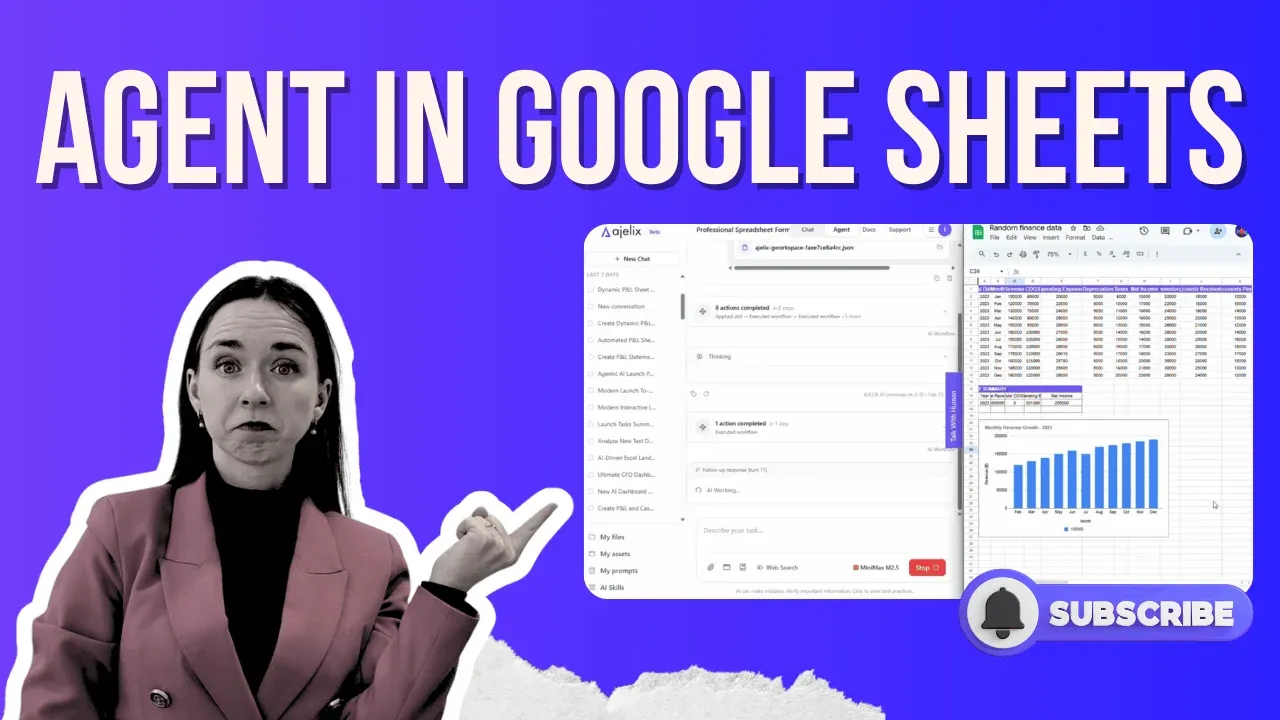
3. Google Sheets Workflow Automation
ChatGPT can write a formula for your Google Sheet if you describe what you need. Paste it in, apply it, format the columns, build the chart, export – that’s all still on you.
For a one-off task, that’s manageable. For anything recurring, it adds up fast.
Ajelix takes a different approach entirely. Grant it access to your sheet and it handles the full workflow, e.g. applying formulas, auto-formatting, generating charts, and exporting a finished PDF, without you touching the file between start and finish.
See it in action:
4. Landing Pages
Ask ChatGPT to help build a landing page and you’ll get headline structures, copy frameworks, section breakdowns, maybe some HTML.
But the writing, the design decisions, the code, and the assembly are all still yours to execute. That’s hours of work, even with a solid AI prompt as a starting point.
Ajelix approaches this differently. In agent mode, it browses your existing site for brand context, researches your positioning, writes conversion-focused copy, structures the layout, and generates production-ready HTML, CSS, and JavaScript – all in a single workflow.
The output isn’t a brief or a template. It’s a deployable page, including hero section, feature breakdown, social proof, and FAQ.
For marketing teams running multiple campaigns, it’s the difference between launching this week and launching next month.
See it in action:
5. Market Research
Ask ChatGPT to research a market and you get a summary built from training data. No live sources or structured output, nothing you can hand directly to a team.
Give the same brief to Ajelix and it searches the web in real time, pulls competitor data, pricing benchmarks, and audience signals, then compiles everything into a structured report ready to use.
See it in action:
6. SEO, Content & Keyword Research
Ask ChatGPT for keyword ideas and you get a list. Turning that into a content strategy, mapping keywords to pages, and writing optimized copy still takes hours of manual work.
Ajelix handles the full workflow: researches keywords, identifies gaps, maps them to a content structure, and produces ready-to-publish SEO copy. The output is a complete content asset, not a starting point.
See it in action:
7. E-Commerce
Ask ChatGPT to write product descriptions or plan a promotional campaign and it produces text. Scaling that text across a catalog, formatting it, and pushing it live is still on you.
Ajelix takes a product brief and generates store-ready content at scale: descriptions, meta copy, and campaign assets in one workflow. For teams managing large catalogs, that replaces days of manual copy-paste.
8. Dashboards
Ask ChatGPT to build a dashboard and it recommends tools, outlines structure, and suggests charts. Building the actual dashboard is still a separate project.
Ajelix connects to your data and generates a fully interactive dashboard in one pass, with charts, KPIs, and filters included. The output opens and works immediately.
See it in action:
The pattern across all of them is the same: an AI assistant moves you closer to the finish line, while an AI agent crosses it.
If you want to see all of this in a single overview, Ajelix’s launch demo covers four of the most common agentic use cases back to back: Ajelix Agentic AI Chat: 4 Game-Changing Use Cases →
When Should You Use an AI Agent vs an AI Assistant?
If the AI’s output is a starting point rather than a finished product, you need an agent. Use an assistant when your task is a single step and your judgment shapes the result. Use an agent when the goal is defined and getting there requires multiple steps, tools, or data sources you don’t want to manage manually.
Neither tool is universally better. The question is whether your task demands a response or a result.
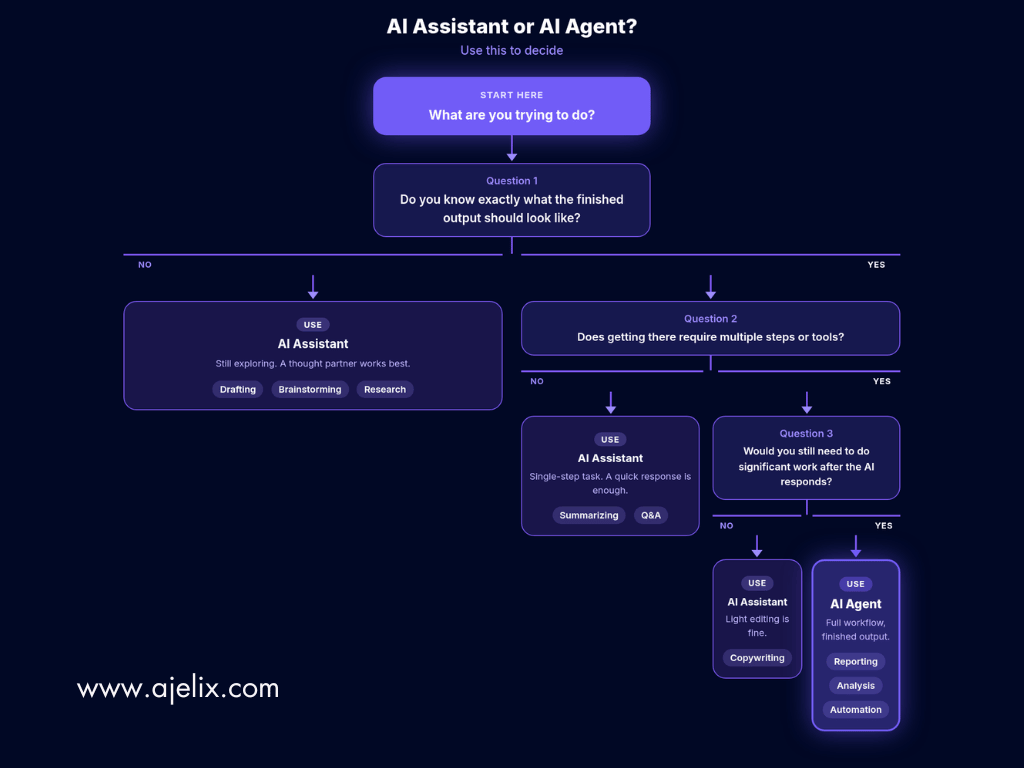
Use an AI assistant when:
- You’re still forming your thinking and need a sounding board
- The task is a single step – a draft, a summary, a quick lookup
- You want to stay in control of each decision along the way
- The output needs your judgment before it’s usable
Use an AI agent when:
- You know what the finished output should look like
- Getting there involves multiple steps, tools, or data sources
- You’re low on time for manual, automation work
- You’d otherwise have to take the AI’s response and do significant work to make it usable
That last point is the clearest signal. If the AI’s output is a starting point rather than a finished product, you need an agent.
In practice, many modern tools sit somewhere on a spectrum between the two. ChatGPT in standard mode is an assistant. ChatGPT in Agent Mode is an agent. Ajelix operates as an agent by default.
What matters less is which label a product uses, and more is understanding what mode you’re actually working in, and whether it matches what the task requires.
The right choice isn’t the tool with the biggest name. It’s the one that fits the job.
FAQ
An AI assistant responds to your requests while an AI agent acts autonomously to complete tasks. An assistant waits for instructions at every step, whereas an agent takes a goal and figures out the necessary steps on its own.
ChatGPT is both, depending on the mode you’re using. The free version operates as an AI assistant (reactive and prompt-driven), while paid plans with Agent Mode enabled function as an AI agent (autonomous and multi-step).
No, AI assistants typically cannot connect to external systems or tools. They generate responses based on their training data and conversation context but don’t browse the web, read files, or execute code independently.
AI agents are best for multi-step workflows that require a finished deliverable. Examples include building financial reports from raw data, creating automated dashboards, generating landing pages, or completing workflows across multiple tools and systems.
It depends on your needs. If you want advice, drafts, or conversational support, ChatGPT as an assistant works well. If you need completed outputs like formatted spreadsheets, automated reports, or multi-system workflows without manual intervention, an AI agent is necessary.
Agentic AI refers to AI systems that operate with autonomy, goal-orientation, tool use, and adaptability. These four properties enable AI agents to complete tasks end-to-end rather than just providing information or suggestions.
Yes, if the underlying system is updated to support autonomous task execution and tool integration. ChatGPT evolved from a pure assistant into offering Agent Mode, and many modern AI tools now sit on a spectrum between assistant and agent capabilities.
Generally yes, because they require more computational resources, system integrations, and advanced capabilities. AI assistants like free ChatGPT are often available at low or no cost, while AI agents typically require paid subscriptions for full functionality.
Use an AI assistant if you need a response, draft, or guidance and are comfortable completing the work yourself. Use an AI agent if you need a finished deliverable and the task involves multiple steps, data sources, or tools.
Traditional automation tools follow fixed, pre-programmed rules and cannot adapt to new situations. AI agents use machine learning to adjust their approach based on context, make decisions during execution, and handle variations without reprogramming.
Agentic AI chat that helps you complete projects
AI for work that ingests, transforms, and delivers the exact deliverables your team needs, while you stay focused on strategy. No more chatting, agents can get the job done.