AI Spreadsheet Generator: Excel Templates With AI Agents
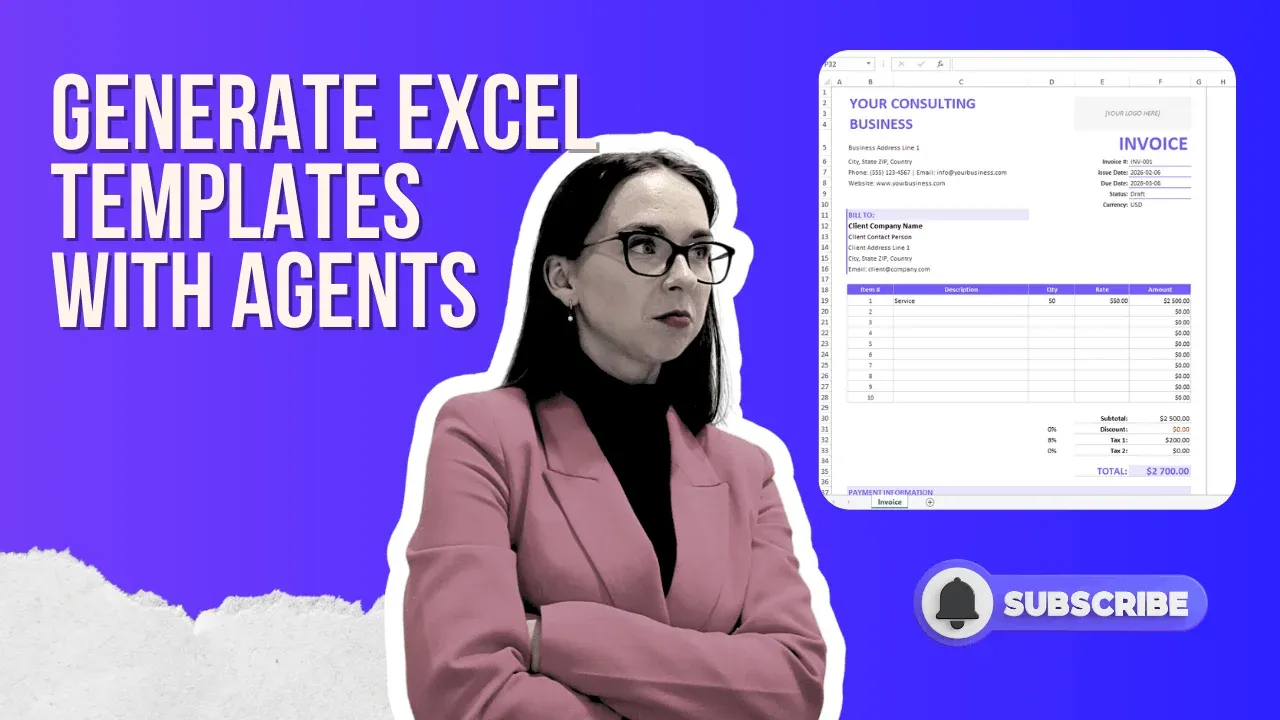
An AI spreadsheet generator lets you build fully functional, professionally designed Excel templates complete with automated formulas, tax calculations, dropdowns, and branded colors in under 5 minutes using a single prompt. Instead of spending hours in Excel or hunting for generic free templates, AI agent tools like Ajelix generate custom, ready-to-use workbooks tailored to your exact business needs.
If you’ve ever wasted time googling “free Excel templates” only to download something generic that doesn’t fit your workflow, an AI excel spreadsheet generator is the upgrade you need. This guide walks you through exactly how to use an AI spreadsheet generator tool, step by step, to create a custom Excel template in minutes, not hours.
Whether you need an invoice template, a financial dashboard, a data analysis workbook, or a reporting tool, AI agents can now handle the entire build process: structure, formulas, formatting, and even brand colors, all from a single written prompt. Watch the video or read the guide below.
What Is an AI Spreadsheet Generator?
An AI spreadsheet generator is a tool that uses artificial intelligence, specifically large language models running in “agent mode,” to automatically create Excel or spreadsheet files based on natural language instructions. Unlike a basic AI chat assistant, a spreadsheet generator AI in agent mode doesn’t just give you advice or code snippets. It actually executes the work: writing formulas, building layouts, applying formatting, and generating a downloadable .xlsx file.
The key difference between chat mode and agent mode is that chat mode is suited for quick research and fast answers. Agent mode is built for actual work execution, things like template creation, data analysis, and dynamic spreadsheet generation. Agent mode takes longer to run, but the quality of output is significantly higher because the AI reasons through a multi-step work plan before it starts building.
Author’s note: When using an AI spreadsheet generator for serious work, always select the highest intelligence model available. The extra processing time is worth it when the output needs to be production-ready and reusable.
How to Create an Excel Template With an AI Agent
The following walkthrough is based on creating a consulting invoice template in the video, but the same process applies to any Excel workbook you want to generate.
1. Open an AI Agent Platform
Navigate to an AI agent tool that supports spreadsheet generation. The example in this guide uses Ajelix (chat.ajelix.com), which offers a free tier so you can test the workflow before committing. Make sure you switch to agent mode rather than chat mode; this is what enables full file creation and execution.
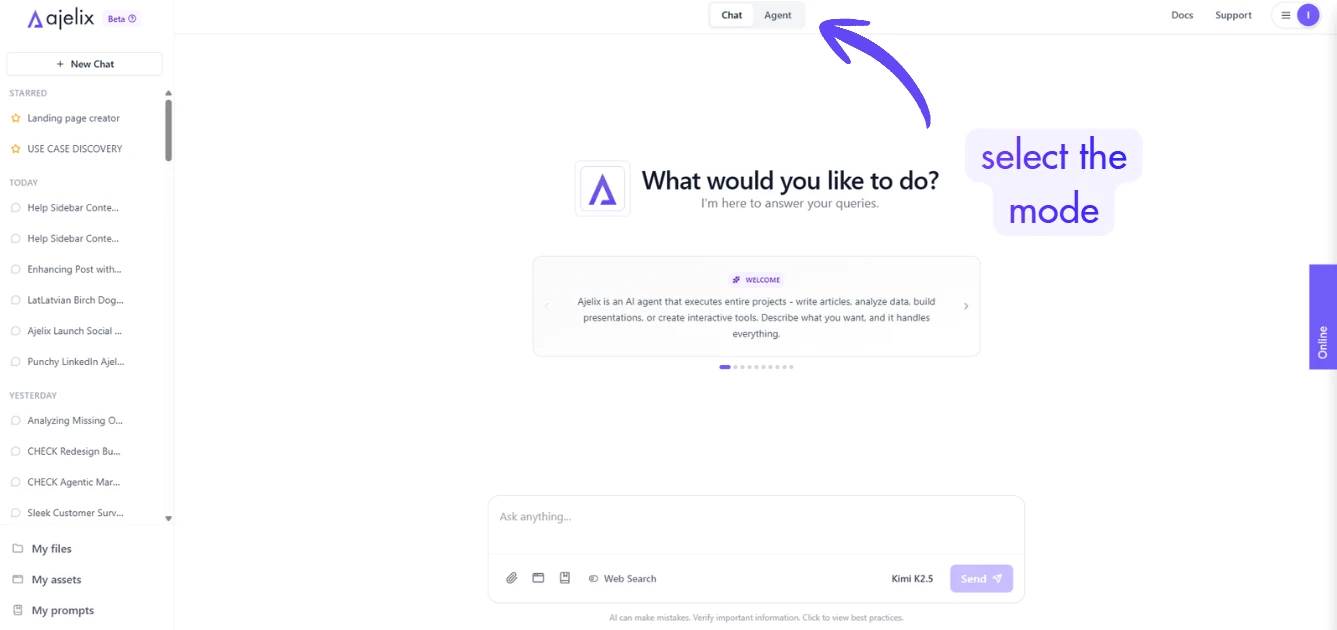
2. Select the Highest-Quality AI Model
Before submitting your prompt, check which AI model is selected. Lower-intelligence models are faster but produce more generic results. For a reusable business template, choose the model with the highest intelligence rating available. The difference in output quality, especially in formula accuracy and layout polish, is significant.
3. Write a Detailed, Specific Prompt
The quality of your AI excel spreadsheet generator output is directly tied to the quality of your prompt. Don’t just say “make me an invoice.” Be specific: include the type of business, the calculations you need (subtotals, taxes, discounts), any dropdowns or status fields, currency options, and your brand color. The more context you provide, the more the AI can tailor the result to your actual workflow instead of producing something generic.
Example prompt used in the video:
Create a reusable, modern Excel invoice template for a consulting business with automated calculations for taxes, discounts, subtotals, and totals. Include client and business information sections, invoice numbering, issue and due dates, payment terms, flexible line items, multiple tax rates, currency support, and a clear financial summary. Add invoice status tracking, payment instructions, notes and terms, and protect calculation cells for reliability. The design should be sleek, professional, print- and PDF-ready, and visually impressive while remaining intuitive and easy to customize.
4. Review the AI’s Work Plan Before It Starts
One of the most valuable features of a true AI agent is that it presents a multi-step work plan before executing. Read through it. This is your chance to confirm the AI has correctly understood your requirements, and to catch any misinterpretations before it spends several minutes building the wrong thing. If something looks off, add a correction before clicking “Start Task.”
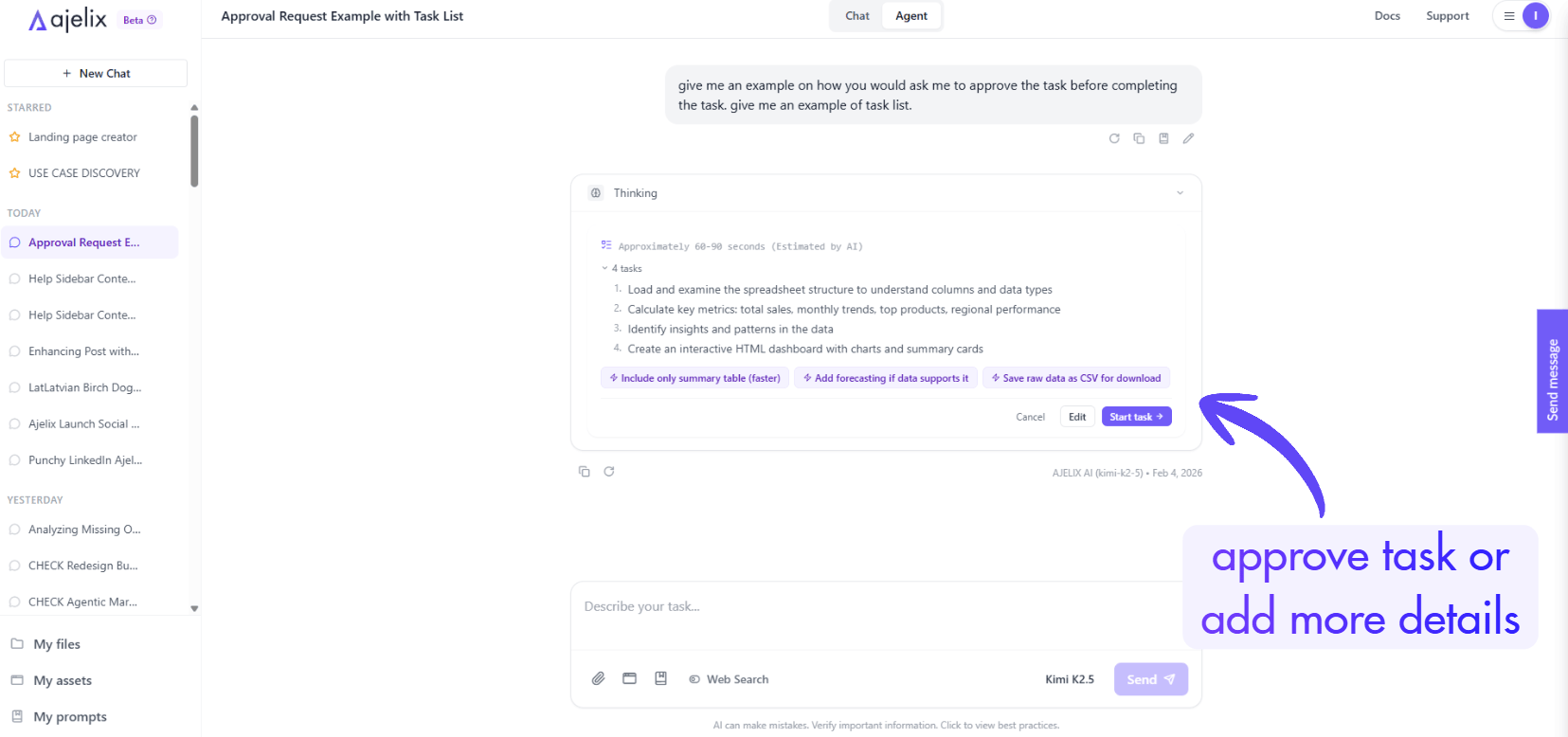
5. Download and Verify Your Excel File
Once the AI agent completes its task (typically 3–5 minutes for a complex template), download the generated .xlsx file. Enable editing in Excel, unprotect the sheet if needed, and verify that formulas calculate correctly, dropdowns work, and the formatting matches your expectations. In most cases, the output is ready to use immediately or requires only minor adjustments.
What the AI Actually Build: A Real Example
In the video walkthrough above, the agent produced a complete consulting invoice template with the following features, all without any manual Excel work:
- Automated Calculations: subtotals, tax calculations, and totals update instantly as line items are entered, no manual formula writing required.
- Status Dropdown: a built-in dropdown field for invoice status (e.g., Draft, Sent, Paid) makes the template immediately functional for tracking.
- Currency Selector: the AI included a field to change the currency symbol, making the template usable across different client markets.
- Brand Color Matching: the accent colors across headers, borders, and UI elements matched the exact violet hex code provided in the prompt.
- Logo Placeholder: an image placeholder was included so the business logo can be inserted without restructuring the layout.
- Print-Ready Layout: the template rendered cleanly as a single-page print preview fully professional and ready to send to clients.
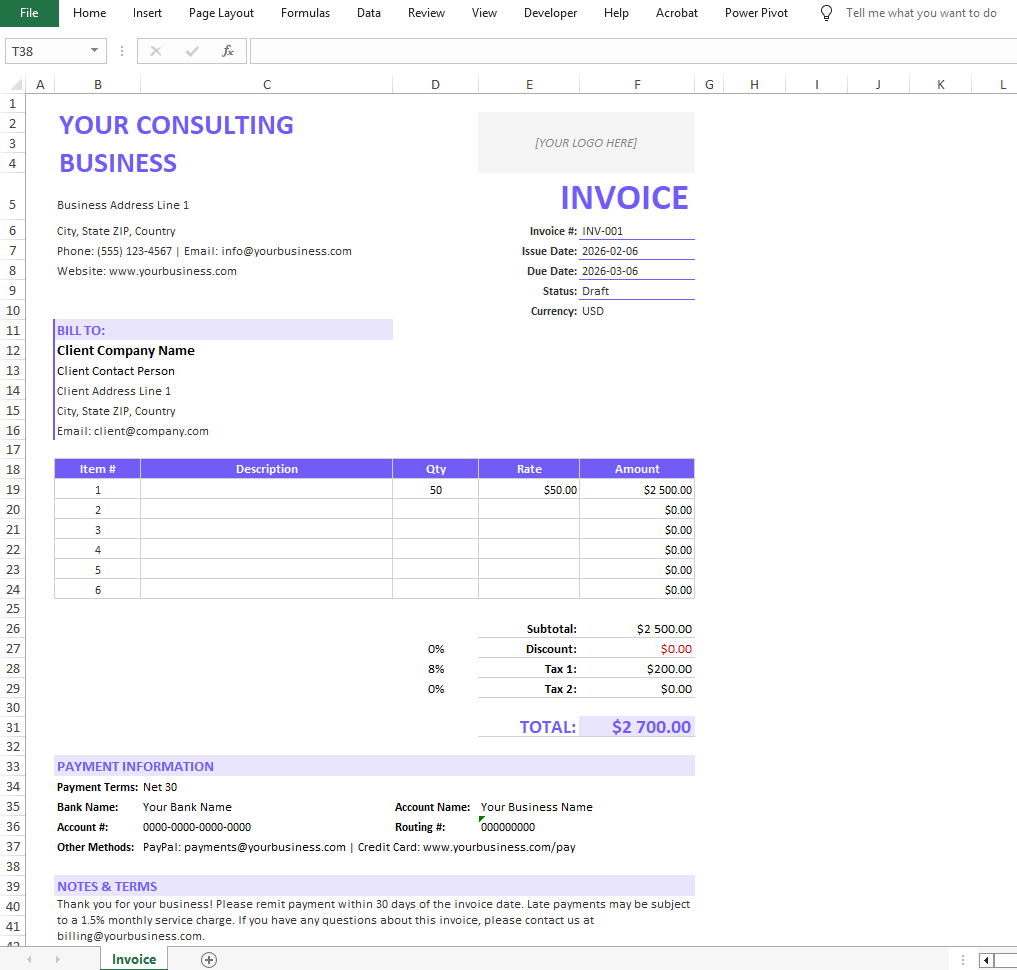
The entire generation process took approximately 5 minutes and involved just 5 agent actions, a remarkably efficient workflow compared to building the same template manually, which would easily take several hours even for an experienced Excel user.
Download the Excel template we generated in the video:
Other Use Cases for AI Spreadsheet Analysis and Generation
The invoice template is just one example. The same agentic workflow applies to a wide range of business needs. Here are use cases that demonstrate the breadth of what’s possible with a spreadsheet generator AI:
- Financial performance dashboards: feed in a CSV of your business data and ask the AI to build a dynamic financial dashboard (we have a guide and video on this), complete with charts, KPI summaries, and conditional formatting. The AI handles all formula logic and visual layout. The resulting workbook can be shared with your team via a link directly from the platform.
- Data analysis: one of the most powerful applications is spreadsheet analysis: uploading a PDF or image containing tabular data, and asking the AI to extract that data into a clean, structured Excel workbook with charts. This eliminates hours of manual data entry and reformatting, especially useful when working with financial reports, research documents, or scanned tables.
- Data cleaning and restructuring: If you have messy CSV data with inconsistent formatting, missing headers, or mixed data types, an AI can clean and restructure it automatically, producing a well-formatted, analysis-ready workbook from data that would otherwise require significant manual cleanup.
- Sales and operations templates: sales tracking sheets, project timelines, budget planners, inventory trackers, and any repeatable business workbook can be generated using a single detailed prompt. The AI includes dynamic features like dropdown validation, conditional formatting, and cross-sheet formulas that many users wouldn’t know how to build themselves.
You can also generate PowerPoint presentations (we have a video and a guide on this too), perform financial modelling with agents (also video + guide), or create charts in Excel without lifting a finger.
Wrap Up
AI spreadsheet generators represent a genuine shift in how business users can work with Excel. What used to require hours of manual work or specialized Excel knowledge can now be accomplished in minutes with a well-written prompt and the right AI agent tool. The output isn’t a starting point for heavy modification. It’s a finished, professional, ready-to-use workbook.
For invoices, dashboards, financial reports, data cleaning, or any repeatable spreadsheet task, the AI spreadsheet generator workflow is worth adding to your daily toolkit. Once you’ve built your first template this way, it’s difficult to imagine going back to doing it manually.
Watch the full video above to see the complete walkthrough, and visit chat.ajelix.com to try it yourself with the free tier.
FAQ
An AI spreadsheet generator is a tool that uses artificial intelligence in “agent mode” to automatically create Excel files based on natural language instructions. Unlike a basic AI chatbot, it doesn’t just give advice, it actually executes the work, writing formulas, building layouts, applying formatting, and delivering a downloadable .xlsx file.
Chat mode is designed for quick research and fast responses. Agent mode is built for actual work execution like template creation, data analysis, and full spreadsheet generation. Agent mode takes longer to run but produces significantly higher quality output because the AI reasons through a multi-step work plan before building anything.
Most templates take between 3 to 5 minutes to generate, depending on complexity and the AI model selected. A complete consulting invoice template with automated formulas, dropdowns, and brand colors, for example, was generated in approximately 5 minutes.
Be as specific as possible. Include your business type, every calculation you need, interactive features like dropdowns or status fields, currency preferences, and your brand colors. The more context you provide, the more tailored and ready-to-use the output will be.
A well-prompted AI excel spreadsheet generator can produce automated calculations, tax fields, currency selectors, status dropdowns, logo placeholders, conditional formatting, cross-sheet formulas, and print-ready layouts, all without any manual Excel work.
Yes. Common use cases include financial performance dashboards, sales tracking sheets, budget planners, inventory trackers, project timelines, and data cleaning workbooks. You can also use it for AI spreadsheet analysis, uploading raw or messy data, and having the AI restructure and visualize it automatically.
Free templates are generic and require significant modification to fit your workflow, branding, and formulas. An AI spreadsheet generator builds exactly what you need from scratch in minutes, already customized to your business, with no generic structure to strip out.
Always select the highest intelligence model available on whichever platform you use. The difference is especially noticeable in complex tasks, where better models produce cleaner formula logic, more accurate layouts, and better interpretation of design requirements like brand colors.
Before executing a task, most AI agents present a multi-step work plan outlining what they intend to build. Reading it takes a few seconds and lets you catch any misinterpretations before the AI spends several minutes building the wrong thing. If something looks off, you can correct it before the build starts.
The tool used in this guide, Ajelix, offers a free tier at chat.ajelix.com. It includes access to agent mode, so you can test the full template generation workflow without needing to upgrade first.
Agentic AI chat that helps you complete projects
AI for work that ingests, transforms, and delivers the exact deliverables your team needs, while you stay focused on strategy. No more chatting, agents can get the job done.