Advanced Agentic Research With AI Agents
If you’ve ever had 20+ browser tabs open, a half-finished notes doc, and still no clear answer after hours of research, agentic deep research is what you’ve been waiting for. Unlike standard AI assistants or basic web search, agentic AI doesn’t just answer questions; it plans, executes, and delivers structured outputs autonomously.
In the video and guide, watch a full walkthrough of how to use an AI agent to conduct agentic market research on Canva and generate an interactive executive dashboard ready to share with your team.
What Is Agentic Research? (And Why It’s Different)
Agentic research is the process of using an AI agent to autonomously plan and execute multi-step research tasks, including live web searches, data synthesis, and report generation, without you having to handle the steps in between manually.
Here’s how it differs from standard approaches:
| Task | Chat AI / ChatGPT Deep Research | Agentic AI Research |
|---|---|---|
| Web access | Optional, single-pass | Multi-step, live browsing |
| Task planning | None | Builds and executes a task plan |
| Output | Text response | Interactive reports, dashboards, files |
| Autonomy | You guide each step | AI works through steps independently |
| Best for | Quick answers | Complex research workflows |
This is also the core distinction in the agentic AI vs AI agents examples debate: AI agents act on goals, not just prompts.
How to Run Agentic Web Research
1. Write a Detailed Research Prompt
Start with a clear, goal-oriented prompt. In this example, the prompt frames the task as: “I’m a content creator for Canva. Research the brand, market positioning, competitors, and create a detailed market comparison analysis.”
Here’s the prompt I used:
I am a content creator for this SaaS: [insert any url]. Research the brand, its market positioning, and competitors, then create a detailed market comparison overview that uncovers key insights. Your analysis should include competitor feature comparisons, target customer segments, pricing and positioning differences, strengths and weaknesses of each product, and any relevant market trends or opportunities. Present the findings in a structured and easy-to-digest format (e.g., tables, summary insights), so I can understand where the brand stands versus alternatives and identify strategic opportunities.
The more specific your prompt, the better the agentic AI research output. Think about what deliverables you need: a SWOT analysis, pricing comparison, feature matrix, and say so upfront.
2. Enable Web Search
This is non-negotiable for agentic deep research. Without web search enabled, the AI will rely only on its training data, which may be months or years out of date. Enabling web search gives the agent access to live internet data, making it genuinely useful for market research, competitor analysis, and trend tracking.
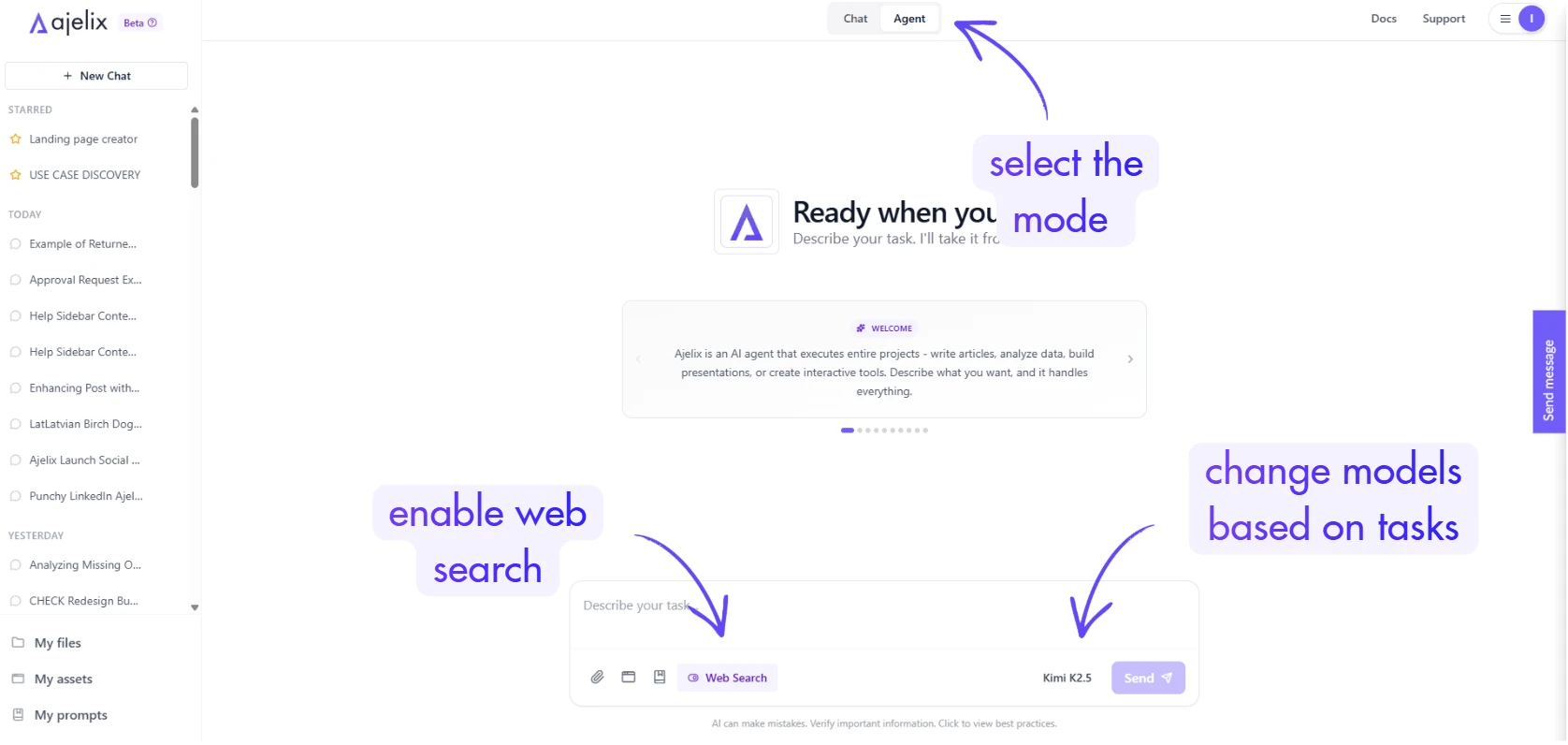
This is the key difference between deep research vs web search in tools like ChatGPT: deep research uses web access in an agentic, multi-step way rather than a single lookup.
3. Switch to Agent Mode
Ajelix offers both a chat mode and an agent mode. Chat mode is for simple, conversational tasks. Agent mode is built for complex workflows, such as agentic AI market research, data analysis, file creation, and multi-step web research. Always use agent mode for research tasks that require more than one action.
4. Choose a High-Intelligence Model
Speed matters less than quality when you’re doing agentic deep research. Choose the most capable model available on your platform. A slower, smarter model will produce a far more useful research report than a fast, lightweight one. If the AI takes 10 minutes to deliver a complete competitive analysis, that’s still faster than doing it manually.
5. Review the Task Plan Before Execution
Before the agent begins working, it will typically present a work plan, a list of tasks it intends to complete. This is your opportunity to review its reasoning and add any missing deliverables (e.g., a pricing comparison table, a visual positioning chart). Once you’re satisfied, approve the plan and let the agent execute.
6. Review the Output
After execution (roughly 3–10 minutes depending on complexity), the agent returns a structured report. In this example, the output included an executive summary, competitive landscape overview, pricing comparisons, feature comparison matrix, SWOT analysis, and key market trends all sourced from live web data with citations included.
Turning Research Into a Shareable Dashboard
Raw report text is useful, but a polished, interactive dashboard is what you actually present to a team. After the initial research is complete, you can prompt the agent to generate one:
"Create an interactive dashboard with the market research so I can share it with my team. The dashboard should be modern and visually polished. Use [hex color] as the accent color."
The agent will write the code and render a fully interactive HTML dashboard complete with competitive positioning maps, spider charts, SWOT tabs, pricing breakdowns, and trend projections. No design tools or developer required. Take a look at the dashboard agent created in this video:
Once created, you can:
- Publish it with a shareable link for your team
- Download it as an HTML file
- Edit it further using the AI improve function to fix buttons, adjust colors, or add sections
What Else Can Agentic AI Build From Research?
The same agentic workflow that produces research reports can also generate:
- Mini CRM tools, contact management apps built from a few prompts
- Landing pages are full interactive pages with content researched and written by the agent. (We have a video and a guide on this, too)
- Data dashboards upload a CSV and receive a visual analytics dashboard with insights and recommendations. (watch a video on how to create a dashboard from data)
- Lead gen apps, tools like org chart builders (I created this one with AI too), or intake forms, created with a single prompt
- Kanban boards are fully functional, locally-stored project management tools (check the kanban board I created with one prompt)
This is why agentic AI vs AI agents examples matter: traditional AI assistants answer questions. Agentic AI builds things.
Key Takeaways for Agentic Research
- Agentic research automates the full research-to-report pipeline, not just a single search
- Agent mode + web search enabled is the required combination for agentic deep research
- Use a high-intelligence model when quality matters more than speed
- Review the task plan before execution to catch missing deliverables
- Convert outputs to dashboards for team-ready presentations
- The difference between deep research Gemini-style or how to use ChatGPT deep research vs true agentic research is autonomy: agents plan and execute multi-step workflows, not just one-shot lookups
Try It Yourself
The tool used in this video is available at chat.ajelix.com with a free trial. Whether you’re doing competitive intelligence, market sizing, content research, or product analysis, agentic AI research compresses days of work into minutes.
FAQ
Agentic research is the process of using an AI agent to autonomously plan and execute a multi-step research workflow, including live web search, source analysis, and report generation without manual steps in between. Unlike asking an AI a question and getting a text answer, agentic research produces structured deliverables like reports, dashboards, and comparison matrices.
The terms are often used interchangeably, but agentic AI refers to the capability of an AI that can plan and act autonomously across multiple steps. AI agents are the implementations of that capability. In practice, an AI agent performs agentic research by breaking a goal into tasks, executing each one (including web searches), and delivering a final output rather than waiting for you to guide it step by step.
A regular web search returns a list of links. Agentic deep research goes further: the AI visits sources, reads and synthesizes information across them, builds a structured analysis, and formats the output into a usable report all autonomously. It’s the difference between getting directions and having someone drive you there.
Tools like ChatGPT deep research and Gemini deep research are forms of agentic web research they browse the web and synthesize findings across multiple sources. The key differentiator with dedicated agentic AI platforms is the ability to go beyond text reports and generate interactive assets like dashboards, apps, and data visualizations from the same research session.
No. The entire workflow from research prompt to interactive dashboard is done through natural language prompts. The agent writes and executes any required code behind the scenes. Non-technical users can also use built-in AI improvement tools to make edits without touching code.
A full agentic AI market research workflow, including web research, SWOT analysis, competitor comparison, and report generation, typically takes 3 to 10 minutes, depending on the complexity of the task and the model used. Generating an interactive dashboard from that research adds another 5 to 7 minutes.
Beyond a written report, agentic research can produce interactive HTML dashboards, competitive positioning maps, feature comparison matrices, pricing tables, SWOT analyses, and shareable links, all from a single research session. The same workflow can also be extended to build mini CRM tools, landing pages, and data dashboards.
The higher the intelligence model you choose, the better the output. Speed matters less than quality for research tasks. A more capable model will produce more accurate synthesis, better structured outputs, and fewer hallucinations, even if it takes a few extra minutes to complete.
Agentic AI chat that helps you complete projects
AI for work that ingests, transforms, and delivers the exact deliverables your team needs, while you stay focused on strategy. No more chatting, agents can get the job done.